
WordPress Contact Form Not Sending Emails? Trace the Delivery Problem
WordPress form emails missing? Check submissions, notification settings, sender identity, SMTP and inbox delivery with a safe, evidence-led checklist.
If a WordPress contact form shows a success message but no email arrives, trace the submission in stages: form acceptance, message generation, mail-provider handoff and recipient delivery. A successful form response does not prove inbox delivery. Check the recorded submission, sender settings and mail logs before replacing the form plugin or changing DNS.
A missed enquiry can look like a quiet business day until a customer phones to ask why nobody replied. The uncomfortable part is that the website may appear perfectly normal. Its layout loads, the submit button responds and the visitor receives a reassuring message, while the team never sees the request. Troubleshooting should therefore follow the message rather than the appearance of the page.
This guide is for website owners and students learning how WordPress forms connect to email. It separates safe observations from changes that need hosting or mail administration access. The examples are illustrative, not reports of client work or evidence that a particular plugin has been tested by HView.
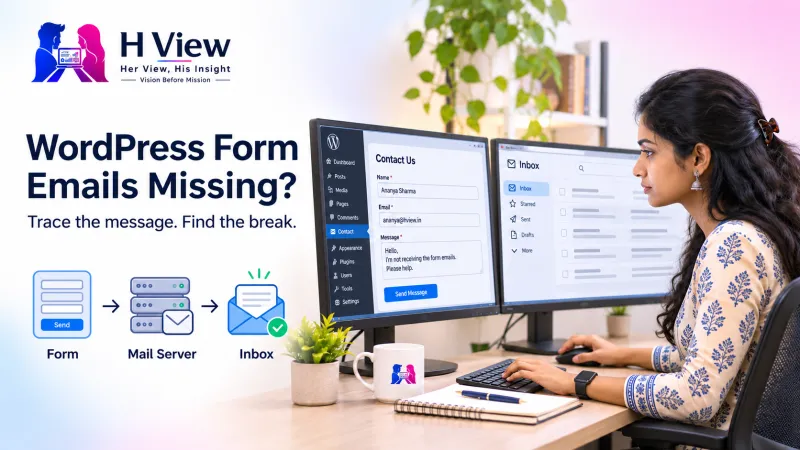
Where can a contact-form message get lost?
The form
The browser sends the fields, and the application decides whether to accept them.
The sender
WordPress asks the configured mailing method to process a notification.
The mailbox
The receiving system accepts, rejects, filters or quarantines the message.
Keep these checkpoints separate in your notes. An entry in a form plugin’s submissions screen establishes that the application stored an entry, if that feature is enabled; it does not establish that the notification reached its destination. Likewise, a server accepting an outgoing message does not tell you which mailbox folder ultimately received it.
The WordPress wp_mail() reference explicitly explains that a true return value means the sending method processed the request without an error, not that the recipient received it. That distinction is the starting point for a useful diagnosis, because it prevents a misleading “sent” label from ending the investigation too early.
What should you record before changing anything?
Make one controlled submission using an address you own and a distinctive subject such as “Website enquiry test, 4 November, 10:15.” Record the exact page, time and time zone, the intended recipient and the response shown in the browser. Use invented enquiry text and leave out private customer details. A unique test is easier to locate than ten identical messages sent in quick succession.
Check inbox, spam and quarantine, then check whether the destination mailbox is full or governed by forwarding rules. If the site has multiple forms, identify which form is embedded on the affected page. A copied landing page may still point at an older form configuration even when the visible labels look current. Avoid submitting repeatedly while a delayed queue may still be working.
 Also readHTML Contact Form Not Sending Messages? How Form Submission Works→
Is the form generating the notification?
Open the form’s notification settings and check the actual recipient. Look for disabled notifications, conditional rules and field references that no longer match the form. If the email body uses a field token that was renamed, the visitor’s message may be missing even though another part of the notification is sent. Compare the configured fields with a saved test entry where available.
A useful example is a form copied from a recruitment page to a sales page. The sales team may assume it is connected to their inbox, while the recipient still belongs to a former employee or a conditional recruitment rule. In that situation, installing another mail plugin would add complexity without addressing the wrong destination. The evidence points first to the notification configuration.
Are From and Reply-To being used correctly?
The visitor’s address usually belongs in Reply-To rather than being presented as the website’s authenticated sender. For example, a business might send from enquiries@example.com and set Reply-To to the visitor’s address. The address is an example, not a working HView mailbox. The sending identity must match what the chosen provider actually allows; simply typing a domain address does not authenticate it.
Contact Form 7’s mail configuration guide explains its From and header fields, while its configuration validator FAQ explains why an unrelated visitor address can look like spoofed mail. Other form plugins have different settings screens, so follow the documentation for the plugin installed on your website rather than copying screenshots blindly.
When should you investigate SMTP and DNS?
If notification settings are correct, inspect the configured sending connection. Check provider name, host, port, encryption method and account authorization against the provider’s instructions. An expired connection or incorrect sender permission may prevent handoff. Keep passwords and tokens out of screenshots, support messages and public error reports; use a temporary authorized account or another agreed secure access method when help is needed.
SPF, DKIM and DMARC help receiving systems assess sender authorization and domain alignment. They are not interchangeable switches, and a DNS record should be checked against the real mail provider before editing. The WordPress mail administration handbook discusses outgoing mail and deliverability. For a practical introduction, see our guide to business email authentication; verify the settings for every legitimate sender before enforcing a stricter domain policy.
| Observation | What it suggests | Next useful evidence |
|---|---|---|
| No entry and a visible form error | Submission may not be accepted. | Validation response and the affected form’s settings. |
| Entry saved, but notification absent | Storage worked; generation or sending still needs checking. | Notification rule and mail-event log. |
| Provider reports rejection | The message reached a sending or receiving boundary that refused it. | Exact rejection code and provider explanation. |
| Message reaches spam | Delivery happened, but filtering affected visibility. | Message headers, sender alignment and mailbox policy. |
An example investigation without random plugin changes
Imagine a small tuition business that receives no trial-class requests after launching a new page. A controlled test appears in the form’s entries list, so the team knows the visitor’s fields reached WordPress. The email notification still points to an old mailbox. Correcting that address and repeating the test produces a message in spam, revealing a second issue rather than disproving the first fix.
The team now has two separate observations: a wrong recipient was configured, and the corrected notification is filtered. They compare the message headers and provider settings instead of changing the website theme. Their completion record includes the tested page, submitted fields, received message and a successful reply. This sequence is an illustrative diagnostic exercise, not a claim that every missing email has these causes.
How do you know the repair is complete?
Test as a logged-out visitor on desktop and a phone. Confirm that required-field errors are understandable, the submit control recovers after an error and a successful request is recorded where intended. Confirm the notification contains the name, email, message and useful source-page information. Open the reply action and check that it addresses the visitor rather than the website’s sending mailbox.
Keep the minimum useful diagnostic record and follow your privacy policy when storing messages. Email logs can contain personal information, so restrict access and choose a sensible retention period. If enquiries matter to the business, a secure saved lead record gives the team a way to recover requests when email delivery is delayed; email should be a notification channel, not the only record of demand.
 Also readElementor Changes Not Showing on the Live Website? What to Check→
Her View
A visitor should not have to understand SMTP to ask for help. Clear field labels, a truthful success message and a reliable follow-up process protect the relationship at the moment someone is ready to contact the business. A beautiful form is only useful when the organisation can act on the enquiry.
His Insight
Treat the form as a chain of observable events. Separate submission, storage, notification generation and delivery, and record what each test establishes. That approach makes a repair easier to verify and gives the next developer useful evidence instead of a list of plugins that were installed and removed.
H View Verdict
Trace one message from the page to the recipient before replacing working components. Correct the smallest evidenced problem, repeat the same controlled test and confirm the complete visitor-to-reply journey. A green success banner alone is not an acceptance test.
Frequently asked questions
Will an SMTP plugin automatically fix a contact form?
It may help when the outgoing connection is the problem, but it will not correct a wrong recipient, disabled notification or unrelated form error. Establish which stage fails before choosing a replacement or adding another plugin.
Should I use the customer’s email as the From address?
Use a sender identity permitted by your mail provider and place the visitor’s validated address in Reply-To where appropriate. Follow the form plugin’s instructions and verify that replying reaches the intended person.
Can a message be saved even when email fails?
Some form systems support stored entries, but availability and configuration differ. Confirm this explicitly, control access and review privacy implications rather than assuming every plugin keeps a recoverable copy.
Need help tracing the problem? Use the direct enquiry form on our WordPress and Elementor support page. Share the affected public page and a redacted error description; please do not send passwords or real customer messages.
H View stories follow our editorial policy. Spotted an error? Tell us and we will correct it.
Rate this article
One tap is enough. No comment needed.
Was this article helpful?
Your answer goes straight to our editors.








Comments0
No comments yet. Start the conversation.