
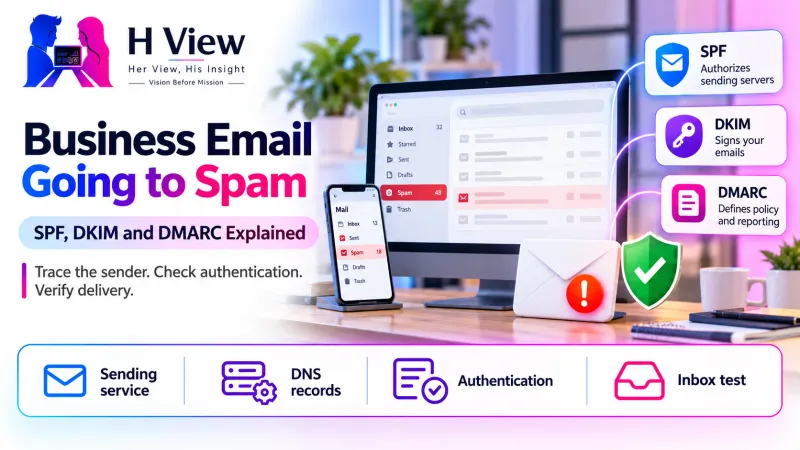
Business Email Going to Spam: SPF, DKIM and DMARC Explained
SPF, DKIM and DMARC help identify your domain, but delivery needs more than DNS records. Trace a real message and check each sending service.
Business email can land in spam because the receiving provider cannot trust the sender, the domain's authentication is incomplete, or the sending behaviour looks unwanted. SPF, DKIM and DMARC help establish domain identity, but they do not guarantee inbox placement. The useful first step is to trace one real message and check its authentication results, rather than repeatedly sending the same email again.
List every sending service
Check authentication results
Test a real message
For a small business, this often appears as a missing quotation or a contact-form notification that never reaches staff. The sender sees no obvious failure, while the recipient assumes nothing arrived. Understanding the separate roles of the website, mail provider and recipient's filtering helps you ask better questions and avoid changing the wrong service.
Are website hosting and business email the same service?
They may be sold together, but they are not automatically the same system. Your website can run on one host while your mailboxes use another provider and your newsletter uses a third platform. DNS records connect those services to the domain. Moving a website does not necessarily require moving email, and changing nameservers without preserving the mail records can interrupt a previously working setup.
Start with an inventory of every service that sends using your domain: staff mailboxes, website forms, invoices, support tools and marketing platforms. Include systems used only occasionally, such as payroll notifications or event invitations. An authentication change that fixes the main mailbox but excludes the invoicing service can simply move the problem elsewhere.
What do SPF, DKIM and DMARC each do?
SPF publishes which sending systems are authorised for a domain used during mail delivery. DKIM adds a cryptographic signature that a recipient can verify using a public key published for the signing domain. DMARC evaluates alignment with the domain shown in the visible From address and publishes a handling policy for messages that fail the required authentication relationship.
For DMARC, an aligned pass from SPF or DKIM can satisfy the authentication requirement; both do not have to pass for every individual message. That distinction matters because forwarding can affect SPF while a valid DKIM signature may survive. Your provider should explain the actual result for the message in question instead of reducing the diagnosis to a green badge in a generic checker.
| Mechanism | Plain-language role | Common misunderstanding |
|---|---|---|
| SPF | Authorises sending systems for the relevant domain | Adding a record does not authorise every future service |
| DKIM | Lets recipients verify a domain signature | Publishing a key is not enough if the sender does not sign |
| DMARC | Checks aligned authentication and states a policy | A strict policy does not repair unauthorised legitimate senders |
 Also readHTML Contact Form Not Sending Messages? How Form Submission Works→
What should you check on an affected message?
Choose one recent message with an identifiable subject and record the sending time, sender service and recipient provider. Ask the recipient to inspect the original message headers if it reached spam. Authentication results can show SPF, DKIM and DMARC outcomes, while a rejection notice may identify a delivery or policy problem. Treat headers as diagnostic material that can include private addresses and routing information.
If the message never arrives anywhere, check the sending provider's delivery events and any bounce report. “Sent” in an application may mean it handed the message to another system, not that the recipient accepted it. A website's success screen is even earlier in the chain. Separate submission, mail acceptance, recipient acceptance and inbox placement when describing the incident.
How should you correct DNS authentication?
Use the exact records supplied by the actual sending provider and confirm which DNS service is authoritative for the domain. Editing a record in an old hosting panel has no effect if the domain now uses different nameservers. Keep a copy of the current records and identify who owns the domain account before changing anything.
Avoid creating multiple competing SPF records for the same domain. Where several legitimate services need authorisation, the published policy must account for them within SPF's technical limits. Do not copy another company's record, invent DKIM values or publish a DMARC rejection policy simply because it sounds more secure. A provider-specific configuration and a controlled validation process are safer than a universal template.
- Inventory all legitimate sending services and their domain identities.
- Check the active DNS location and preserve the current records.
- Publish and enable the provider's SPF and DKIM configuration.
- Inspect real messages for authentication and alignment results.
- Review DMARC reporting and strengthen policy after legitimate senders are accounted for.
Why can authenticated mail still go to spam?
Authentication helps recipients assess identity; it does not turn unwanted mail into wanted mail. Sending history, recipient complaints, unusual volume and the nature of the message can still affect filtering. A business that suddenly sends a large campaign from an address previously used for a few personal quotations may encounter problems even when its DNS records are correct.
Keep marketing consent and transactional communication separate in your planning. Do not use a contact-form submission as permission for unrelated bulk marketing. Maintain accurate recipient lists, remove addresses that repeatedly reject delivery and honour unsubscribe requests where applicable. These are operational habits, not a one-time DNS setting, and they protect the usefulness of the business's email channel.
A practical example: quotations work, website notifications do not
Imagine an agency's staff mailboxes send quotations successfully, but notifications from its website reach spam. This is an illustrative example, not an HView customer result. The website uses a different sending service, and its messages use the business's visible From address without an aligned authentication setup. Testing only the staff mailbox would miss that difference.
The owner maps the website's sending route, configures the chosen provider correctly and tests a labelled enquiry. The acceptance check includes the application record, delivery event and the receiving mailbox. A Reply-To address can point to the visitor where appropriate, while the authenticated From identity belongs to the business. The exact arrangement should follow the provider's documentation and application requirements.
What evidence should support receive?
Send the affected domain, sending service, approximate time and a redacted rejection or authentication result. Explain whether all recipients are affected or only one provider, and whether the behaviour began after a migration or a new mailing tool. This narrows the investigation far more than “email is not working,” especially when several platforms share the same brand name.
Keep passwords, private keys and complete customer messages out of ordinary support enquiries. If a specialist needs deeper access, agree a secure method and remove temporary access afterwards. Once delivery works, document the records, sender inventory and person responsible for monitoring reports so the next hosting change does not undo the configuration.
 Also readA Plugin Update Broke Your Website: How to Identify the Conflict→
Her View, His Insight
Her View: An email problem is a customer communication problem before it is a DNS problem. Provide an alternative contact route while investigating so a missed notification does not leave someone waiting indefinitely.
His Insight: Diagnose the exact sending path. The website, staff mailbox and newsletter may have different authentication results even though every message appears to come from the same business.
Frequently asked questions
Will adding DMARC guarantee inbox delivery?
No. DMARC supports domain authentication and policy, while recipients still make filtering decisions. Correct authentication is part of a dependable setup rather than an inbox guarantee.
Should I immediately use a reject policy?
First identify and validate legitimate senders. An enforcement policy can affect legitimate messages that are not aligned, so review provider guidance and reporting before increasing enforcement.
Do I need to move my website to fix email?
Usually that decision requires separate evidence. Your mail provider, DNS configuration and website sending method can often be assessed without moving the whole website.
Need help tracing the sending route?
HView can review the website's notification flow and domain setup through Digital Solutions. If the problem begins inside a WordPress form, see our WordPress repair process. Share the symptoms and affected service first, without sending private messages or credentials.
Sources and further reading
H View stories follow our editorial policy. Spotted an error? Tell us and we will correct it.
Rate this article
One tap is enough. No comment needed.
Was this article helpful?
Your answer goes straight to our editors.








Comments0
No comments yet. Start the conversation.