
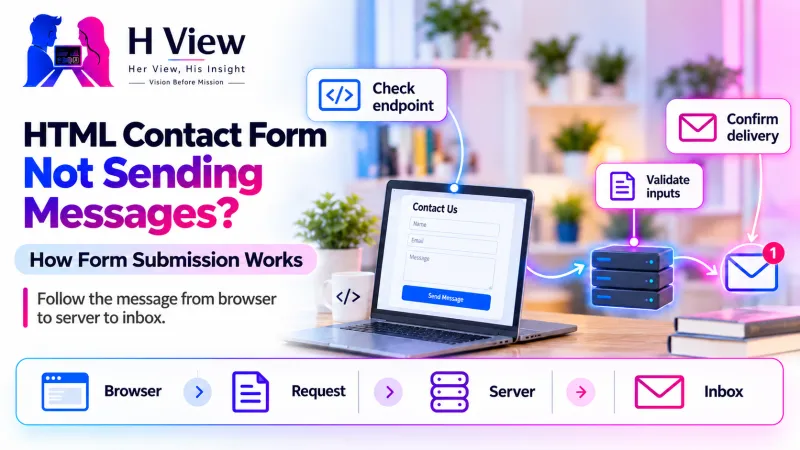
HTML Contact Form Not Sending Messages? How Form Submission Works
A contact form needs more than HTML. Follow a test message from browser to endpoint, server processing and inbox to understand where enquiries disappear.
An HTML contact form does not send email by itself. It collects values and submits them to a server endpoint or a form service, which must validate the request and handle storage or delivery. When messages disappear, trace that chain instead of assuming that a visible Send button means a complete contact system exists.
Check the form destination
Trace the server response
Verify storage and delivery
This distinction matters when a business launches a simple website quickly. The contact page may look finished, accept typing and even display a cheerful confirmation, while nobody has connected the form to a working destination. A reliable form needs both a usable interface and a verified outcome. This guide explains what to check without asking you to become a full-time developer.
Where does a message go after someone clicks Send?
The browser starts with the form's controls: name, email, message and any other fields. The form's action identifies a destination, while its method describes how the browser submits the information. Many contact systems use POST, which puts the submitted values in the request body. That does not make the information encrypted by itself; the connection still needs HTTPS.
Some websites replace the browser's normal submission with JavaScript. A script collects the values, calls an endpoint and updates the interface based on the response. That can improve the experience, but it introduces another place where the process can fail. An attractive animation is not evidence that the server accepted or delivered a message.
| Stage | What should happen | Evidence to check |
|---|---|---|
| Browser | Collect the intended fields | Field names and validation messages |
| Request | Reach the correct endpoint | Network request and response |
| Server | Validate and process the message | Application record or relevant log |
| Delivery | Pass the notification to the mail provider | Provider event or SMTP result |
| Recipient | Receive the message where expected | Inbox, spam folder or rejection report |
What can you check without changing the website?
Start with one labelled test message and record the time, affected page and browser. Use a real address you control, but do not include sensitive customer information. Check whether the form reports missing required information, accepts a valid submission and gives a useful result. If the button does nothing, note whether other interactive elements are also failing.
Ask the developer or host to examine the relevant request in browser developer tools. A request that never leaves the browser points toward validation or JavaScript behaviour. A 404 response suggests the destination cannot be found, while a 500 response indicates a server-side failure requiring logs. A successful HTTP response only confirms that the request was handled at that level; it does not establish inbox delivery.
 Also readA Plugin Update Broke Your Website: How to Identify the Conflict→
Could the form be missing its backend?
A common beginner mistake is treating HTML as the entire sending mechanism. A form copied from a design template might point to an example address, a placeholder path or a service that was never configured. On a static host, uploading a PHP handler does not automatically make PHP available. The hosting platform must actually support the chosen server-side runtime.
Check the implementation with the person responsible for the website. Is there a server handler, a hosted form endpoint or another supported integration? Who owns the service account, and what happens when its quota is reached? Keep the answers with the site's handover notes so a future developer does not have to rediscover how enquiries were meant to work.
Why can a success message be misleading?
A confirmation can be displayed too early, particularly when custom JavaScript shows it immediately after the button is clicked. The interface should wait for an appropriate server response and explain failures honestly. Otherwise, customers may believe the business received an enquiry that was rejected, never submitted or stopped by a configuration problem.
Separate a stored enquiry from an email notification as well. Some systems keep a submission in a dashboard and then attempt to email staff. That design can preserve a lead when notification delivery fails, provided someone monitors the dashboard. Other systems only send email. Know which behaviour you have before deciding that an empty inbox means the form never recorded anything.
How should validation and errors work?
Browser validation helps visitors correct obvious mistakes, such as leaving a required field blank. The server must validate the request again because browser checks can be bypassed. Validation should enforce useful limits and acceptable values without removing legitimate names or ordinary punctuation simply because they look unfamiliar to an overly strict rule.
Good error handling also protects the message someone has already written. If a required field is missing, keep the remaining values and explain what needs attention. If the service is unavailable, provide a clear retry route and an alternative contact method. Do not expose internal paths, credentials or raw diagnostic output to visitors just to make a failure visible.
- Confirm the form submits to an owned, supported destination.
- Verify valid and invalid inputs receive the expected responses.
- Check that success appears only after the application accepts the request.
- Confirm the enquiry is stored or delivered according to the agreed design.
- Repeat the test on mobile and in a logged-out browser.
A practical example: the page works, but the destination does not
Imagine a freelance designer publishes a business website on a static hosting plan and leaves the contact form pointing to send.php. This is an illustrative example, not an HView client case. The browser displays the page perfectly, but the hosting service has no PHP execution environment, so the submission cannot be processed as intended.
The solution is not repeatedly adjusting the button colour or adding another success animation. The owner needs a supported backend or a suitable form service, along with ownership of its account and a delivery test. Once connected, the team should check failures too, including a temporarily unavailable service and a validation error, rather than testing only the easiest successful submission.
What should a form handover contain?
Keep a short record of the endpoint, service owner, notification recipients and storage location. Document any quota, retention setting or ongoing cost. Explain which team member checks missed deliveries and how the business can retrieve an enquiry if an email does not arrive. These practical details are often more valuable than a long list of interface features.
Plan for spam and misuse without making contact unnecessarily difficult. Rate limits, server-side checks and an appropriate anti-abuse mechanism can help, but no single control replaces monitoring. Avoid asking visitors for information the business does not need. A contact form should make an enquiry easier, while keeping its data handling understandable to both the visitor and the owner.
 Also readWebsite Not Appearing on Google? Start with These Checks→
Her View, His Insight
Her View: A customer should not need to understand servers to know whether an enquiry was accepted. Clear confirmation, useful errors and an alternative contact route are basic parts of a trustworthy business experience.
His Insight: Treat the form as a delivery workflow rather than a rectangle on a page. Following one test message from browser to destination is a stronger acceptance test than checking whether the button reacts.
Frequently asked questions
Can a mailto link replace a contact form?
It opens the visitor's configured email application rather than operating as a server-backed form. That can be a useful alternative contact route, but it behaves differently across devices and does not provide the same submission workflow.
Does POST make the message private?
No. POST avoids placing the form values in the URL, but HTTPS protects the connection in transit. Storage, access and retention still need separate attention on the receiving system.
What if only the notification email is missing?
Check whether the application stored the enquiry, then trace the mail provider's result and the recipient's filtering. Fixing delivery is different from rebuilding the browser form.
Need a working enquiry journey?
HView can assess the form, endpoint and intended delivery flow through Digital Solutions. For a WordPress installation, our WordPress support page explains how assessment and scoped repairs work. Share the public page and symptoms rather than private enquiries or passwords.
Sources and further reading
H View stories follow our editorial policy. Spotted an error? Tell us and we will correct it.
Rate this article
One tap is enough. No comment needed.
Was this article helpful?
Your answer goes straight to our editors.











Comments0
No comments yet. Start the conversation.