
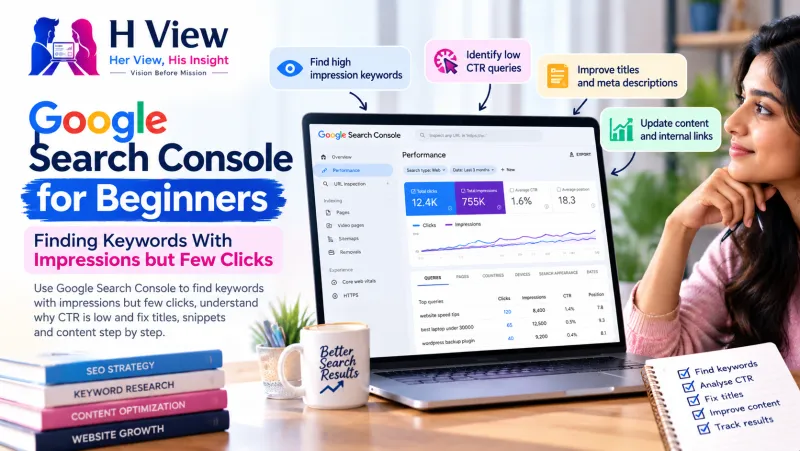
Google Search Console for Beginners: Finding Keywords With Impressions but Few Clicks
Your pages are already showing up on Google for hundreds of searches. People just are not clicking. Here is how to find those keywords in Search Console and turn views into visits.
In Google Search Console, open Performance, turn on Impressions, Clicks, CTR and Position, then sort queries by impressions. Keywords with many impressions but a low click-through rate are your quickest SEO wins: Google already shows your page for them, so a better title, description or answer can bring more visitors without new content.
Most beginners open Search Console, see a graph, feel either happy or worried, and close it. The real value is one level down, in the list of searches that already show your pages. Hidden in that list are searches where hundreds of people saw your link and almost nobody clicked. Each of those is a small leak you can fix in an afternoon.
What do impressions, clicks, CTR and position mean?
| Metric | What it means |
|---|---|
| Impressions | How often a link to your site appeared in search results someone saw |
| Clicks | How often someone clicked through to your site |
| CTR (click-through rate) | Clicks divided by impressions |
| Average position | The average ranking of your site's top result for that query |
Google explains these metrics in detail in its Performance report help page. One important point: position is an average, so a page that sometimes ranks 3rd and sometimes 15th may show 9.
How do you find keywords with impressions but few clicks?
Five steps in Search Console
- Open Search Console for your site and go to Performance, then Search results.
- Click the boxes for Total clicks, Total impressions, Average CTR and Average position.
- Set the date range to the last three months.
- In the Queries table, sort by Impressions.
- Look for queries with high impressions, a low CTR and an average position between roughly 1 and 15. Then click the query and switch to the Pages tab to see which page is showing.
Export the table to Google Sheets if you want to filter more easily. Search Console keeps up to 16 months of performance data, so you can also compare this year with last year.
 Also readGoogle AI Search in 2026: What Small Publishers Should Change to Stay Visible→
Why is your click-through rate low?
Common causes and fixes
Ranking too low
- Position 8 to 15: page is on the edge
- Fix: improve content depth and internal links
Title doesn't match the search
- People search one thing, your title says another
- Fix: rewrite the title around the query
Answer already shown
- A summary or snippet answers the question
- Fix: offer more than the quick answer
- Put the main search phrase near the start of the page title
- Make the title specific: numbers, year, location or outcome
- Write a meta description that promises what the page delivers
- Answer the query clearly near the top of the page
- Add something extra: a checklist, table, tool or local detail
- Link to the page from related articles on your site
Google may rewrite titles it thinks do not describe the page well, so keep titles honest and close to the content. Its guidance on title links explains what it looks for.
How do you know if your fix worked?
Note the date you changed the title or content. After three to four weeks, compare the same query's CTR and clicks with the previous period using the date comparison in Search Console. Change one thing at a time on important pages, so you know what made the difference. Our full guide to Search Console for beginners covers the other reports worth understanding.
Her View
Many small business owners feel SEO is a mysterious, expensive thing done by agencies. This one exercise shows it does not have to be. Spending one hour a month with your own Search Console data, improving a few titles, is something a boutique owner or a tutor can absolutely do herself.
 Also readGoogle Business Profile for Small Businesses in India: How to Show Up When Customers Search Nearby→
His Insight
Prioritise by potential. A query with 5,000 impressions at 0.5% CTR and position 6 is worth far more attention than one with 100 impressions. Doubling CTR on a few high-impression queries can bring more traffic than publishing several new posts. Keep a simple sheet of what you changed and when.
H View Verdict
Search Console already tells you where Google shows your pages. Find the queries with high impressions and low clicks, make your titles and answers match what people are searching, and measure the result a few weeks later. It is the fastest, cheapest SEO win most sites ignore.
Want this done for your business?
If you would rather have someone read your Search Console data and fix the pages for you, the H View team can help. H View studies how your business works today and builds the right digital platform for it, from search visibility to turning manual work into automated systems.
- Website SEO
- GEO and AI search visibility
- Websites and apps
- CRM and ERP
- Management portals
- Automation and digitisation
Frequently Asked Questions
What is a good CTR in Google Search Console?
There is no single good number. CTR depends heavily on position, the type of query and what else appears on the results page. Compare a page with its own past CTR and with similar pages on your site.
Why do I have impressions but no clicks?
Your page may rank low on the first page or beyond it, your title may not match the search, or the results page may already answer the question. Improving titles and content usually helps.
How long does Search Console keep data?
The Performance report shows up to 16 months of data, which lets you compare results year on year.
How long after changing a title will CTR change?
Google needs to recrawl the page first, which can take days or longer. Compare at least three to four weeks of data before and after the change.
H View stories follow our editorial policy. Spotted an error? Tell us and we will correct it.
Rate this article
One tap is enough. No comment needed.
Was this article helpful?
Your answer goes straight to our editors.






Comments0
No comments yet. Start the conversation.