
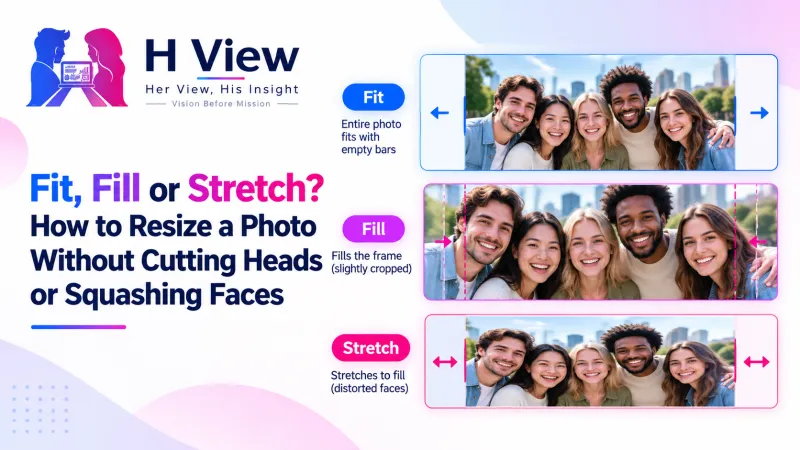
Fit, Fill or Stretch? How to Resize a Photo Without Cutting Heads or Squashing Faces
Squashed faces, cut-off heads and ugly white bars all come from one thing: a shape mismatch. Here's what aspect ratio really means, and when to choose Fit, Fill and crop, or Stretch when you resize photos.
When you resize photos to a different shape, you must choose what to sacrifice. “Fit” keeps the whole picture and adds bars, “Fill and crop” fills the frame and trims the edges, and “Stretch” forces the size and distorts faces. For people, use Fill and crop with the face centred; for documents and logos, use Fit.
You resize a family photo for a WhatsApp DP and someone's head is cut off. You resize a landscape shot for an Instagram post and everyone looks oddly thin. You resize a certificate for a form and it ends up with fat white borders. None of these are mistakes in the tool; they're a shape problem called aspect ratio.
What Is Aspect Ratio?
Aspect ratio is the shape of an image: width compared to height. A phone photo is usually 4:3 or 16:9; an Instagram portrait post is 4:5; a Story or Reel is 9:16; a passport photo (35 × 45 mm) is 7:9. Changing the size while keeping the shape is easy. Changing the shape always means cropping, padding or distorting.
| Option | What it does | Use it for | Avoid it for |
|---|---|---|---|
| Fit | Keeps the whole picture, adds a background where needed | Documents, certificates, logos, screenshots | Social posts where bars look odd |
| Fill and crop | Fills the frame from the centre, trims the edges | Profile photos, Instagram posts, thumbnails | Anything where the edges matter |
| Stretch | Forces the exact width and height | Plain backgrounds, textures, very small shape changes | Faces and people, almost always |
How Do I Avoid Cutting Off Heads?
- Pick the target shape first, then crop before resizing so the face is in the middle.
- Use “Fill and crop” in the Image Resizer, which crops from the centre.
- If heads are near the top edge, leave headroom when you take the photo, or choose a slightly wider original.
 Also readPixels vs KB: Why Your Photo Is Too Big Even When It Looks Small→
Why Do Thumbnails Look Wrong on YouTube?
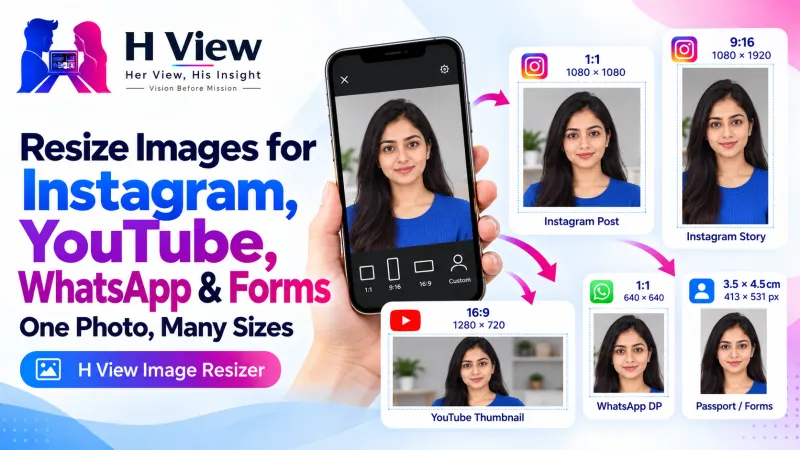
Because of shape again. YouTube's help page asks for a 16:9 thumbnail for videos and 9:16 for Shorts. A square image will be padded or cropped. Resize to 1280 × 720 (16:9) with Fill and crop, keeping text away from the edges.
Does Resizing Change Quality?
Shrinking an image keeps it sharp. Enlarging a small image makes it softer, because new pixels have to be invented; for that, the AI Photo Enhancer does a better job than plain resizing. Saving format matters too: PNG for screenshots and graphics, JPG for photos, as MDN's image format guide explains.
Her View
Photos of our families are precious, and nothing deflates a moment like posting one where Amma's head is cut off or everyone looks stretched. Knowing one simple rule, crop for people and fit for documents, means the photo you share looks the way you remember it.
 Also readHow to Resize Images for Instagram, YouTube Thumbnails, WhatsApp DP and Forms→
His Insight
Stretch is the option that looks easiest and does the most damage. Our eyes are extremely sensitive to distorted faces; even a 10 percent squash feels wrong. If a form demands an exact shape, crop the photo to that shape first, then resize, and never stretch a portrait.
H View Verdict
Before you resize photos, decide the shape. Use Fill and crop for people and social posts, Fit for documents and logos, and avoid Stretch for faces. Batch-resize in the browser, free, and your photos never leave your device.
Frequently Asked Questions
What is the difference between Fit and Fill?
Fit keeps the whole picture and adds a background where needed. Fill and crop fills the whole frame and trims the edges.
Why does my resized photo look squashed?
It was stretched to a different shape. Use Fill and crop, or crop to the right aspect ratio before resizing.
What shape is an Instagram portrait post?
4:5, which is 1080 × 1350 pixels.
Can I resize many photos to the same size?
Yes. Add them all to the Image Resizer, choose the size and fit, and download them as a ZIP.
Related: Image sizes for Instagram, YouTube, WhatsApp and forms.
H View stories follow our editorial policy. Spotted an error? Tell us and we will correct it.
Rate this article
One tap is enough. No comment needed.
Was this article helpful?
Your answer goes straight to our editors.







Comments0
No comments yet. Start the conversation.