
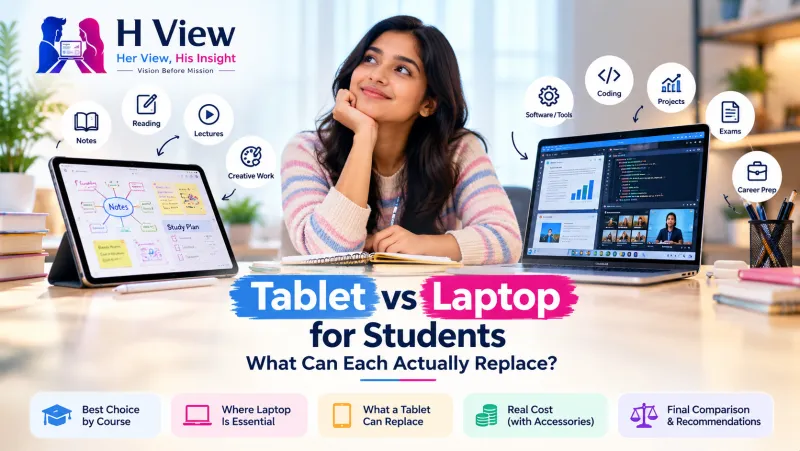
Tablet vs Laptop for Students: What Can Each Actually Replace?
Tablets now handle reading, notes and online classes brilliantly, but laptops still win for coding, design and long assignments. Here is how to choose by course.
A tablet can replace a laptop for students who mostly read, take handwritten notes, attend online classes and do light writing. A laptop is still the better tablet vs laptop choice for coding, heavy spreadsheets, design software, long assignments and exam portals that need a full desktop browser. Many students do best with a laptop first and a tablet later.
Every admission season, parents and students face the same question at the electronics store: a sleek tablet with a stylus or a regular laptop? Tablets have become far more capable, and laptops have become lighter. The right answer depends less on specs and more on what the course actually asks you to do every week.
What can a tablet actually replace?
Tablets have closed a lot of the gap. Apple's iPadOS 26 update, announced in June 2025, added free-form resizable windows, a Mac-style menu bar, a more detailed Files app, a Preview app for marking up PDFs and the ability to run long tasks in the background. Android tablets also offer split-screen multitasking, and many now ship with a stylus.
What each device handles well
Tablet is great for
- Reading PDFs and e-books
- Handwritten notes and diagrams
- Online classes and video lectures
- Annotating slides
- Light writing with a keyboard case
Laptop is better for
- Coding and programming tools
- Long assignments and theses
- Heavy Excel or statistics software
- Design, CAD and video editing
- Exam and government portals
Where do tablets still fall short for students?
- Software: many engineering, science and design courses use desktop programs that have no full tablet version
- Coding: serious programming needs a full operating system with terminals and IDEs
- Typing comfort: long assignments are easier on a laptop keyboard and larger screen
- Online exams and portals: some proctored exams and application portals require Windows or macOS with a specific browser
- Total cost: a good keyboard case and stylus can add a lot to a tablet's price
Before buying, check your course or institution's requirements. Some colleges list minimum laptop specifications for specific programmes.
 Also readDoes a Bigger Phone Battery Really Mean Better Battery Life?→
Which is better by course?
| Course or need | Better choice | Why |
|---|---|---|
| School students (classes 6 to 10) | Tablet | Reading, videos and notes; easier to manage with parental controls |
| Arts, commerce, law, humanities | Either, laptop for heavy writing | Lots of reading and writing |
| Engineering and computer science | Laptop | Coding, simulation and design software |
| Medical and nursing | Tablet plus laptop later | Heavy reading and diagrams; laptop for research work |
| Design, architecture, media | Laptop, with a drawing tablet if needed | Professional software and large files |
| Competitive exam preparation | Tablet or laptop | Depends on whether mock tests need a desktop browser |
What about cost?
Tablets can look cheaper until you add accessories. In the OnePlus Diwali 2026 sale, for example, the official page listed the OnePlus Pad Go 2 from ₹29,999 with a free stylus for a limited period and the Pad 4 from ₹59,499 (OnePlus). Add a keyboard case and the total moves closer to a mid-range laptop. Compare the full setup you will actually use, not just the tablet price.
Can a student use both?
Yes, and that is often the ideal. A practical path is to buy a reliable laptop first for coursework and add a tablet later for reading and notes. If the budget allows only one device and the course involves any coding or specialised software, pick the laptop.
Her View
Parents often worry that a tablet becomes an entertainment screen. That is a fair concern for younger children. Set up screen-time limits and keep study apps on the home screen. For college students, the bigger risk is the opposite: buying a tablet because it feels modern, then struggling with assignments that need a laptop. Ask a senior from the same course what they actually use.
 Also readShould You Upgrade Your iPhone or Keep It Another Year? 5 Checks Before You Spend→
His Insight
Work backwards from the syllabus. List the five tasks you will do most each week and check whether each works fully on a tablet. If even one essential task needs a desktop app, the laptop wins. Specs come second; compatibility comes first.
H View Verdict
A tablet can replace a laptop for reading, note-taking and online classes, and it is a great second device. For coding, design, heavy writing and many exam portals, a laptop is still essential. Check your course requirements, price the full setup with accessories, and when in doubt, choose the laptop first.
Frequently Asked Questions
Can a tablet replace a laptop for college?
For reading, notes and online classes, often yes. For coding, design software, long assignments and some exam portals, a laptop is still needed.
Is a tablet or laptop better for engineering students?
A laptop. Engineering courses commonly use programming tools and simulation or design software that need a full desktop operating system.
Is an iPad good for note-taking?
Yes. With a stylus, tablets are excellent for handwritten notes, diagrams and annotating PDFs and slides.
What should I buy first, a laptop or a tablet?
If you can buy only one and your course needs any specialised software, buy the laptop first and add a tablet later.
H View stories follow our editorial policy. Spotted an error? Tell us and we will correct it.
Rate this article
One tap is enough. No comment needed.
Was this article helpful?
Your answer goes straight to our editors.










Comments0
No comments yet. Start the conversation.