
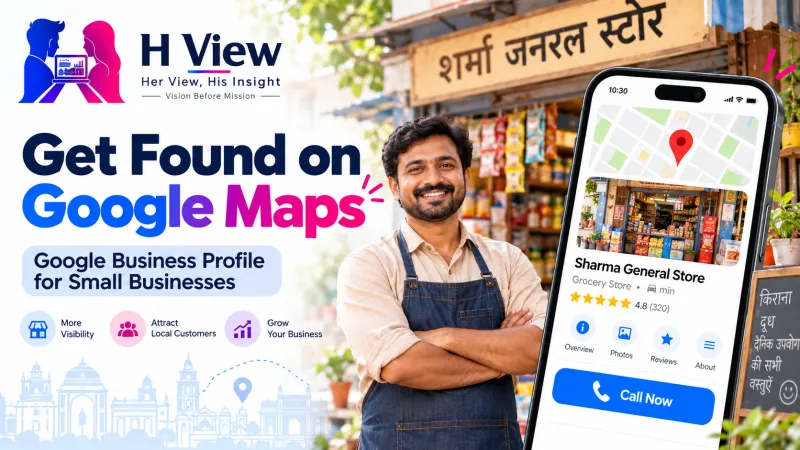
Google Business Profile for Small Businesses in India: How to Show Up When Customers Search Nearby
When someone searches "tailor near me" or "bakery in Kukatpally", Google Business Profiles decide who shows up first. How small businesses can set one up, verify it and keep it working—for free.
When a customer types “boutique near me”, “AC repair in Kondapur” or “best biryani nearby” into Google, the first thing they usually see is not a website. It is a map with three or four businesses, their ratings, opening hours and a call button. Those listings come from Google Business Profile.
For a small shop, clinic, salon, tuition centre or home-based service, this free profile can bring more customers than an expensive website. Yet many local businesses either don’t have one, never verified it, or set it up once and forgot about it.
This guide explains how to create, verify and maintain a Google Business Profile properly, without paying an agency for basic work you can do yourself.
What Is a Google Business Profile?
A Google Business Profile is your business’s listing on Google Search and Google Maps. It can show your business name, category, address or service area, phone number, hours, photos, reviews, website link and updates.
It is free. It does not replace a website, but for local searches it often matters more, because it appears right where customers are making decisions.
Who Should Have One?
A Business Profile is meant for businesses that serve customers in person, either at a location or by visiting customers. That includes:
- Shops, restaurants, salons, clinics, gyms and coaching centres with a physical location.
- Service businesses that visit customers, such as electricians, plumbers, pest control or home tutors, which can show a service area instead of a public address.
Purely online businesses with no in-person contact are generally not eligible. Check Google’s eligibility guidelines before you start.
 Also readInstagram for Small Businesses: What to Post When You Have No Marketing Budget→
How to Create or Claim Your Profile
If your business is not on Google yet
- Go to business.google.com/add and choose to add your business.
- Enter your real business name, category, and either your address or your service area.
- Add your phone number and website if you have one.
- Choose one of the verification options Google offers and complete it.
If your business already appears on Maps
Sometimes customers or Google have already added your business. Search for it on Google Maps, open the listing, and select “Claim this business”, then “Manage now”, and follow the verification steps. Google’s official help page on adding or claiming a Business Profile walks through both routes.
Verification: The Step Most People Skip
An unverified profile has limited control and is easier for others to edit. Verification proves you own or manage the business. Google shows you the verification methods available for your business; complete whichever is offered and keep any codes or instructions safe.
Use your real business details consistently. Mismatched names, addresses or phone numbers across your signboard, website and profile can delay verification and confuse customers.
Seven Things That Make a Profile Actually Work
1. Use your real business name
Write the name exactly as it appears on your signboard. Stuffing keywords such as “Best Boutique Hyderabad Bridal Blouse Designer” into the name goes against Google’s guidelines and can get your profile suspended.
2. Choose the right primary category
The primary category tells Google what you are. A “Bakery” and a “Cake shop” or a “Beauty salon” and a “Bridal makeup artist” can reach slightly different searches. Pick the closest match and add a few relevant secondary categories.
3. Keep hours accurate, including festivals
Nothing frustrates a customer more than reaching a closed shop that Google said was open. Update special hours for Diwali, Sankranti, Eid, Christmas and other holidays.
4. Add real photos
Upload clear photos of your storefront, interior, products and team. Real photos build trust far better than stock images.
5. Write a helpful description
Explain what you do, who you serve and what makes you different in simple language. Mention your locality naturally.
6. Ask for reviews and reply to every one
Ask happy customers to leave a review. Reply politely to all reviews, including negative ones. A calm, helpful reply to a complaint often impresses future customers more than a perfect rating.
7. Post updates
Share offers, new products, festival timings or events. Regular updates show customers, and Google, that the business is active.
Common Mistakes to Avoid
- Creating duplicate profiles for the same location.
- Using a home address publicly when you don’t receive customers there. Use a service area instead.
- Buying fake reviews. They can lead to removal and damage trust.
- Paying someone to “rank you first on Google Maps”. No one can guarantee that.
 Also readThe Digital Marketing Funnel Explained: From Stranger to Loyal Customer→
Her View: Your Profile Is Your Shop Window Online
Many women run excellent home-based businesses, from tailoring and baking to tuition and beauty services, but their customers come only through word of mouth. A Business Profile with a service area lets them be found by people nearby without revealing their home address publicly.
The profile also gives small businesses something word of mouth cannot: visible proof. Reviews, photos and replies show your quality to people who have never met you.
His Insight: Local Search Rewards Consistency, Not Tricks
Google generally considers how relevant a business is to the search, how close it is to the searcher and how prominent it is. You can’t change your location, but you can improve relevance with accurate categories and descriptions, and prominence with genuine reviews and activity.
Small, consistent effort beats one-time setup. If you also have a website, link it to your profile and make sure Google can index it. Our guides on why a website may not show on Google and keyword research for beginners will help you strengthen both.
H View Verdict
For local businesses in India, a well-maintained Google Business Profile is one of the most valuable free marketing tools available. Create or claim it, verify it, use your real name and the right category, keep hours and photos current, and respond to every review.
It takes an hour to set up properly and a few minutes a week to maintain. In return, you appear exactly when nearby customers are ready to call, visit or buy. For the bigger picture, see our guide to what actually matters in digital marketing in 2026.
Frequently Asked Questions
Is Google Business Profile free?
Yes. Creating, verifying and managing a Google Business Profile is free.
Can a home-based business create a Google Business Profile?
Yes, if it serves customers in person. If customers don’t visit your home, set a service area instead of showing your address.
Why is my business not showing on Google Maps?
Common reasons include an unverified profile, incorrect category, inconsistent details, a suspended listing, or simply that other businesses are closer or more prominent for that search.
How do I get more Google reviews?
Ask satisfied customers directly, share your review link after a successful service, and reply to all reviews. Never buy or fake reviews.
Can someone guarantee my business will rank first on Google Maps?
No. Local rankings depend on relevance, distance and prominence, and no agency can guarantee a top position.
H View stories follow our editorial policy. Spotted an error? Tell us and we will correct it.
Rate this article
One tap is enough. No comment needed.
Was this article helpful?
Your answer goes straight to our editors.








Comments0
No comments yet. Start the conversation.