
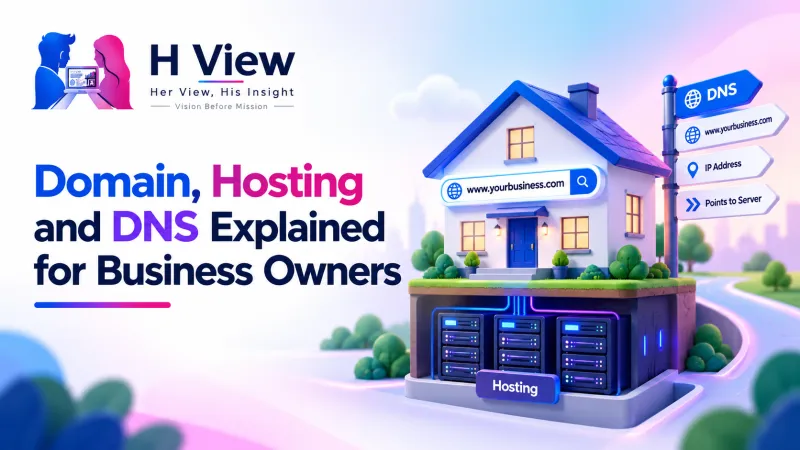
Domain, Hosting and DNS Explained for Business Owners
Domain, hosting and DNS in plain words: what each one does, how they connect, which DNS records matter and how to keep your business website and email safe.
Your domain is your business's address on the internet (like yourshop.in), hosting is the rented computer where your website's files live, and DNS is the directory that connects the two. You need domain and hosting together for a website to work, but they are separate services that you can buy, manage and move independently.
This guide explains each one in plain words, shows how they fit together, and lists the mistakes that cost small businesses their website or email.
What is a domain name?
A domain name is the readable address people type to reach you, such as sharmaclinic.in. Computers find each other using numeric IP addresses; the domain is the friendly label on top of that number.
The last part of a domain (.in, .com, .org) is called the extension or top-level domain. In India, the .in registry is run by the National Internet Exchange of India (NIXI), a not-for-profit body that the Government of India authorised as the .IN Registry in January 2005. You do not buy directly from NIXI. You buy through an accredited registrar, which is a company licensed to sell domain registrations.
You do not own a domain forever. You register it for a period and must renew it, or the name can lapse.
What is web hosting?
Hosting is space on a server, a computer that stays connected to the internet all day, where your website's pages, images and database are stored.
Think of a kirana store. The domain is the shop's name board; the hosting is the premises where the goods sit. You can change the premises and keep the same name board, and that is exactly how moving a website to a new host works.
Domain, hosting and DNS at a glance
Domain
- Your address, like yourshop.in
- Bought from a registrar
- Renewed regularly
- Stays with you if you change host
Hosting
- Where website files are stored
- Bought from a hosting company
- Decides speed and uptime
- Can be changed without changing domain
DNS
- The directory linking the two
- Managed at registrar, host or DNS service
- Also routes your email
- Small changes, big effects
Three separate services that must point to each other correctly.
What types of hosting are there?
Most small businesses only need to understand four common types:
- Shared hosting: Many websites share one server. Cheapest, and fine for a simple coaching centre or clinic site.
- VPS (virtual private server): A server split into virtual machines with reserved resources, for growing traffic.
- Dedicated server: A whole server for you alone, usually more than a small business needs.
- Cloud hosting: Runs on a network of servers that can scale up or down.
 Also readHow to Build a Digital Marketing Plan for a Small Business in India→
How does DNS connect your domain to your hosting?
DNS stands for Domain Name System. Google describes DNS as the phone book of the web: it translates a readable address into the IP address of the server that hosts the website. Every time someone types your domain, a quick lookup happens in the background before your page appears.
What happens when a customer types your domain
This usually takes a fraction of a second.
DNS settings live in a "DNS zone" at your registrar, host or a separate DNS provider, depending on your nameservers.
Which DNS records should a business owner know?
These five records cover almost everything a small business does. The descriptions follow Google Workspace's DNS basics guide.
What lives in your DNS zone
Get these right and your website and business email both work reliably.
| Record | What it does | When you touch it |
|---|---|---|
| A | Links your domain to the IP address of your hosting server | Launching a site or moving to a new host |
| CNAME | Points one name to another, such as www to your main domain | Connecting www, a shop builder or a subdomain |
| MX | Directs email for your domain to your email provider | Setting up business email like info@yourshop.in |
| TXT | Holds text used to verify ownership and set up SPF, DKIM and DMARC | Verifying Google tools or improving email delivery |
| NS | Names the servers that handle DNS for your domain | Moving DNS management to a new provider |
A common and painful mistake: a business moves its website to a new host, the new host asks to change nameservers, and nobody copies the old MX records. The website works, but email silently stops arriving. Always note your existing records before changing nameservers.
Why do DNS changes not show up immediately?
Every DNS record has a TTL, or Time To Live, which is the number of seconds other systems keep a cached copy before checking again. According to Google, changes to a record with a TTL of 86400 seconds can take up to 24 hours to take effect. Google suggests a lower TTL, such as 300 seconds, when you might need to revert quickly.
How do you set up a domain and hosting for a new business?
Here is a sensible order for a boutique, clinic or coaching centre going online for the first time:
Setup plan for a new business website
Timings are a guide; DNS changes may take longer to spread.
Once the site is live, make sure Google can find it. Our guides on technical SEO for beginners and why a website may not show on Google explain the next steps.
What mistakes should you avoid with domains and hosting?
Domain and hosting safety checklist
- Register the domain in the business owner's name, not the developer's
- Keep registrar login details with you, not only with an agency
- Use an email address you check regularly as the contact email
- Turn on auto-renewal and keep payment details current
- Enable two-factor authentication on registrar and hosting accounts
- Keep the domain locked against transfers unless you are moving it
- Save a copy of all DNS records before any change
- Take regular website backups that you can download
A ten-minute check today can save weeks of trouble later.
If you plan to move a domain to another registrar, know the rules. Under ICANN's transfer policy for generic domains like .com, you need an authorisation code (AuthInfo or EPP code) from your current registrar, and a registrar may deny a transfer within 60 days of initial registration or a previous transfer. Changing the registrant's name, organisation or email can also trigger a 60-day transfer lock. Country domains like .in follow their own registry rules, so check with your registrar.
Domain and hosting costs also belong in your yearly plan. Our guide to a digital marketing budget for small businesses shows where these basics fit.
 Also readThe Digital Marketing Funnel Explained: From Stranger to Loyal Customer→
Her View
For many first-time owners, a website feels like something that belongs to the developer. A tailor or home baker trusts a nephew or a freelancer, and years later discovers the domain is registered under someone else's email. Understanding these three words is not about becoming technical. It is about owning what you built and being able to ask the right questions with confidence.
His Insight
Treat domain, hosting and DNS as three separate assets with separate risks. The domain is the asset you cannot replace, so protect it with auto-renewal, two-factor login and your own account. Hosting is replaceable, so choose based on speed, support and backups, and be ready to switch. DNS is the control panel, so document every record. Keeping the domain separate from hosting means a hosting problem never puts your domain at risk.
H View Verdict
Your domain is your address, hosting is your premises, and DNS is the signboard that sends people to the right door. Register the domain in your own name, choose hosting that fits your current size, and keep a written record of your DNS settings. Get these basics right once, and every other part of digital marketing has a stable foundation.
Want this done for your business?
If domains, hosting and DNS records feel confusing, the H View team can set them up properly and in your name. H View studies how your business works today and builds the right digital platform for it, from search visibility to turning manual work into automated systems.
- Website SEO
- GEO and AI search visibility
- Websites and apps
- CRM and ERP
- Management portals
- Automation and digitisation
Frequently Asked Questions
Can I buy a domain and hosting from different companies?
Yes. You can register your domain with one registrar and host your website with another company. You connect them by updating the nameservers or the A record in DNS.
What happens if my domain expires?
Your website and email linked to the domain can stop working. Registrars usually offer a period after expiry when you can still renew, but restoring a deleted name may cost an extra redemption fee. If it is fully released, someone else can register it, so turn on auto-renewal.
Is .in or .com better for an Indian business?
Both work well. A .in domain signals that you serve India and is managed by the .IN Registry under NIXI, while .com is familiar worldwide. Many businesses register both and point one to the other to protect their name.
Why is my email not working after I changed hosting?
The most common reason is that the MX records were not copied to the new DNS provider when nameservers changed. Check your MX and TXT records against your email provider's instructions. Also allow time for the change to take effect, which depends on the record's TTL.
Do I need hosting if I use a website builder?
Usually not separately. Most website builders include hosting in their plans, and you only connect your own domain to it through DNS. You still need to renew the domain itself.
H View stories follow our editorial policy. Spotted an error? Tell us and we will correct it.
Rate this article
One tap is enough. No comment needed.
Was this article helpful?
Your answer goes straight to our editors.











Comments0
No comments yet. Start the conversation.