
H View Account Explained: Free, Plus and Pro Plans and What You Get
Save articles, pick up where you left off, keep your wishes and checks in one place, and go ad-free if you want. Here is exactly what each H View plan includes.
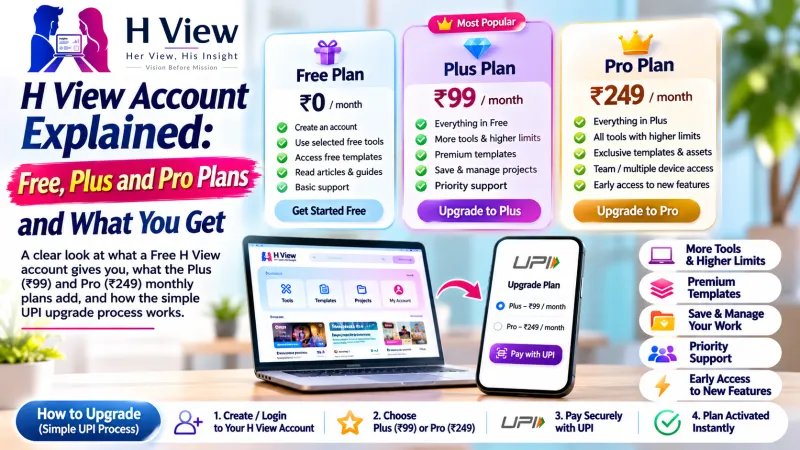
An H View account is free and lets you save articles, continue reading on any device, follow topics and keep your plagiarism checks and interactive wishes in one place. If you want ad-free reading and higher tool limits, you can upgrade to Plus (₹99 a month) or Pro (₹249 a month). Create a free H View account in under a minute.
What does a free H View account include?
As of November 2026, the free plan gives every reader:
- Saved articles: tap the bookmark on any article to read it later.
- Continue reading: H View remembers how far you got, on your phone or laptop.
- Reading history and followed topics, so your dashboard shows what you care about.
- The weekly H View Brief newsletter, if you choose to receive it.
- Plagiarism checker: 3 checks a day of up to 1,000 words each.
- Your interactive creations: every free wish, invitation and game you make is saved to your account.
What do Plus and Pro add?
| Free | Plus | Pro | |
|---|---|---|---|
| Price | ₹0 | ₹99 / month | ₹249 / month |
| Ads | Shown | Ad-free | Ad-free |
| Plagiarism checks | 3 a day, 1,000 words | 50 a month, 5,000 words | 200 a month, 15,000 words |
| Plagiarism reports kept | 7 days | 90 days | 1 year |
| Downloadable PDF report | No | Yes | Yes |
| Custom interactive designs | Full price | 10% off | 15% off |
| Support | Standard | Priority WhatsApp replies | Priority + early access to new tools |
Plus suits students and regular readers. Pro suits teachers, professionals and anyone checking long documents such as theses or reports.
 Also readCloudfolio: A Free PDF Editor, Scanner and Study App That Keeps Your Files on Your Device→
How do you create an H View account?
- Open Sign up from the menu.
- Enter your name, email and a password, and agree to the terms.
- Your dashboard opens straight away. Add a profile photo and pick topics to follow in Settings.
On phones, the account menu sits in the footer bar, so Saved, History and your creations are one tap away.
How does upgrading to Plus or Pro work?
H View does not use a payment gateway yet. Upgrading is a simple, manual UPI process:
- Choose a plan and a duration of 1, 3 or 12 months on the Plans page. You get an order ID.
- Pay the exact amount by UPI. On a phone, the Pay with UPI button opens your UPI app; on a computer, scan the QR code.
- Enter the UTR or transaction reference shown in your UPI app.
- The H View team checks the payment against the bank record and activates your plan, usually the same day.
A UTR or screenshot alone never activates a plan; every payment is matched by hand first. If you are new to UPI references, this overview of UPI and the NPCI website explain how UPI payments work.
 Also readGit Branches Explained with Pictures: Work on Ideas Without Breaking Your Site (Part 12)→
Is your data safe?
- Passwords are stored as secure hashes, never in plain text.
- Plagiarism text is never shared or added to any database.
- You can delete saved items, checks and creations whenever you like.
Frequently asked questions
Do I need an account to read H View?
No. Every article is free to read. An account simply remembers what you read and saves your work.
Can I cancel Plus or Pro?
Plans are prepaid for the months you choose and do not renew automatically, so there is nothing to cancel. When the period ends, you return to the free plan.
Do my interactive wishes disappear if I don't have an account?
Links you share keep working. An account just keeps a list of them so you can find, reshare or check them later.
Can schools or teams buy Pro for several people?
Contact the H View team on WhatsApp for department or newsroom plans.
H View stories follow our editorial policy. Spotted an error? Tell us and we will correct it.
Rate this article
One tap is enough. No comment needed.
Was this article helpful?
Your answer goes straight to our editors.






Comments0
No comments yet. Start the conversation.