
.gitignore Explained: Keep Passwords and API Keys Out of GitHub (Part 10)
Millions of passwords and API keys leak on GitHub every year. Learn how .gitignore and .env files keep secrets safe, and the exact steps to take if one leaks. Part 10 of our visual Git series.
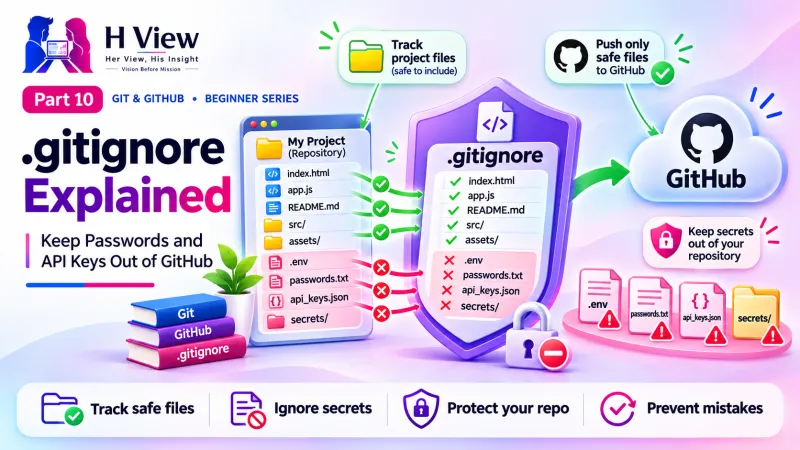
A .gitignore file is a plain text list of files and folders that Git should never track, such as .env files with passwords and API keys, node_modules and system junk. Create it in your project's main folder before your first commit. If a secret is ever pushed by mistake, revoke or change it immediately, because deleting the file does not remove it from history.
Arjun has a story he tells every new developer. A junior colleague once pushed a project to a public GitHub repository with a cloud API key inside a config file. Within hours, someone had found it and started using it, and the account showed charges nobody expected. The key had to be cancelled, the bill disputed and the whole team spent a day cleaning up. "One line in a file called .gitignore would have prevented all of it," he says. In Part 9 Sneha started pushing to GitHub, and her uncle now wants online payments on the bakery site. That makes this Part 10 the safety lesson she, and you, must read first.
Your one-minute summary
- .gitignore tells Git which files to leave out
- Keep secrets in a .env file and list .env in .gitignore
- Share a safe .env.example with blank values instead
- .gitignore does not affect files Git already tracks; use git rm --cached
- If a key leaks: revoke it first, clean up second
- GitHub push protection blocks many known secret types in public repositories
Why does .gitignore matter so much?
Because secret leaks are extremely common. GitHub reported detecting over 1 million leaked secrets on public repositories in just the first eight weeks of 2024, which it described as more than a dozen accidental leaks every minute, in its post on keeping secrets out of public repositories.
The size of the problem
Sources: GitHub Blog, February 2024; GitGuardian, State of Secrets Sprawl 2025.
A leaked key can cost real money. A stolen cloud or AI API key can be used to run up bills on your account, and a leaked payment gateway or database password can expose customer data. Automated bots scan public GitHub activity constantly, so a leak can be found within minutes.
What files should never go into Git?
Commit vs never commit
Safe to commit
- HTML, CSS, JavaScript, PHP source code
- Images and fonts your site uses
- README.md and documentation
- package.json and lock files
- .env.example with empty values
Never commit
- .env files with real keys and passwords
- Database dumps and customer data
- node_modules and vendor folders
- Build output such as dist/ or build/
- System files: .DS_Store, Thumbs.db
- Private SSH keys and certificates
 Also readGit push, Git pull and Git clone: Syncing Your Work with GitHub (Part 9)→
How do I create a .gitignore file?
Create a file named exactly .gitignore (with the dot, no extension) in the main folder of your project, next to index.html. Each line is a pattern. Here is a good starter for most web projects:
| Line in .gitignore | What it ignores |
|---|---|
.env | Your secrets file |
.env.* and !.env.example | All .env variants, except the safe example file |
node_modules/ | Installed JavaScript packages (they can be reinstalled) |
dist/ and build/ | Generated output |
*.log | Every file ending in .log |
.DS_Store and Thumbs.db | Mac and Windows system junk |
uploads/ | User-uploaded files on a live site |
* matches anything, so *.log means every .log file. A trailing / means a folder. A leading ! means "do not ignore this one". Lines starting with # are comments. The full rules are in the gitignore documentation.When you create a new repository on GitHub, you can pick a ready-made .gitignore template for your language, such as Node or Python. GitHub's public gitignore collection has templates for most frameworks.
How do .env files keep API keys safe?
The standard pattern is simple: real secrets live in a .env file that is ignored, and your code reads them from there. A .env.example file, with the same names but no values, is committed so teammates know what to fill in.
The safe secrets pattern on the bakery site
The key name is shared; the key value never enters Git.
Why is .gitignore not working for my file?
.gitignore only affects files Git is not yet tracking. If you committed a file before adding it to .gitignore, Git keeps tracking it. To stop tracking it while keeping it on your computer:
| Step | Command |
|---|---|
| 1. Add the file to .gitignore | Add the line .env |
| 2. Stop tracking it (file stays on disk) | git rm --cached .env |
| 3. Commit the change | git commit -m "Stop tracking .env" |
| 4. Check | git status no longer lists .env |
Important: this stops future tracking only. The file is still inside older commits. If it contained real secrets, follow the leak steps below.
What should I do if I pushed a password or API key?
Act in this order. The first step matters most.
Leaked secret: emergency steps
Deleting the repository or the commit is not enough: copies may already exist.
Does GitHub protect me automatically?
Partly. Since early 2024, GitHub has turned on push protection by default for pushes to public repositories. If it recognises a supported secret, such as a known cloud or payment provider key, it blocks the push and tells you which line contains it. It is a valuable safety net, but it cannot recognise every kind of password, so .gitignore and good habits remain your main defence.
Four layers of protection
Your security checklist
- Create .gitignore before the first commit of every project
- Keep all keys and passwords in .env, never in code
- Commit a .env.example with empty values
- Run
git statusandgit diff --stagedbefore every commit - Use private repositories for client work
- If a key leaks, revoke it first
Her View
Many small businesses trust a freelancer or student with their website, payment gateway and customer list. That trust deserves care. A single careless commit can expose a family business's customers or create an unexpected bill. Learning .gitignore is not just a technical skill; it is a way of respecting the people who rely on your work, like Sneha's uncle and his bakery customers.
 Also readCreate a GitHub Account, Secure It and Connect It to Your Computer (Part 6)→
His Insight
Think in layers. Layer one: .env and .gitignore keep secrets out. Layer two: reviewing git diff --staged catches mistakes. Layer three: GitHub push protection catches known key formats. Layer four: if all else fails, rotating the key limits the damage. Never rely on one layer alone, and never put secret keys in browser code.
H View Verdict
A five-line .gitignore and a .env file prevent one of the most common and costly beginner mistakes. Create them at the start of every project, and if a key ever leaks, revoke it before anything else. Next, in Part 11, we learn how to undo mistakes in Git safely, without panic.
Self-assessment: test yourself
Ready? Tap an option for each question. You will see right away whether you got it, with a short explanation, and your score at the end. Take your time, and try again as often as you like.
.gitignore and secrets quiz: 10 questions
1. Where should your real API keys live?
- In index.html
- In README.md
- In a .env file listed in .gitignore
- In a commit message
Keep secrets in an ignored .env file and read them from your server-side code.
2. You pushed a live API key to GitHub. What is the first step?
- Delete the repository
- Revoke or rotate the key
- Add it to .gitignore
- Rename the file
Once exposed, the key must be treated as stolen. Revoking it is the real protection.
3. Why is .gitignore not ignoring a file you committed earlier?
- .gitignore is broken
- It only affects untracked files
- You need to restart Git
- It only works on GitHub
Use git rm --cached to stop tracking a file Git already knows about.
4. In .gitignore, what does *.log mean?
- Only a file named *.log
- Every file ending in .log
- The log folder
- Git's own log
The star matches any characters, so every .log file is ignored.
5. Which file should you commit to show which secrets are needed?
- .env
- .env.example with empty values
- id_ed25519
- node_modules
.env.example documents the names without exposing values.
6. What does a leading ! mean in .gitignore, as in !.env.example?
- Delete this file
- Do not ignore this file
- Make it urgent
- Hide it from GitHub
! creates an exception to an earlier ignore rule.
7. Is it safe to put a secret payment key in browser JavaScript?
- Yes, if the repo is private
- No, visitors can see browser code
- Yes, if minified
- Only on weekends
Secret keys must only be used on the server.
8. What does GitHub push protection do?
- Speeds up pushes
- Blocks pushes containing many known secret types
- Deletes your repository
- Makes repos private
It scans pushes to public repos and blocks supported secrets it recognises.
9. Should node_modules be committed?
- Yes, always
- No, ignore it; packages can be reinstalled
- Only on Mac
- Only in public repos
node_modules is large and rebuildable; commit package.json and the lock file instead.
10. Is deleting a leaked file in a new commit enough to make you safe?
- Yes
- No, it remains in history and copies may exist
- Yes, if you push quickly
- Only for private repos
Old commits still contain it; rotating the key is what protects you.
Frequently asked questions
Is a private repository safe for API keys?
Safer, but not safe. Collaborators, future team members and any leak of the repository would expose them. Keep keys out of Git entirely.
Can I have more than one .gitignore?
Yes. A .gitignore in a subfolder applies to that folder. Most projects need only one, in the main folder.
Should I ignore package-lock.json?
No. Lock files should usually be committed so everyone installs the same package versions. Ignore node_modules, not the lock file.
How do I ignore a file on my computer only?
Add it to .git/info/exclude inside your project. It works like .gitignore but is not shared with others.
H View stories follow our editorial policy. Spotted an error? Tell us and we will correct it.
Rate this article
One tap is enough. No comment needed.
Was this article helpful?
Your answer goes straight to our editors.







Comments0
No comments yet. Start the conversation.