
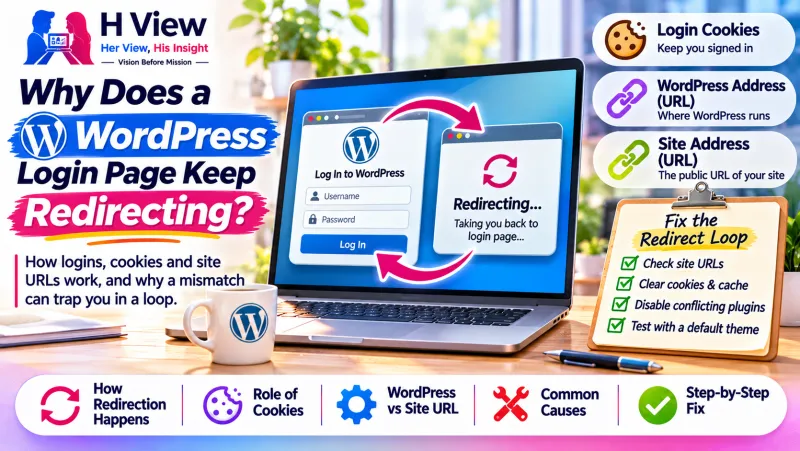
Why Does a WordPress Login Page Keep Redirecting? How Logins, Cookies and Site URLs Work
A WordPress login that keeps sending you back to the login page is usually a cookie or address problem, not a wrong password. How WordPress logins, cookies and site URLs fit together.
A WordPress login redirect loop happens when you enter the right username and password but are sent straight back to the login page. It usually means WordPress cannot set or read its login cookie, often because the site's saved addresses do not match the address you are using, not because your password is wrong.
Understanding how a WordPress login actually works makes this problem far less mysterious, and it helps you explain it clearly to whoever looks after your website.
What happens when you log in to WordPress?
Logging in is a short conversation between your browser and the site:
- You submit your username and password on
wp-login.php. - WordPress checks them and, if they are correct, asks your browser to store login cookies.
- Your browser sends those cookies back with every request to the dashboard.
- WordPress reads the cookies, recognises you and shows the admin area.
The WordPress cookies documentation explains that WordPress uses cookies for authentication, so cookies must be enabled to log in. If valid cookies are present you go directly to the dashboard; if they are missing, expired or invalid, WordPress asks you to log in again. If step 3 or 4 fails, you get the loop.
Why would the login cookie fail?
| Possible cause | What is going on |
|---|---|
| Address mismatch | The WordPress Address and Site Address settings differ from each other or from the address in your browser (www vs non-www, http vs https). Cookies are tied to a specific address, so they may not be sent back. |
| Old or blocked cookies | The browser holds stale cookies from before a change, or blocks cookies entirely. |
| HTTPS changes | A move to HTTPS, or a proxy/CDN setting, makes WordPress think a request is insecure and redirect it again. |
| Caching | A cache serves an old copy of the login or admin page instead of a fresh, personalised response. |
| Plugin behaviour | Security, login or redirect plugins add their own rules that conflict with WordPress's normal flow. |
The address mismatch has been recognised for a long time. A WordPress core ticket from 2012 (#20430) describes how setting one address with www and the other without it can make the login redirect repeatedly and break cookie setting.
 Also readElementor Changes Not Showing on the Live Website? What to Check→
What are the WordPress Address and Site Address?
In Settings → General, WordPress stores two addresses. The WordPress Address is where the WordPress files live; the Site Address is the address visitors type. On most sites they are identical. Problems often start after a migration, a domain change or a switch to HTTPS, when one value is updated and the other is not, or when they no longer match how the site is actually reached.
Why should changes be made carefully?
These addresses affect every page, image link and redirect on the site. Editing them without a backup, or in the wrong place, can lock you out of the dashboard completely. Clearing your own browser cookies is harmless and a sensible first step; changes to site settings, configuration files or server rules are best done by someone who can take a backup and test on a copy first.
What information helps someone diagnose it?
- The exact address you type to reach the login page.
- Whether the loop happens in every browser and in a private window.
- Any recent change: migration, new domain, SSL certificate, CDN, caching or security plugin.
- Whether the public site still loads normally.
Her View / His Insight
Her View: Being locked out of your own website feels alarming, but this problem rarely means data is lost. The content is usually safe; the door just is not recognising your key.
His Insight: Note what changed last. Login loops very often appear right after an address, HTTPS or caching change, and that timeline is the fastest clue.
Frequently asked questions
Does a login loop mean my site was hacked?
Not usually. It is most often a cookie, address or caching issue. If you also see unfamiliar admin users or strange redirects for visitors, ask for a security review.
Will clearing cookies fix it?
Sometimes, if your browser was holding old cookies. If the loop returns in every browser, the cause is more likely on the site itself.
Why did it start after moving to HTTPS?
If one saved address still uses http, or a proxy hides the secure connection from WordPress, the site may keep redirecting between versions and the login cookie may not be accepted.
Need help getting back in?
HView's Digital Solutions team can review a WordPress login problem safely, with a backup first and a written scope. See also our WordPress repair services.
References

H View stories follow our editorial policy. Spotted an error? Tell us and we will correct it.
Rate this article
One tap is enough. No comment needed.
Was this article helpful?
Your answer goes straight to our editors.




Comments0
No comments yet. Start the conversation.