
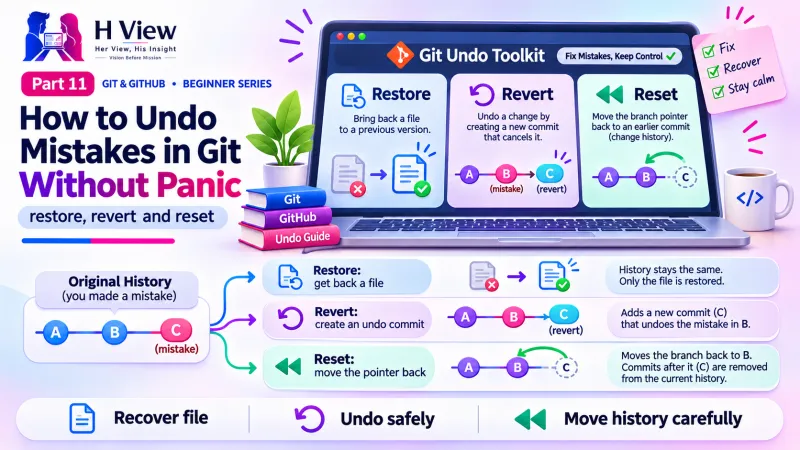
How to Undo Mistakes in Git Without Panic: restore, revert and reset (Part 11)
Discard changes, unstage files, fix your last commit or reverse a pushed one. A visual decision guide to git restore, git revert, git reset and the reflog safety net. Part 11 of our Git series.
To undo in Git, first ask where the mistake is. Use git restore to discard edits you have not committed, git commit --amend to fix your last commit before pushing, and git revert to safely reverse a commit that is already on GitHub. Avoid git reset --hard unless you are sure, because it can delete work.
It was 11 pm and Sneha had made three mistakes in one evening. She had messed up the CSS, committed with the message "fnial", and pushed a change that broke the checkout page on the live bakery site. Her first instinct was to search online and paste the first command she found, git reset --hard. Arjun's message arrived just in time: "Stop. Breathe. Tell me where each mistake is." Ten minutes later, all three were fixed and nothing was lost. Mistakes are guaranteed; as we saw in Part 1, Git makes them cheap. This Part 11, which closes Module 3, turns that promise into practical commands, organised by Arjun's question: "Where is the mistake right now?"
Your one-minute summary
- git restore file: throw away uncommitted edits to a file
- git restore --staged file: unstage, keeping your edits
- git commit --amend: fix the last commit's message or contents (before pushing)
- git revert <id>: create a new commit that reverses an old one (safe after pushing)
- git reset: move back in history; powerful, use carefully
- git reflog: Git's safety net for finding "lost" commits
Which undo command should I use?
Match the command to where the mistake lives, using the three areas from Part 4 plus GitHub.
Undo decision guide
git restore index.html discards the editsgit restore --staged index.html unstages, edits keptgit commit --amend or git reset --soft HEAD~1git revert <id> adds a reversing commitgit reflog finds where you wereThe further a mistake has travelled, the more careful the undo needs to be.
How Sneha fixed her three mistakes
Messy CSS, not committed
- Where: working folder
- Fix:
git restore style.css
Typo "fnial", not pushed
- Where: last local commit
- Fix:
git commit --amend -m "Add festival menu"
Broken checkout, already pushed
- Where: GitHub and the live site
- Fix:
git revert e4f5g6h, thengit push
How do I discard changes I have not committed?
You edited style.css, it looks terrible, and you want the last committed version back. Use git restore:
| Situation | Command | Result |
|---|---|---|
| Discard edits to one file | git restore style.css | File returns to the last commit |
| Discard all unstaged edits | git restore . | Every tracked file returns to the last commit |
| Unstage a file, keep edits | git restore --staged style.css | File leaves the box, edits stay |
| Restore a file from an older commit | git restore --source 5d6e7f8 style.css | File matches that older version |
git restore on unstaged edits cannot be undone: those edits were never saved in Git. If you are unsure, commit or copy the file first. In VS Code, the same action is the curved "Discard Changes" arrow next to a file. Also readGit status, Git log and Git diff: Reading Your Project's History (Part 8)→
How do I fix my last commit?
You committed, then noticed a typo in the message or a forgotten file. If you have not pushed yet, amend it:
- Fix the message:
git commit --amend -m "Add contact form" - Add a forgotten file:
git add about.htmlthengit commit --amend --no-edit
Amend replaces the last commit with a new one. That is fine on your laptop, but if the old commit is already on GitHub, amending creates a mismatch, so use revert instead.
How do I undo a commit that is already on GitHub?
Use git revert. It does not delete anything. It creates a new commit that does the exact opposite of the bad one, so history stays honest and teammates are not disrupted.
How git revert works
Revert is the safe, team-friendly undo for anything already pushed.
What does git reset do, and when is it dangerous?
git reset moves your branch back to an earlier commit. It comes in three strengths, and the difference matters.
The three strengths of git reset
--soft (gentle)
git reset --soft HEAD~1- Removes the last commit
- Changes stay staged, ready to recommit
- Safe
--mixed (default)
git reset HEAD~1- Removes the last commit
- Changes stay in your files, unstaged
- Safe
--hard (dangerous)
git reset --hard HEAD~1- Removes the last commit
- Deletes the changes from your files too
- Use only when sure
Only reset commits you have not pushed. For pushed commits, use revert.
Can I recover a commit I "lost"?
Usually, yes. Git keeps a private diary of everywhere HEAD has pointed, called the reflog. Even after a bad reset, the old commit is normally still there for a while.
| Step | Command |
|---|---|
| 1. See recent positions | git reflog shows lines like e4f5g6h HEAD@{2}: commit: Add gallery |
| 2. Find the commit you want | Read the messages and note the ID |
| 3. Get it back on a safe branch | git branch rescue e4f5g6h |
The reflog is local to your computer and entries expire after a while, so act soon. Uncommitted edits discarded with git restore or reset --hard are not in the reflog, which is one more reason to commit often.
How do I put work aside for a moment?
Halfway through a change, a client calls with an urgent fix. git stash saves your unfinished edits and gives you a clean folder. Fix the urgent issue, commit it, then run git stash pop to bring your unfinished work back.
What should I never do as a beginner?
Danger zone
Before Part 12, make sure you can
- Discard a messy edit with
git restore - Unstage a file with
git restore --staged - Fix a commit message with
git commit --amend - Reverse a pushed commit with
git revert - Explain why
reset --hardandpush --forceare risky - Find an old position with
git reflog
Her View
Fear of breaking things holds many talented people back. Knowing exactly how to undo turns that fear into curiosity. Try these commands on a practice project, break it on purpose and bring it back. Each time you recover, your confidence grows. Mistakes are not a sign you are bad at this; they are simply part of the work, even at 11 pm.
 Also readYour First Git Repository and First Commit, Step by Step (Part 7)→
His Insight
Most "Git disasters" come from two commands: reset --hard and push --force. Avoid both on shared work and you avoid most trouble. Prefer revert on anything pushed. Commit before risky experiments, because committed work can almost always be recovered through the reflog, while uncommitted work cannot.
H View Verdict
Undo in Git depends on where the mistake is: restore for uncommitted edits, amend or soft reset for local commits, revert for pushed commits and reflog as the last safety net. That completes Module 3, the daily workflow. In Part 12, we start Module 4 with Git's most powerful idea: branches.
Self-assessment: test yourself
Ready? Tap an option for each question. You will see right away whether you got it, with a short explanation, and your score at the end. Take your time, and try again as often as you like.
Undo quiz: 10 questions
1. A bad commit is already on GitHub. Which is the safest undo?
- git reset --hard
- git revert <id>
- Delete the repository
- git push --force
Revert adds a reversing commit without rewriting shared history.
2. Which command unstages a file but keeps your edits?
- git restore file
- git restore --staged file
- git reset --hard
- git revert
--staged moves the file out of the staging area only.
3. Which reset deletes changes from your files?
- --soft
- --mixed
- --hard
- None of them
--hard resets your files too, so uncommitted work is lost.
4. You typed a wrong message in your last commit and have not pushed. Use
- git commit --amend -m "New message"
- git revert
- git clone
- git init
Amend replaces the last local commit with a corrected one.
5. Which command helps find commits after a bad reset?
- git status
- git reflog
- git stash
- git pull
The reflog records where HEAD has been, including "lost" commits.
6. What is the golden rule of undoing?
- Always force push
- Local can be rewritten, shared should be reversed
- Never commit
- Delete .git when stuck
Rewrite only unpushed history; use revert for pushed work.
7. A client calls with an urgent fix while you are mid-change. Which command sets your work aside?
- git reset --hard
- git stash
- git revert
- git clone
git stash saves unfinished edits; git stash pop brings them back.
8. Can git restore bring back edits you discarded before ever committing them?
- Yes, always
- No, they were never saved in Git
- Only on Mac
- Only with reflog
Git can only recover what was committed. Commit often.
9. What does git reset --soft HEAD~1 do?
- Deletes all files
- Removes the last commit but keeps its changes staged
- Pushes to GitHub
- Creates a branch
Soft reset undoes the commit while keeping your work ready to recommit.
10. Does git revert delete the bad commit from history?
- Yes
- No, it adds a new commit that reverses it
- Only on GitHub
- Only if pushed
History is kept; the revert commit cancels the changes.
Frequently asked questions
What is the difference between git revert and git reset?
Revert adds a new commit that reverses an old one, keeping history intact. Reset moves the branch back and removes commits from it. Use revert for pushed work, reset only for local work.
Can I undo a git revert?
Yes. Revert the revert commit: git revert <revert-commit-id>.
Is git checkout still used to undo changes?
Older tutorials use git checkout -- file. Newer Git versions added git restore and git switch to make these jobs clearer. Both work; this series uses the newer commands.
How do I undo in VS Code or GitHub Desktop?
VS Code has "Discard Changes" and "Undo Last Commit" in the Source Control menu. GitHub Desktop offers "Discard changes" on files and "Revert changes in commit" or "Undo" on recent commits in the History tab.
H View stories follow our editorial policy. Spotted an error? Tell us and we will correct it.
Rate this article
One tap is enough. No comment needed.
Was this article helpful?
Your answer goes straight to our editors.










Comments0
No comments yet. Start the conversation.