


H View
  • Home
  • About
  • Blogs
  • Categories
    • AI
    • Tech
    • Lifestyle
    • Business
      • Money
    • Sports
  • Reviews
  • Contact
Connect With Us
H View
  • Home
  • About
  • Blogs
  • Categories
    • AI
    • Tech
    • Lifestyle
    • Business
      • Money
    • Sports
  • Reviews
  • Contact
Connect
Audio

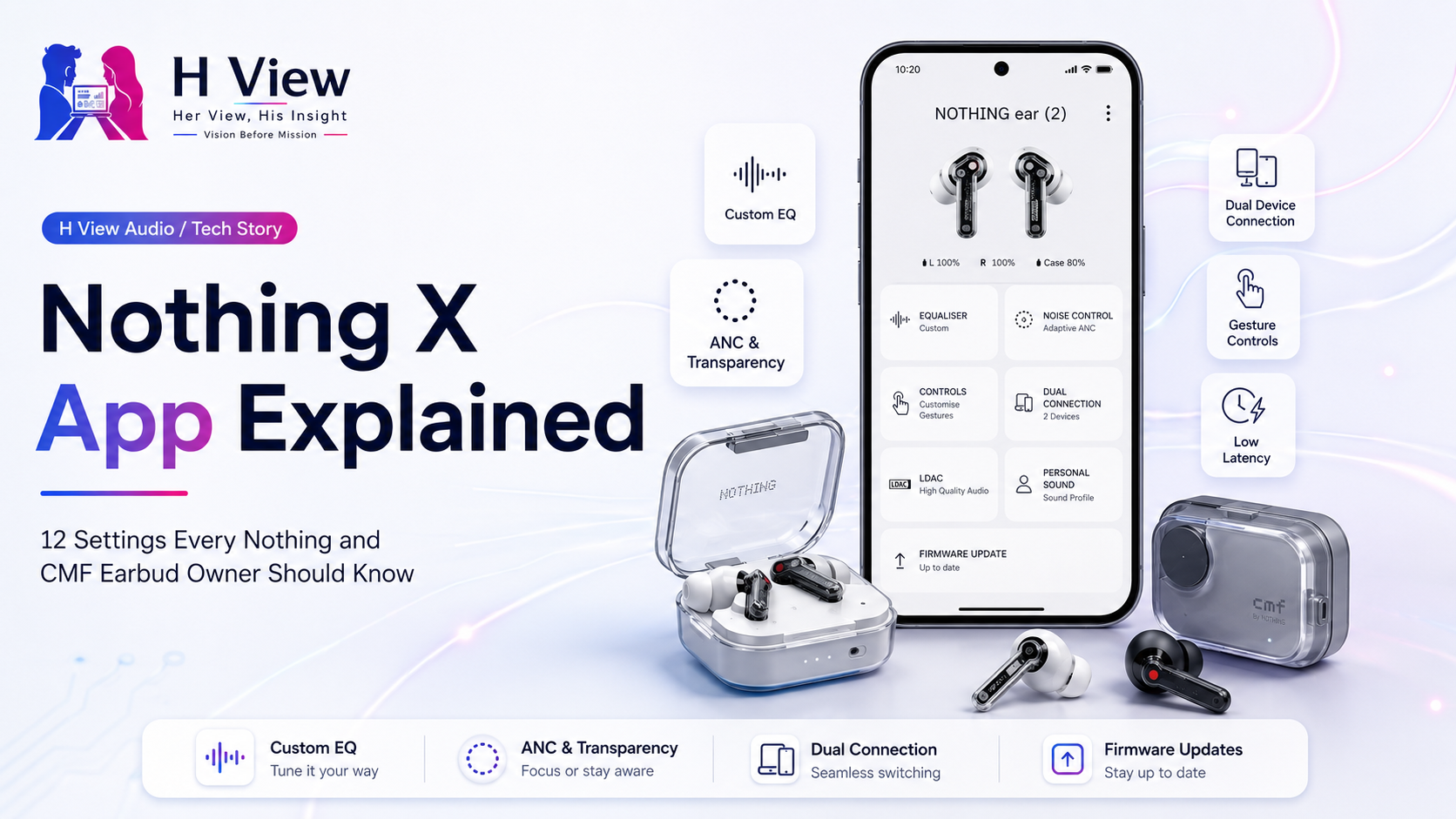
Nothing X App Explained: 12 Settings Every Nothing and CMF Earbud Owner Should Know

☆☆☆☆☆No reader ratings yet
By HarikaUpdated August 20, 202612 min read7 views

Buying a good pair of Nothing or CMF earbuds is only half the experience. The hardware determines the driver, microphones, battery and physical controls, but many of the features that actually change how the earbuds behave are hidden inside the Nothing X app.

That matters more now than it did a few years ago. Nothing X is no longer simply an app for checking battery percentage or downloading firmware. Depending on the product connected, it can control equalisation, noise cancellation, gestures, dual-device connections, personalised sound, high-resolution codecs, low-latency modes and even AI-related functions. Nothing also updates the app independently of Nothing OS, so a feature can appear through a Play Store update without your phone receiving a major operating-system update at all.

The confusing part is that every Nothing and CMF audio product does not receive exactly the same menu. Ear (3a), Ear, CMF Buds Pro 2, Headphone (1) and other models expose different settings according to their hardware. That is why opening Nothing X and assuming the defaults are already optimal can mean missing some of the most useful capabilities you paid for.

Here are the settings we think owners should actually spend time understanding.

Start With the Sound Settings Most People Never Properly Tune

The most obvious place to begin is the equaliser, but it is also one of the areas people tend to overcomplicate.

1. Try the EQ presets before creating your own profile

Nothing X includes preset sound profiles on supported audio products, typically choices such as Balanced, More Bass, More Treble and Voice. Newer devices can offer additional presets, and Ear (3a), for example, provides four preset EQ options alongside a fully adjustable eight-band equaliser.

The temptation is to immediately move every frequency slider because custom EQ sounds more “advanced.” In practice, listening to the presets for a few days first gives you a much better idea of what you actually want to change.

If vocals feel buried, More Treble or Voice may tell you whether additional upper-frequency presence helps. If music sounds thin during commuting, More Bass may be enough without building an aggressive custom curve.

For many users, one of the presets is already close enough.

2. Advanced EQ can completely change how Nothing earbuds sound

Owners of supported models should spend time in Equaliser → Advanced.

Nothing’s official instructions for Nothing Ear allow users to adjust frequency, Q factor and gain, which gives considerably more control than an ordinary bass-and-treble slider. Once created, the profile can even be shared through a QR code.

This is one of the strongest features in Nothing’s audio ecosystem because it lets enthusiasts tune the earbuds without forcing casual users to understand audio engineering.

The important thing is restraint. Boosting every frequency does not improve sound. A small reduction can sometimes be more effective than a large boost.

For example, someone who finds vocals slightly distant may make a modest midrange adjustment rather than increasing the entire upper half of the spectrum. Someone listening to bass-heavy electronic music might prefer a controlled low-end increase without making vocals muddy.

Nothing X gives you enough control to make those differences audible.

3. Share and import EQ profiles instead of starting from zero

The QR sharing system is easy to overlook.

Nothing allows supported custom EQ profiles to be shared through a QR code. Ear (3a) also officially supports sharing its custom sound profile directly from Nothing X.

That turns equalisation into something community-driven. If another user has spent hours creating a profile for rock, podcasts or a particular Nothing model, you may be able to try their tuning instead of recreating everything yourself.

We would still treat shared profiles as starting points rather than universal upgrades. Ear shape, hearing sensitivity and music preference differ too much for one “best Nothing EQ” to work for everyone.

Noise Control Is More Flexible Than Simply ANC On or Off

Active Noise Cancellation is another setting many people leave untouched after the first day.

4. Use Adaptive ANC when your environment keeps changing

On supported models, Nothing X can offer multiple ANC strengths alongside Adaptive mode.

For example, Nothing’s current support information for Headphone (1) lists High, Mid, Low and Adaptive options, while other supported products offer similar environmental adjustment. Adaptive ANC automatically changes cancellation according to surrounding noise.

That is useful during a normal working day because your environment is rarely constant. A quiet office does not require the same cancellation as a bus ride. Running maximum ANC all day can also feel unnecessary for some listeners.

If you move frequently between indoors and outdoors, Adaptive is the setting we would try first.

5. Transparency mode can be more practical than removing an earbud

Nothing X also allows supported products to switch between Noise Cancellation, Transparency and normal listening modes.

Transparency is easy to dismiss as something useful only when crossing roads, but it can be valuable at work. If someone approaches your desk, you can hear them without taking an earbud out and then forgetting where you placed it.

It is also useful in airports and railway stations where announcements matter.

The H View preference here is simple: ANC for environments you actively want to block, Transparency when awareness matters, and normal mode when neither is necessary.

The Controls Can Be Much Better Than Their Default Behaviour

The physical earbuds rarely arrive configured exactly the way every owner wants.

6. Remap gestures around what you actually use

Nothing X lets supported earbuds assign functions such as play/pause, next track, previous track, volume adjustment, noise-control switching and voice-assistant activation to available gestures. Nothing Ear, for example, lets users configure left and right controls separately.

This sounds minor until you realise how often you touch the earbuds.

If you adjust volume more frequently than you call a voice assistant, giving a gesture to volume makes more sense. Someone who constantly switches between ANC and Transparency may prioritise that instead.

CMF Buds Pro 2 goes further because its case Smart Dial can be configured for volume, playback, noise cancellation, calls, microphone mute and even Low Lag Mode.

Leaving every control at factory settings means adapting yourself to the earbuds instead of adapting the earbuds to you.

7. Enable wear detection when your model supports it

Wear detection can automatically pause audio when the headphones are removed and resume playback when they are put back on.

Nothing’s Headphone (1), for example, ships with this feature disabled by default and requires Nothing X to enable it.

This is precisely the sort of hidden setting people miss because they assume something so basic would already be active.

It is especially useful for desk work. Remove the headphones when someone speaks to you, and the podcast pauses automatically instead of continuing for another two minutes while you are distracted.

Connection Settings Can Make Daily Use Much Easier

The biggest convenience improvement for someone using both a laptop and phone may have nothing to do with sound quality.

8. Turn on Dual Connection if you regularly use two devices

Supported Nothing and CMF products can stay connected to two devices simultaneously.

On CMF Buds Pro 2, Nothing documents how calls and music are prioritised when Dual Connection is active. A call on the second device can temporarily take control before audio returns to the original device once the call finishes.

Picture someone working on a Windows laptop while keeping a Nothing Phone beside them. Music plays from the laptop, a phone call arrives, the earbuds switch over, and after the conversation the user returns to work without opening Bluetooth settings.

That is far more useful in daily life than many headline audio specifications.

Dual Connection can occasionally introduce a small delay while switching audio channels on certain devices, and Nothing acknowledges that Bluetooth compatibility can affect handover behaviour.

If you only ever use one device, leave it off. If you regularly move between two, it can become essential.

9. Low Lag Mode matters more for gaming than ordinary music

Some CMF products expose Low Lag Mode through Nothing X, and CMF Buds Pro 2 even allows it to be assigned to the Smart Dial.

The purpose is to reduce the delay between something happening on screen and the corresponding sound reaching your ears.

For Spotify, that difference is irrelevant. For a competitive mobile game, it can affect whether a gunshot or footstep feels synchronised with the action.

We would not leave latency modes enabled automatically unless needed, because specialised modes can introduce their own battery or connectivity trade-offs depending on the device.

Use them for gaming, then return to the normal mode for everyday listening.

Nothing X Can Improve the Audio Signal Before It Reaches Your Ears

Some options only become useful when the connected phone and earphones both support them.

10. Enable LDAC when sound quality matters more than maximum stability

Supported Nothing products can use LDAC, a higher-bitrate Bluetooth codec. Nothing describes LDAC support at up to 990 kbps with 96kHz/24-bit capability when both the phone and headphones support it.

It can be worth enabling if you listen to high-quality source material in relatively quiet conditions.

But this is another setting where context matters more than specifications.

If you are streaming ordinary compressed audio in a noisy railway station, the difference may be difficult to appreciate. Higher-bitrate codecs can also be more demanding on the Bluetooth connection.

For critical listening at home, try LDAC. For maximum stability in crowded wireless environments, the standard codec may sometimes be the better practical choice.

11. Run Personal Sound Profile instead of assuming both ears hear identically

Supported Nothing earbuds include a Personalised Sound Profile process inside Nothing X.

Nothing’s setup instructions place it under Device Settings, where the app guides the user through a hearing-based calibration.

This is more interesting than a conventional EQ because it is trying to adapt playback to the listener rather than asking the listener to manually guess which frequencies need adjustment.

Human hearing is not perfectly symmetrical. Age, exposure to loud environments and simple biological variation can make sensitivity different between ears.

The resulting profile will not suit everyone, and some people may still prefer the unmodified tuning. But owners of a supported model should at least run the test once. You can always turn it off afterward.

The Most Boring Setting May Be the One That Saves You Trouble

The last feature is not exciting until something goes wrong.

12. Check firmware updates and Find My Earbud

Nothing X is also the management hub for firmware updates. Nothing’s support documentation identifies firmware updating, ANC control, EQ adjustment and Find My Earbud among the app’s core functions.

Firmware matters because audio products continue changing after launch. Stability fixes, connection improvements and feature adjustments may arrive through firmware rather than through Nothing OS.

The same applies to Nothing X itself. Nothing explicitly says app-based updates such as Nothing X can be delivered separately from major OS releases through Google Play.

That means someone waiting for “Nothing OS 5.0” before expecting anything new in their earbuds may be looking in the wrong place.

Turn on automatic app updates or occasionally check Nothing X manually.

Find My Earbud is equally simple. If an earbud disappears somewhere in your room, triggering the supported locating function is far easier than crawling under furniture while playing music at maximum volume.

One Important Warning: Your Nothing X Screen May Look Different

Nothing X now manages a growing range of products, and the menu changes according to what you connect.

A CMF Buds Pro 2 owner can see Smart Dial options that obviously do not exist on a standard pair of Nothing Ear. Headphone (1) exposes wear detection and headphone-specific controls. Ear (3a) includes its newer eight-band EQ and AI-related capabilities.

Nothing redesigned the X app in 2025 and said it intended to provide more frequent feature updates throughout the year.

So when you see a Nothing X tutorial online, check both the date and the product being demonstrated before assuming your screen should be identical.

Her View

What I like about Nothing X is that most of its useful features do not demand attention every day. You can spend a few minutes setting the earbuds up properly, then allow those preferences to disappear into normal use.

Gesture customisation and Dual Connection are good examples. Neither sounds exciting enough to influence a purchase, but both can remove small annoyances repeatedly. Having music pause automatically when headphones come off or switching from a laptop to an incoming phone call without opening Bluetooth settings is the kind of convenience you notice most when it stops working.

The only risk is that Nothing keeps adding useful options without making owners aware that they exist. A person may use their earbuds for a year without realising that a feature they wanted was sitting in Nothing X the entire time.

His Insight

The Nothing X app also changes how we should evaluate audio hardware.

Two products with similar drivers and microphones can offer very different long-term experiences depending on how much control the companion software provides. Nothing has increasingly treated EQ, firmware, device switching and custom controls as part of the product rather than optional extras.

That makes continued app support important. The official Nothing OS roadmap confirms that Nothing X updates can arrive independently through the Play Store, which allows Nothing to improve the audio ecosystem without waiting for a major Android release.

The trade-off is fragmentation. Not every device supports Advanced EQ, Personal Sound, Smart Dial, LDAC or Adaptive ANC. Nothing needs to keep making model-specific compatibility clearer so users know whether a missing toggle is a bug or simply unsupported hardware.

The H View Take

Nothing X is easy to underestimate because it looks like a companion app. In reality, it has become part of the product.

For most owners, we would begin with four changes: choose an EQ that genuinely suits your music, customise the controls, enable Dual Connection if you use two devices, and check whether your earbuds have firmware waiting. After that, explore features such as Personal Sound, LDAC, Adaptive ANC or Low Lag Mode only when they match the way you actually use the earbuds.

There is no benefit in turning every advanced feature on simply because it exists.

The better approach is to make Nothing X disappear into your routine. Spend ten minutes configuring it properly, and your earbuds should require less thought afterward.

That, more than any hidden menu, is what good companion software should accomplish.

Frequently Asked Questions

Is Nothing X only for Nothing earbuds?

No. Nothing X supports compatible Nothing and CMF smart audio products, and the newer app has expanded into broader device management. Available controls depend on the hardware connected.

Is Nothing X available on iPhone?

Yes. Nothing officially provides Nothing X through both Google Play and Apple’s App Store. Its support documentation lists Android and iOS compatibility.

Can I change the EQ in Nothing X?

Yes, on supported audio products. Some models provide presets and custom EQ, while selected Nothing products also provide Advanced EQ with frequency, Q factor and gain controls.

Does Nothing X support connecting earbuds to two devices?

Supported models offer Dual Connection. The exact behaviour and connection priority differ by product, so check the device-specific menu and support documentation.

Why can’t I see a setting mentioned in this guide?

Nothing X adapts its available controls to the connected product. Hardware features such as Smart Dial, LDAC, Personal Sound or particular ANC modes are not available on every Nothing or CMF model.

Do I need a Nothing OS update to receive new Nothing X features?

Not necessarily. Nothing says apps including Nothing X can receive new features, improvements and fixes through Google Play independently of major Nothing OS releases.

Written by

Harika

Harika is the co-founder of H View and covers AI, technology, gadgets, digital tools, online platforms, and modern internet trends. Her articles focus on simplifying complex topics with practical explanations, balanced opinions, and reader-first insights.

Topics coveredAIAutoBusinessCyber SafetyDigital MarketingGuidesH ViewHistoryLifestyleMoneyReviewsTechAudioGadgetsWordpress
View all posts by author

Submit Your View

Share your real experience and help other readers decide better.

🔒 Your review may be published after moderation.

Reader Reviews

No community views yet. Be the first to share yours.

8.0Excellent

H View Score

A quick view of our final rating for this review.

✉

Stay Updated with H View

Get the latest reviews and insights straight to your inbox.

🔒 No spam. Unsubscribe anytime.

Trending Reviews

The Art of Saying “NO”: Reclaiming Your Time, Energy, and PeaceAugust 20, 2026Keyword Research for Beginners: How to Find What People Actually Search on GoogleAugust 20, 2026What Does “Savings” Actually Mean? Cash, Bank Balance, FD, RD, Gold, Insurance and Investments ExplainedAugust 20, 2026Companies Replaced Workers With AI. Why Are Some Hiring People Back?August 20, 2026Am I in a Toxic Relationship? 10 Signs You Shouldn’t IgnoreAugust 20, 2026How to Get Your Website Mentioned in ChatGPT, Gemini and Google AI SearchAugust 19, 2026Why the Middle Class Is Spending More and Saving LessAugust 19, 2026Nothing Playground Explained: Can Anyone Build Their Own Nothing OS Tools?August 19, 2026

Related Blogs

Audio

Nothing Ear (3a) Explained: Audio Snapshot, Call Recording and Everything New

Wireless earbuds have become predictable. Most brands compete through better Active Noise Cancellation (ANC), stronger…

Harika August 8, 2026
H View

Honest reviews. Smart ratings. Real insights.

Explore

HomeReviewsBlog

Company

AboutAdvertiseContact

Support

Privacy PolicyTerms & ConditionsDisclaimerEditorial Policy

Subscribe to H View

Get the latest updates and exclusive content straight to your inbox.

🔒 No spam. Unsubscribe anytime.
© 2026 H View. All rights reserved.
HomeReviewsBlogContact