
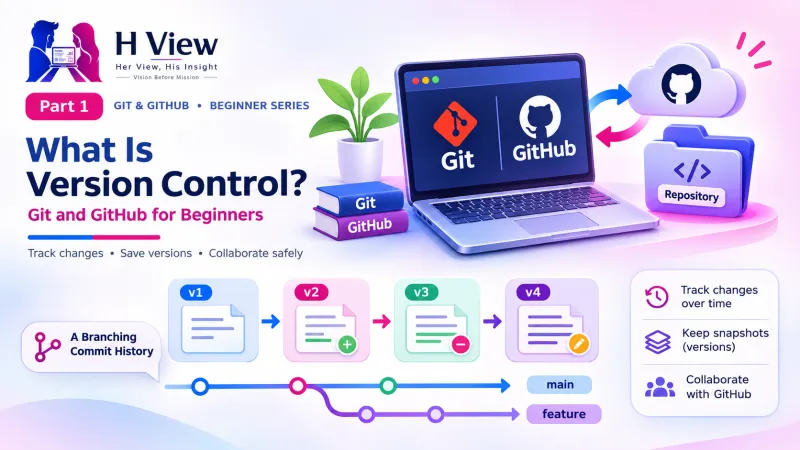
What Is Version Control? Git and GitHub for Beginners (Part 1)
What version control is, how snapshots and commits work, and why Git matters even if you build websites alone. Part 1 of our visual Git and GitHub series for beginners.
Version control is a system that saves snapshots of your project over time, so you can see exactly what changed, go back to any earlier version, and work with other people without overwriting each other's work. Git is the most popular version control tool in the world, and GitHub is a website where you keep and share Git projects online.
Let us begin with a story you may recognise. Sneha, a commerce graduate from Guntur, started building websites for local shops last year. She learned from YouTube and uses AI tools to write most of her code. One Friday night, the bakery website she had built for her uncle was working perfectly. She asked an AI tool to "make the menu look more modern". It changed four files. The menu looked lovely, but the order form stopped working, and Ctrl+Z could not bring it back. She spent the whole weekend rebuilding something that had worked on Friday.
If that sounds familiar, this series is for you. This is Part 1 of our 20-part Git and GitHub for Beginners series. Today there are no commands and nothing to install, just the big idea, explained with pictures, so that what happened to Sneha never happens to you.
Your one-minute summary
- Version control = saved snapshots of your project on a timeline
- Every snapshot records what changed, when, who changed it and why
- It lets you undo anything, compare versions, experiment safely and work in a team
- Git is the tool on your computer; GitHub is a website that stores Git projects online
- In Stack Overflow's 2022 survey, 93.87% of developers said they use Git
- It helps even if you work alone, and especially if you code with AI
What problem does version control solve?
It replaces the "copy and rename" habit that almost everyone starts with. Without version control, people keep old versions by duplicating files. After a few weeks the project folder is full of names like index_old.html, index_final.html, index_final_v2.html and index_final_FINAL_use_this.html. Nobody remembers which one works, what changed between them, or why.
Sneha's project folder, before she learned Git
Five copies, zero confidence. If you have ever saved "working-version-dont-touch.zip", you were already doing version control by hand.
Copying files has four big problems. You cannot tell what changed without reading two files line by line. A file name says nothing about why it changed. Copying a whole website folder each time is slow and wasteful. And when two people edit the same file, one person's work usually gets lost.
The same project, two ways
Without version control
- Folders full of "final_v2_REAL" copies
- No idea what changed or why
- Emailing files to teammates, work gets overwritten
- A broken laptop can mean lost code
With version control
- One clean folder, with a hidden history
- Every change labelled with a short message
- Teammates' work combined safely
- An online copy on GitHub as a backup
How does version control work?
It works by taking snapshots. Whenever you reach a point worth remembering, such as "the navbar works" or "fixed the contact form", you tell the system to save a snapshot of your whole project, together with a short message describing it. In Git, a snapshot is called a commit. Lined up in order, your commits form a timeline of the project's life.
Sneha's week, if she had used Git
Each entry is a saved snapshot she could return to at any moment.
| In a video game | In Git |
|---|---|
| Save point | Commit (snapshot) |
| Save file name, like "Before the dragon" | Commit message, like "Before redesigning header" |
| Loading an old save | Going back to an earlier commit |
| Trying a side quest on a separate save slot | Experimenting on a branch (Part 12) |
One important difference from Google Docs: version control does not save every second. You decide when to take a snapshot. That is a feature, not a flaw, because each commit marks a meaningful step instead of half-typed code.
 Also readWordPress Says Your PHP Version Is Outdated: What Should You Do?→
What does version control give you?
Going back in time is only one of its powers. Here is the full picture in one mind map. If you can redraw it from memory, you understand why developers rely on it.
Version control mind map
What is a "diff"?
A diff is the difference between two versions of a file, shown line by line. Instead of comparing two files by eye, version control highlights exactly which lines were removed and which were added. On GitHub, removed lines appear in red with a minus sign and added lines appear in green with a plus sign. Here is the diff that would have saved Sneha's weekend:
| Line | Change | Code in order.html |
|---|---|---|
| 18 | − removed | <form action="send-order.php" method="post"> |
| 18 | + added | <form class="modern-form"> |
One glance tells you the AI quietly removed the part that sends the order. Put it back, and the form works again. You will produce diffs like this yourself in Part 8.
What is the difference between centralised and distributed version control?
In a centralised system, the history lives on one central server. In a distributed system, every computer keeps a complete copy of the history. Git is distributed, which is a big reason it is fast and works offline.
Two ways to keep history
Centralised (for example, Subversion)
- One server holds the history
- You need a connection to save history
- If the server fails, history can be lost
Distributed (Git)
- Every computer has the full history
- Commit offline, sync later
- Any copy can restore everything
GitHub acts as a shared meeting point for distributed Git projects, but your laptop still holds the whole history.
Why is Git the most popular version control tool?
Git is free, fast, distributed, and supported by nearly every coding tool and hosting service. It was created by Linus Torvalds, the creator of Linux, after the Linux kernel project lost free use of the commercial tool BitKeeper in 2005. According to the history of Git, development began on 3 April 2005, and within days Git was managing its own code.
Git by the numbers
Source: Stack Overflow Developer Survey 2022, the latest Stack Overflow survey to ask about version control.
That 17% figure matters. Stack Overflow called it surprising that so many learners skip version control. Sneha was one of them. If you are a beginner reading this, you are about to join the 93%.
Do I need version control if I work alone?
Yes, and solo builders often benefit the most. Here is why:
- You use AI coding tools. An AI assistant can change five files at once. If the site breaks, one step takes you back to the last working commit. We cover this in Part 20.
- You return to old projects. Six months later, your commit messages remind you what you did and why.
- You want work or clients. Public projects on GitHub act as a living portfolio.
- You want a free website. GitHub Pages can publish a site straight from your project (Part 18).
What does a normal day with version control look like?
It is a simple loop you repeat whenever you finish a small piece of work. Do not worry about the Git words yet; each step gets its own article.
The everyday version control loop
Professional developers run this loop many times a day. Soon you will too.
Your 20-part learning path
We will follow Sneha through the whole series as she turns her uncle's bakery site into a properly managed project.
Her View
Many people who build their first website with AI tools feel quietly afraid of breaking it. That fear makes them stop experimenting, and experimenting is how we learn. Version control removes that fear. When you know you can always go back, you try the bold layout, the new feature, the idea you were unsure about. It is less a technical tool and more a confidence tool, and everyone deserves that confidence from day one.
 Also readBest WordPress Hosting for Beginners in India→
His Insight
Treat commits like a logbook. Small, frequent commits with clear messages, such as "Fix mobile menu overlap", are far more useful than one giant commit at the end of the day. When something breaks, small commits narrow the search to a few lines. And because Git is distributed, your laptop holds the complete history, so pushing to GitHub regularly gives you a free off-site backup.
H View Verdict
Version control is the single most useful habit a new web builder can pick up. It turns "I hope this works" into "I can always go back". Learn the idea first, which you just did, and the commands will feel natural. Next, we clear up the most common beginner confusion: Git versus GitHub.
Self-assessment: test yourself
Ready? Tap an option for each question. You will see right away whether you got it, with a short explanation, and your score at the end. Take your time, and try again as often as you like.
Version control quiz: 10 questions
1. What does Git call a saved snapshot of your project?
- A backup
- A commit
- A branch
- A diff
A commit is a snapshot with a message. A branch is a separate line of work, and a diff shows changes between versions.
2. In a diff on GitHub, green lines with a plus sign are
- Errors
- Removed lines
- Added lines
- Comments
Green with a plus means added. Red with a minus means removed.
3. Git is which type of version control system?
- Centralised
- Distributed
- Cloud-only
- Automatic
Git is distributed: every computer keeps the complete history.
4. Who created Git, and when?
- GitHub, in 2008
- Linus Torvalds, in 2005
- Microsoft, in 2018
- Google, in 2010
Linus Torvalds began building Git in April 2005 for Linux kernel development.
5. In Stack Overflow's 2022 survey, what share of developers used Git?
- About 50%
- About 70%
- About 94%
- 100%
93.87% of respondents to the version control question said they use Git.
6. What is the biggest problem with keeping versions as "index_final_v2.html" copies?
- The files are too small
- You cannot easily tell what changed, when or why
- Browsers cannot open them
- They are illegal
Copies carry no record of what changed or why, and they quickly become confusing.
7. In the video game analogy, a commit message is like
- The game controller
- The name of a save file
- The final boss
- The game's price
Like a save-file name, the message tells you what that snapshot contains.
8. Does Git save your work automatically every few seconds?
- Yes, like Google Docs
- No, you decide when to commit
- Only on GitHub
- Only for HTML files
You choose meaningful moments to commit, which keeps history clean.
9. Which statement about GitHub is true?
- It is the same thing as Git
- It is a website that stores and shares Git projects
- It replaces the need for Git
- It only works offline
Git is the tool; GitHub is an online home for Git projects. Part 2 explains more.
10. Sneha's AI tool broke a working form. With Git, what could she have done?
- Rebuild it from memory
- Buy a new laptop
- Return to Wednesday's working commit or compare the versions
- Delete the website
Every commit is a safe point; a diff shows exactly what the AI changed.
Frequently asked questions
What is version control in simple words?
It is a way of saving snapshots of your project over time, so you can see what changed, go back to an earlier version, and work with others safely.
Is Git the same as GitHub?
No. Git is the version control tool that runs on your computer. GitHub is a website that stores Git projects online and adds collaboration features. Part 2 of this series explains the difference in detail.
Is Git free?
Yes. Git is free and open source, released under the GPL-2.0 licence, and runs on Windows, macOS and Linux.
Do I need to know coding to learn version control?
Very little. If you can create and edit files for a website, you can learn Git. This series starts with ideas and pictures before any commands.
H View stories follow our editorial policy. Spotted an error? Tell us and we will correct it.
Rate this article
One tap is enough. No comment needed.
Was this article helpful?
Your answer goes straight to our editors.







Comments0
No comments yet. Start the conversation.