
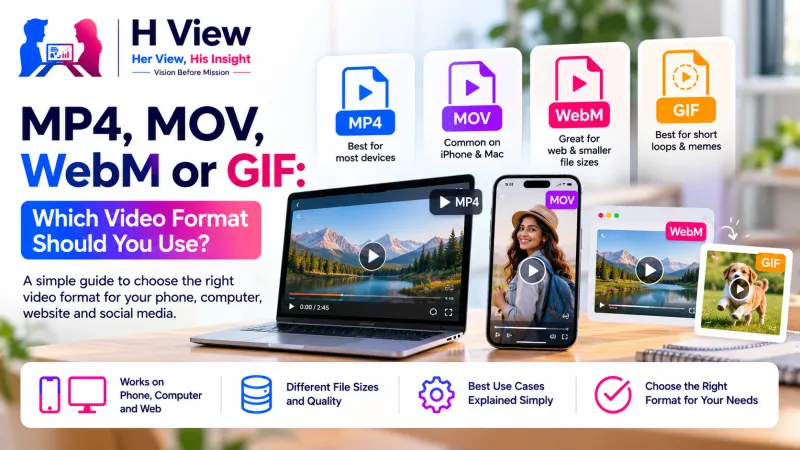
MP4, MOV, WebM or GIF: Which Video Format Should You Use?
Why some videos won't play on a laptop, upload to a portal or embed on a website: it's usually the format. A plain guide to MP4, MOV, WebM and GIF, and which video format to choose for WhatsApp, iPhone, websites and short loops.
MP4 (with H.264 video and AAC audio) is the safest video format for almost everything: WhatsApp, social media, portals and every phone or laptop. Use MOV mainly inside Apple apps, WebM for embedding on websites, and GIF only for short silent loops. If a video won't play, convert a copy with the free H View Video Converter.
“The video isn't opening.” It's one of the most common messages in any family or office group. Usually the video is fine; the format just doesn't suit the device or app trying to play it. Knowing four formats and when to use each solves most of these problems.
Container vs Codec: Why Do Two MP4s Behave Differently?
A video file has a container (MP4, MOV, WebM, MKV) that holds the streams, and codecs (H.264, HEVC, VP8, AAC) that compress the video and audio inside. A device needs to understand both. That's why an iPhone's HEVC video in a MOV file may not play on an older laptop, while an MP4 with H.264 almost always does. MDN's video codec guide describes AVC (H.264) as part of the MPEG-4 family used across devices.
Which Video Format Should I Use?
| Format | Best for | Watch out for |
|---|---|---|
| MP4 | Sharing anywhere, uploads, WhatsApp, YouTube, portals | Very little; it's the universal choice |
| MOV | iPhone recordings and Apple editing apps | Some Windows apps and portals reject it |
| WebM | Embedding on websites | Not accepted everywhere; slower to create in a browser |
| GIF | Short reactions, product demos, how-to steps | No sound; large files if long or wide |
| MKV, AVI | Recordings from some cameras and screen recorders | Often won't upload; convert to MP4 |
 Also readHow to Convert MOV to MP4 and Make a GIF from a Video, Free→
How Do I Fix a Video That Won't Play or Upload?
- Open the Video Converter and add the file.
- Choose MP4.
- Convert and download; the MP4 plays on Android, iPhone, Windows, Mac and every social app.
- If it's also too big, run it through the Video Compressor at 720p.
All of this runs on FFmpeg inside your browser, so your videos are never uploaded.
When Does a GIF Make Sense?
For a three-to-five second loop: a product rotating, a button being tapped, a reaction. Keep it under 10 seconds and around 480 pixels wide. For anything longer, a short MP4 is smaller and better quality; most platforms autoplay short MP4s without sound anyway. Our guide on converting MOV to MP4 and making GIFs has the settings.
Her View
The person who fixes “the video isn't opening” in a family is rarely thanked and often stressed. A single simple rule, convert to MP4, turns that from an evening of searching into a one-minute task, and nobody has to send precious videos to unknown websites to do it.
 Also readJPG, PNG or WebP: Which Image Format Should You Use, and When?→
His Insight
Compatibility beats efficiency for sharing. Newer codecs like HEVC are more efficient, which is why phones use them, but the moment a video leaves your phone, the widest compatibility wins. Keep originals in whatever your phone records; share MP4 copies.
H View Verdict
MP4 for sharing, MOV for Apple editing, WebM for websites and GIF for tiny loops. When in doubt, convert a copy to MP4, and keep the original. Free, private and watermark-free in your browser.
Frequently Asked Questions
What is the best video format for WhatsApp?
MP4 with H.264 video and AAC audio, ideally compressed to 720p for quick sending.
Why won't my iPhone video play on Windows?
It may be a MOV file with HEVC video. Convert it to MP4 and it will play almost everywhere.
Is WebM better than MP4?
WebM is efficient for websites, but MP4 is far more widely supported for sharing and uploads.
Do GIFs have sound?
No. Use a short MP4 if you need sound.
H View stories follow our editorial policy. Spotted an error? Tell us and we will correct it.
Rate this article
One tap is enough. No comment needed.
Was this article helpful?
Your answer goes straight to our editors.






Comments0
No comments yet. Start the conversation.