
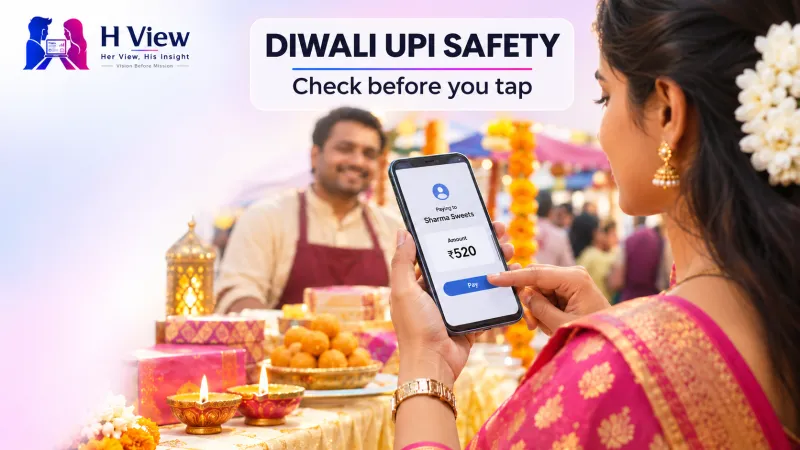
Diwali UPI Safety: How to Spot Payment Scams Before You Tap
A practical Diwali guide to UPI safety: how to check QR codes, spot fake festive offers, protect your PIN and report a fraudulent payment quickly.
Diwali payments are convenient—but a rushed tap can be costly
Diwali shopping often means more QR codes, delivery messages, cashback offers and quick transfers than usual. That makes a simple rule especially useful: a UPI PIN authorises money leaving your account; it is not needed to receive money. Before paying, pause long enough to read the name on the payment screen, confirm the amount and ask whether you initiated the transaction. If a message creates urgency, asks for an OTP or PIN, or tells you to install a screen-sharing app, stop and verify through the official app or number.
This is not a reason to avoid digital payments. UPI remains useful for small purchases, gifts and bills. The aim is to make the routine safer during a busy week, when shoppers may be distracted by crowds, notifications and limited-time offers. A scammer does not need a sophisticated technical trick if they can persuade someone to approve the wrong request.
What should you check before scanning a QR code?
Look at the payment screen before entering your PIN. A QR code generally contains the recipient’s payment information. It does not itself prove that the person or shop is genuine. Confirm the displayed name with the shopkeeper or recipient, especially when a printed code is taped over another code, a seller sends a code through chat, or a donation box appears in an unexpected place. For a shop purchase, the amount should match what you agreed to pay. If a screen unexpectedly says “collect,” “approve,” or shows a request from a person you do not recognise, cancel it.
The National Payments Corporation of India warns that scanning a QR code and entering a UPI PIN are part of making a payment; they are not steps for receiving money. Be cautious of anyone who says they must “send” you a refund, prize, subsidy or cashback and then asks you to scan a code or type your PIN. A genuine incoming transfer does not require you to disclose your PIN or OTP.
A quick check at the counter
- Read the payee name shown in your UPI app, not just the shop sign or QR sticker.
- Check the amount before approving. Do not rely on a seller saying, “It is the same as last time.”
- Use your own trusted payment app, opened from your phone. Avoid links sent by strangers to “complete” a payment.
- Wait for the success confirmation in your app. A screenshot from the other person is not proof that your account was credited.
- If the recipient name is different from the business name, ask why before paying.
 Also readDigital Arrest and Online Payment Scams: How to Protect Your Money Without Living in Fear→
How do fake Diwali offers try to catch shoppers?
Seasonal fraud often borrows the language of legitimate sales: “last few minutes,” “exclusive festival reward,” “delivery held,” or “refund expires today.” The offer may arrive by SMS, WhatsApp, social media, email or a search advertisement. It can imitate a known retailer while using a misspelled web address or a lookalike account. Its purpose is to move you away from a verified app or website and into a form that collects credentials, card details or an OTP.
Do not follow a payment or refund link just because the message contains a logo, order number or your first name. Open the retailer’s official app yourself, or type the known website address. If the message claims your parcel is delayed, check the order inside the account where you placed it. A random “delivery fee” link can be a credential-theft page. If an offer seems unusually generous, compare it with the price displayed on the retailer’s official channel and check whether the seller and return policy are clearly identified.
Another common pressure tactic is a caller claiming to be from a bank, payment company, police unit or customer-support desk. A caller may say an account will be blocked unless you share a code, install an app or move money to a “safe” account. End the call and contact the institution through the number on its official website, card or app. Do not search for a support number and trust the first sponsored result without checking that it belongs to the institution.
Why should you protect your OTP, PIN and screen?
Your UPI PIN, banking password and one-time password are private authorisation details. A legitimate support agent does not need you to read those secrets aloud to process a refund. Never share them in a call, message or screen-share session. A scammer may ask you to install remote-access or screen-sharing software under the pretext of troubleshooting. Once access is granted, they can see codes or guide you into approving a transfer. Do not install an app at a stranger’s instruction.
Use a unique phone lock code and keep your payment app and operating system updated through their official stores. Enable transaction alerts. Set a practical UPI limit if your bank or app offers one, and keep only the balance you need in an account used for daily spending. These steps do not prevent every fraud, but they can limit exposure and help you spot activity quickly. If you lend your phone to a child or relative while shopping, do not leave a payment app open and unattended.
Be careful with public Wi-Fi and borrowed devices when signing in to a bank account. A crowded festive setting can also make it easy for someone nearby to watch you enter a PIN. Shield the screen and use your own device. If your phone is lost, contact your mobile operator and bank promptly using verified channels, and block access according to their instructions.
What should you do if a payment looks wrong?
First, do not make another transfer to “reverse” the first one. Save the transaction ID, date, amount, recipient details, messages, call logs and any website address. Contact your bank or payment app using the official support route and report the transaction immediately. If money has been lost to online financial fraud in India, call the national cybercrime helpline at 1930 as soon as possible and file a report at the government’s National Cyber Crime Reporting Portal. The portal says prompt reporting matters; quick action can help the relevant institutions attempt to trace or hold funds, though recovery is not guaranteed.
Do not delete messages or reset the phone before preserving evidence. If you entered a password or PIN on a suspicious page, contact the bank through a verified number, change credentials from a trusted device and follow the bank’s advice about freezing or securing the account. If the scam involved a fake call or message rather than a completed payment, the Department of Telecommunications’ Chakshu facility is intended for reporting suspected fraudulent communications. Use official government portals rather than links supplied by the suspicious sender.
Can families make festive payments safer together?
Yes. Agree on a short family rule before going shopping: nobody shares an OTP or PIN, nobody approves a request to receive money, and nobody acts on an urgent link without checking it independently. Older relatives may be targeted with fake bank calls; younger shoppers may see fake social-media giveaways or influencer promotions. A quick conversation is more useful than simply telling someone to “be careful.” Show them how to confirm the payee name and where the transaction history is located in their own app.
For group purchases, decide who pays and how everyone will confirm the amount. Avoid sending money to a new account because a chat message says the old QR code is broken. Call the person using a saved number if the payment details change. For donations, use a recognised organisation’s official website or a verified collection point, and ask for a receipt. For online shopping, keep the order confirmation and pay through the retailer’s official checkout.
What are the warning signs worth remembering?
Pause if someone asks you to share a PIN or OTP, scan a QR code to receive funds, install remote-access software, transfer money to a “safe” account, or act before you can verify the request. The NPCI’s fraud-awareness guidance covers common UPI risks, while the government’s CyberDost awareness campaign includes phishing and digital-payment fraud. Keep those lessons practical: verify the recipient, use a trusted app, and stop when a request feels rushed or unusual.
 Also readIndependence Day Scam Alert 2026: Fake Greetings, Gift Links and Offers You Should Never Click→
Her View
Festival spending often happens while someone is juggling shopping lists, family calls and travel plans. That is exactly when a polite but hurried request can slip past. A small pause before authorising a payment protects more than a bank balance: it gives people room to ask a question without feeling embarrassed. Families should make it normal to double-check a payee, especially when the person paying is older, new to digital wallets or using a shared phone.
His Insight
Payment safety is a habit, not a special technical skill. Read the screen, keep your PIN private and verify support contacts independently. If an offer depends on secrecy or immediate action, treat that pressure itself as a warning sign. A genuine retailer or bank can withstand a minute spent checking its official app.
H View Verdict
Enjoy the convenience of UPI this Diwali, but treat every authorisation as a decision. Confirm who receives the money, never use your PIN to “receive” a payment and report suspected financial fraud quickly through 1930 and the official cybercrime portal. The best festive deal is the one that does not ask you to surrender control of your account.
Frequently asked questions
Do I need a UPI PIN to receive money?
No. A UPI PIN authorises a payment from your account. Do not enter it to accept a refund, prize or incoming transfer.
What is the first thing to do after a fraudulent transfer?
Contact your bank or payment app through an official support channel and call 1930 promptly. Preserve transaction details and submit a report through the National Cyber Crime Reporting Portal.
Is every QR code unsafe?
No. QR codes are a convenient way to identify payment details, but check the recipient and amount shown in your own app before authorising anything.
Sources: NPCI fraud awareness; National Cyber Crime Reporting Portal; MyGov CyberDost campaign.
H View stories follow our editorial policy. Spotted an error? Tell us and we will correct it.
Rate this article
One tap is enough. No comment needed.
Was this article helpful?
Your answer goes straight to our editors.







Comments0
No comments yet. Start the conversation.