
Static vs Dynamic QR Codes: Why Some Free QR Codes Stop Working, and Smart Everyday Uses
You printed 500 menus with a QR code, and three months later it leads to an "upgrade your plan" page. Here's the difference between static and dynamic QR codes, and smart everyday uses for Wi-Fi, contacts and WhatsApp.
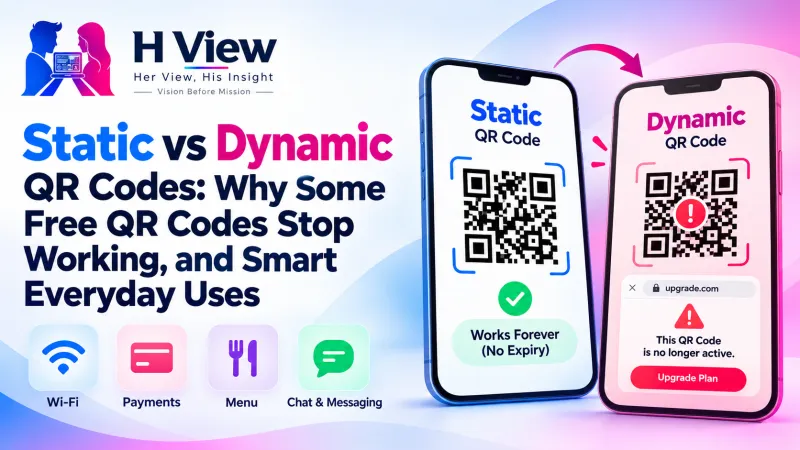
In the static vs dynamic QR codes question, the difference is where the information lives. A static code stores your link, UPI ID or Wi-Fi details inside the code itself and never expires. A dynamic code points to a short link owned by a QR company and stops working if that service or plan ends.
Restaurants, schools and small shops learned this the hard way. They made a “free” QR code online, printed it on menus, banners and visiting cards, and months later customers scanning it landed on a page asking the owner to upgrade. The code wasn't broken; it was dynamic, and the free trial had ended.
Static vs Dynamic QR Codes: What's the Difference?
| Static QR code | Dynamic QR code | |
|---|---|---|
| Where the data lives | Inside the code itself | On the QR company's server, behind a short link |
| Expires? | No, as long as your details stay valid | Can stop when a plan or trial ends |
| Can you edit it after printing? | No; make a new code | Yes, through the provider's dashboard |
| Scan tracking | None | Usually yes |
| Privacy | Scans don't pass through anyone | Every scan passes through the provider |
The H View QR Code Generator makes static codes, which is why they never expire and nothing passes through H View.
What Are Smart Everyday Uses?
- Wi-Fi for guests: type the network name and password once, print the code, and visitors simply point their camera to join.
- Contact card: put a QR on your visiting card or stall banner so people save your number, email and address in one scan.
- WhatsApp chat: customers scan and land straight in a chat with your business number.
- UPI payments: a printed code works with any UPI app (see our UPI QR code guide). UPI is run by NPCI.
- Links: a Google review page, a menu PDF, a class registration form or a YouTube channel.
 Also readHow to Make a Free UPI QR Code for Your Shop, With Your Logo, That Never Expires→
How Do I Make a QR Code That Scans Well?
- Keep high contrast: dark code on a light background.
- Add a logo only through the tool's “Add a logo” option, which increases error correction so the code still scans.
- Print at least 2 to 3 cm wide for close scanning; much larger for posters seen from a distance. Use SVG for sharp printing at any size, or a PNG up to 2048 px.
- Always scan the final printout with your own phone before distributing copies.
QR codes were invented by DENSO WAVE, and their built-in error correction is why a code can still scan with a logo or small damage.
When Is a Dynamic Code Worth Paying For?
If you run marketing campaigns, need scan analytics, or must change the destination after printing thousands of copies, a reputable paid dynamic service can make sense. Just read the terms, and know what happens to your printed codes if you stop paying.
Her View
Small business owners, especially women running home businesses, are often sold “free” tools that later hold their printed material hostage. A static code they own outright is not just cheaper; it's one less thing someone else controls about their business.
 Also readAre Free Online Converters Safe for Your Aadhaar, PAN and Certificates? What to Check→
His Insight
A static code is just data drawn as squares. No server, no account, no tracking. That simplicity is its strength. If your Wi-Fi password or UPI ID changes, make a new code in a minute; for most small uses that's far easier than managing a subscription.
H View Verdict
For menus, shop counters, visiting cards, Wi-Fi and WhatsApp, a static QR code you generate yourself is the safest choice: free, private and permanent. Choose dynamic only when you truly need tracking or editing, and pay a provider you trust.
Frequently Asked Questions
Do static QR codes expire?
No. The details are stored in the code itself, so it keeps working as long as those details stay correct.
Why did my free QR code stop working?
It was probably a dynamic code that redirected through a QR company's link, and the free plan or trial ended.
How do I share my Wi-Fi with a QR code?
Choose Wi-Fi in the generator, type the network name and password, and print the code. Phones offer to join when they scan it.
Does H View store what I type into the QR generator?
No. The code is made in your browser. H View does not see or store your details.
H View stories follow our editorial policy. Spotted an error? Tell us and we will correct it.
Rate this article
One tap is enough. No comment needed.
Was this article helpful?
Your answer goes straight to our editors.





Comments0
No comments yet. Start the conversation.