
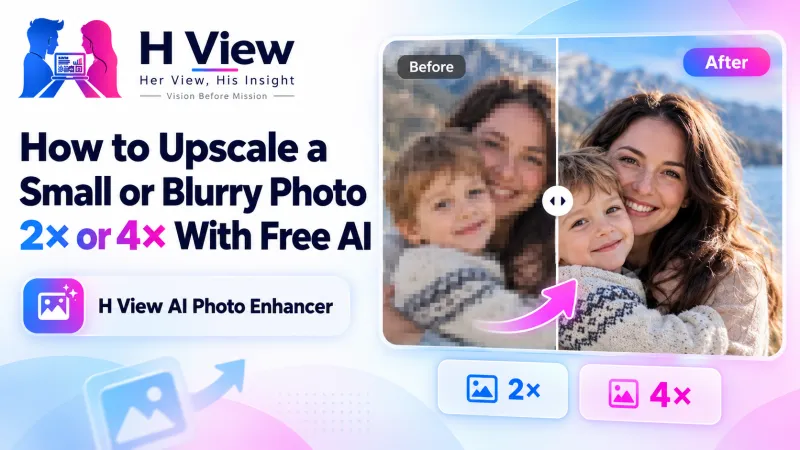
How to Upscale a Small or Blurry Photo 2× or 4× With Free AI
Old phone photos, screenshots and images saved from chats are often too small to print or reuse. Here's how a free AI photo enhancer can upscale them 2× or 4× in your browser, and what it can realistically fix.
To upscale a small photo for free, open the H View AI photo enhancer, add a JPG, PNG or WebP image, choose 2× or 4×, press Enhance, compare before and after with the slider, and download the PNG. An ESRGAN super-resolution model rebuilds edges and texture right in your browser, with no upload and no watermark.
Everyone has that one photo: a lovely family picture from an old phone, a product image a supplier sent on WhatsApp, a screenshot you need for a presentation. It looks fine on a small screen, but the moment you enlarge it for a print or a slide, it turns soft and blocky. Normal resizing just stretches the pixels. An AI upscaler predicts the missing detail instead.
How Do I Upscale a Photo, Step by Step?
- Add a photo. Small and low-resolution photos benefit the most.
- Choose 2× or 4×. 2× doubles the width and height; 4× makes the image four times larger in each direction.
- Enhance. The model works through the picture tile by tile. Large photos take longer on phones.
- Compare and download. Drag the slider to see exactly what changed, then save the enhanced PNG.
Try it now: Open the free AI Photo Enhancer → Free · No sign-up · No watermark · Files stay on your device.
Should I Choose 2× or 4×?
| 2× | 4× | |
|---|---|---|
| Result | Twice as wide and tall (4 times the pixels) | Four times as wide and tall (16 times the pixels) |
| Best input size | Up to about 1,500 pixels on the longest side | Up to about 750 pixels on the longest side |
| Speed | Quick on most devices | Much slower; a laptop helps |
| Good for | Social posts, slides, sharper WhatsApp images | Tiny images that need to be printed or used large |
To keep your browser responsive, very large inputs are scaled down first to those limits.
 Also readHow to Remove a Photo Background for Free Without Uploading It Anywhere→
What Is ESRGAN, and Why Does It Look Better Than Stretching?
ESRGAN stands for Enhanced Super-Resolution Generative Adversarial Networks, a model published by researchers in 2018 that placed first in the PIRM2018 super-resolution challenge (read the paper on arXiv). Instead of averaging neighbouring pixels, it has learned what natural edges and textures look like, so lines stay crisp and text stays readable at the larger size. Our tool runs an ESRGAN (RDN) model using your device's graphics chip.
What Can't It Fix?
- Badly out-of-focus or shaken photos: it sharpens edges but cannot recover detail that was never captured.
- Faces that are only a few pixels wide: the model can only guess so much.
- Heavy compression blocks in very low-quality images may be smoothed but not fully removed.
For a cleaner portrait, combine it with the Background Remover, then set the final dimensions with the Image Resizer.
Her View
Many of our parents' and grandparents' photos survive only as small scans or forwards on family WhatsApp groups. Seeing one of those come back a little sharper, big enough to frame, is genuinely emotional. That such a tool can be free, and private, feels like technology doing something kind.
 Also readHow to Compress a Photo to 50 KB or 20 KB for Exam and Job Forms, Free and Private→
His Insight
Upscaling is heavy computing, and here it happens on your own device rather than a server farm. That is the trade-off for privacy: a phone handles 2× on modest photos well, while 4× on a big image is a job for a laptop. Start small, compare with the slider and only go bigger if you need it. For saving the result, MDN's image format guide explains why PNG keeps the restored detail intact.
H View Verdict
An AI photo enhancer is the right tool when a good photo is simply too small. Use 2× for most jobs and 4× for tiny images, compare before you download, and keep expectations realistic for blurred shots. Free, private and watermark-free.
Frequently Asked Questions
Does the photo enhancer add a watermark?
No. It is free with no watermark and no sign-up.
What is the difference between 2× and 4×?
2× doubles the width and height (four times the pixels). 4× makes the image four times wider and taller, which takes much longer.
Can it fix a very blurry photo?
It sharpens edges and adds detail to small images, but it cannot fully recover a photo that is badly out of focus or shaken.
Why is it slow on my phone?
Upscaling is heavy work done on your own device. Use 2× and a smaller photo on phones, or a laptop for large images.
Explore all H View free tools.
H View stories follow our editorial policy. Spotted an error? Tell us and we will correct it.
Rate this article
One tap is enough. No comment needed.
Was this article helpful?
Your answer goes straight to our editors.








Comments0
No comments yet. Start the conversation.