
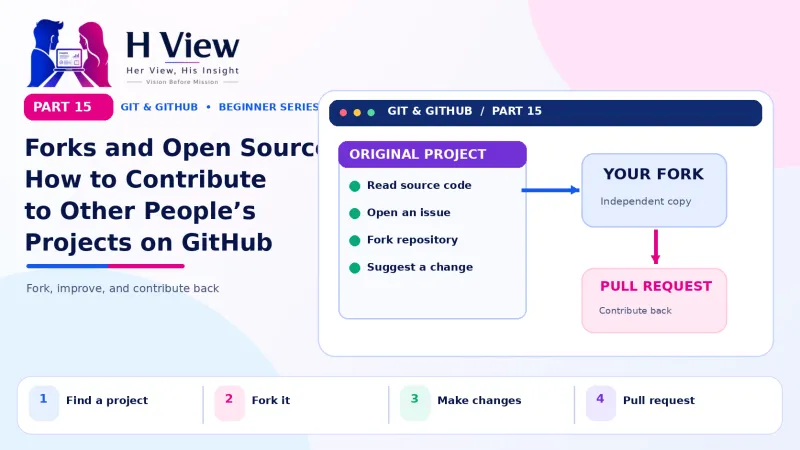
Forks and Open Source: How to Contribute to Other People's Projects on GitHub (Part 15)
A fork is your own copy of someone else's GitHub project. Learn how to fork, contribute through a pull request, stay in sync and find beginner-friendly open source issues. Part 15 of our Git series.
To contribute to someone else's project, you fork it on GitHub, which creates your own copy under your account. You clone your fork, make changes on a branch, push them to your fork and open a pull request asking the original project to accept them. You do not need permission to fork; the maintainers decide whether to merge.
One evening Sneha noticed a typo in the documentation of a free date-picker library she had used for the cake booking page. "Should I tell someone?" she wondered. Arjun had a better idea: "Fix it yourself. Fork the project and send a pull request." Three days later, a maintainer in another country merged her change and wrote "Thanks, great first contribution!" Her name now appears in the list of contributors to a project used by thousands of developers. In Part 14 you opened pull requests inside your own repository. This Part 15 explains forks, which let you contribute to projects you do not own, and walks you through a first open source contribution.
Your one-minute summary
- A fork is your own copy of another person's repository, on GitHub
- The original project is called upstream; your fork is origin
- Workflow: fork → clone → branch → commit → push → pull request
- Keep your fork updated with GitHub's Sync fork button or git pull upstream main
- Start with issues labelled good first issue
- Read CONTRIBUTING.md before you start
What is the difference between a fork, a clone and a branch?
These three words confuse almost every beginner, so let us separate them clearly.
Fork vs clone vs branch
Fork
- A copy on GitHub, under your account
- Of someone else's repository
- Lets you propose changes without access
Clone
- A copy on your computer
- Of any repository, yours or a fork
- Where you actually edit files
Branch
- A line of work inside one repository
- For one feature or fix
- Becomes the source of a pull request
In open source you use all three: fork the project, clone your fork, then work on a branch.
How does contributing through a fork work?
GitHub's guide to forks describes the full model. Here it is as a picture:
The fork-and-pull-request workflow
Your changes travel: your laptop → your fork → a pull request to the original project.
 Also readPull Requests on GitHub Explained: Propose, Review and Merge Changes (Part 14)→
How do I make my first contribution, step by step?
Sneha's first contribution, start to finish
How do I keep my fork up to date?
While you work, the original project keeps moving. Your fork does not update itself. You have two easy options:
| Method | Steps |
|---|---|
| On GitHub (easiest) | Open your fork and click Sync fork, then Update branch. Then git pull on your laptop. |
| From the terminal | Once: git remote add upstream https://github.com/original/project.gitEach time: git switch main, git pull upstream main, git push |
Sync before creating each new branch, so your work starts from the latest version and avoids conflicts.
Three copies, one project
Pull from upstream, push to origin, open pull requests back to upstream.
Where can beginners find open source projects?
- "good first issue" label: many projects tag beginner-friendly tasks this way. Search GitHub for
label:"good first issue"plus a language you know. - Tools you already use: a CSS framework, a VS Code theme or a WordPress plugin. You understand their problems.
- Documentation and translations: many projects need help translating docs into Hindi, Telugu, Tamil and other Indian languages.
- Hacktoberfest: an annual October event that encourages open source contributions, with many beginner-friendly projects taking part.
- College and community projects: student clubs, local meetups and NGO websites often welcome help.
India's open source community is large and growing. Coverage of GitHub's Octoverse 2025 report noted that India overtook the US in total open source contributor count for the first time, so you will find plenty of Indian maintainers and contributors to learn from.
What should I read before contributing?
Files to read in any open source project
What are good manners in open source?
Open source etiquette
- Search existing issues before opening a new one
- Keep pull requests small and focused on one thing
- Follow the project's style and contribution guide
- Be patient; many maintainers are unpaid volunteers
- Accept "no" gracefully; not every idea fits every project
- Do not send low-effort or AI-generated changes you have not checked and tested yourself
That last point matters more than ever. Maintainers increasingly report being flooded with low-quality automated pull requests. A thoughtful, tested contribution stands out and builds your reputation.
How does open source help my career?
What open source gives back
Before Part 16, make sure you can
- Explain fork vs clone vs branch
- Fork a public repository and clone your fork
- Open a pull request from your fork to the original project
- Sync your fork with the original
- Find a "good first issue" in a project you like
Her View
Open source can look like an exclusive club, but its doors are open to anyone willing to read, learn and contribute respectfully. Many first-time contributors, including many women in tech, started with documentation or translations, just as Sneha did. Your perspective is valuable; projects need people who notice what confuses newcomers, because they once were newcomers too.
 Also readREADME, Issues and Projects: Organise Your Work on GitHub (Part 17)→
His Insight
Choose projects you actually use, read the contribution guide first and keep your first pull request very small. Set up the upstream remote once and sync before every branch. Above all, test what you submit. One well-tested, well-explained pull request does more for your reputation than ten rushed ones.
H View Verdict
Forks let anyone contribute to any public project without special access. Fork, clone, branch, push and open a pull request: you already know every step. In Part 16, we bring everything together into a simple team workflow you can use with friends, classmates or clients.
Self-assessment: test yourself
Ready? Tap an option for each question. You will see right away whether you got it, with a short explanation, and your score at the end. Take your time, and try again as often as you like.
Forks and open source quiz: 10 questions
1. A fork is
- A copy on your laptop
- Your own copy of someone else's repository on GitHub
- A type of branch
- A merge conflict
Forks live on GitHub under your account.
2. In the fork workflow, "upstream" usually means
- Your fork
- The original project
- Your laptop
- The main branch
upstream is the conventional name for the original repository.
3. Which label often marks beginner-friendly tasks?
- wontfix
- good first issue
- duplicate
- invalid
Many projects use "good first issue" for newcomers.
4. Which file explains how a project wants contributions?
- LICENSE
- .gitignore
- CONTRIBUTING.md
- index.html
CONTRIBUTING.md is the project's contribution guide.
5. How do you update your fork from the original on GitHub?
- Delete and fork again
- Click "Sync fork"
- Open an issue
- git reset --hard
Sync fork pulls the latest changes from upstream into your fork.
6. Do you need permission to fork a public repository?
- Yes, by email
- No; maintainers decide only whether to merge
- Only for big projects
- Only with a paid plan
Anyone can fork a public repository.
7. Which is a good first contribution?
- Rewriting the whole project
- Fixing a typo in the documentation
- Changing the licence
- Deleting old files
Small, focused improvements are the best way to start.
8. Where do you push your changes in the fork workflow?
- Directly to upstream
- To your fork (origin)
- To a ZIP file
- Nowhere
You push to your fork, then open a PR to upstream.
9. Should you fork your own team's repository where you have write access?
- Always
- Usually not; create a branch instead
- Only on Fridays
- Only for big changes
Forks are mainly for repositories where you cannot push directly.
10. Why should you test AI-generated changes before sending them to open source projects?
- Testing is optional
- Untested automated PRs waste maintainers' time
- AI code never works
- GitHub blocks AI code
Respect maintainers by sending only checked, tested work.
Frequently asked questions
Do I need permission to fork a repository?
No. Any public repository can be forked. Whether your changes are merged is up to the maintainers.
Can I fork a private repository?
Only if you have access to it and the owner's settings allow forking.
Is my fork updated automatically?
No. Use the Sync fork button or pull from upstream regularly.
Should I fork my own team's repository?
Usually not. If you have write access, create a branch in the shared repository instead. Forks are mainly for projects where you do not have write access.
H View stories follow our editorial policy. Spotted an error? Tell us and we will correct it.
Rate this article
One tap is enough. No comment needed.
Was this article helpful?
Your answer goes straight to our editors.








Comments0
No comments yet. Start the conversation.