
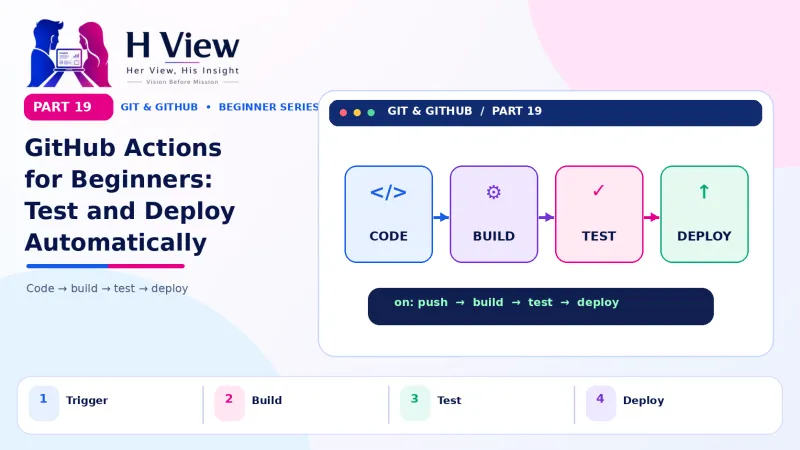
GitHub Actions for Beginners: Let GitHub Test and Deploy Your Website Automatically (Part 19)
GitHub Actions runs jobs for you whenever something happens in your repository: checks on every pull request, automatic deploys and scheduled tasks. Write your first workflow in Part 19 of our Git series.
GitHub Actions is GitHub's built-in automation service. You write a small YAML file, called a workflow, in the .github/workflows folder of your repository. It tells GitHub to run jobs automatically when something happens, such as a push or a pull request. Typical jobs check code for errors, run tests and deploy websites. It is free for public repositories on standard runners.
One Friday evening, a pull request with a missing closing tag slipped past everyone at Sneha's studio. Ravi was tired, Anu was reviewing on her phone and Sneha approved in a hurry. Saturday morning, the hospital's appointment page rendered as a jumbled mess. "Humans get tired," Arjun said when she told him. "Let a robot check every pull request. It never gets tired." That robot is GitHub Actions. In Part 16 we protected main and required reviews, and in Part 18 we published a site with GitHub Pages. This Part 19 connects the two: automatic checks on every pull request, and automatic deploys when main changes, explained without assuming you are a DevOps expert.
Your one-minute summary
- A workflow is a YAML file in .github/workflows/
- An event (push, pull request, schedule) triggers it
- A workflow has jobs; each job has steps
- Jobs run on a runner, a fresh virtual machine provided by GitHub
- Reuse ready-made actions from the GitHub Marketplace
- Free for public repos; the Free plan includes 2,000 minutes a month for private repos
What is CI/CD, in simple words?
CI stands for continuous integration: automatically checking every change as soon as it is pushed. CD stands for continuous delivery or deployment: automatically publishing changes once they pass the checks. Think of a quality inspector on a factory line: every product is checked the same way, every time, without anyone forgetting, even on a Friday evening.
From push to live site, automatically
What are the building blocks of GitHub Actions?
GitHub's Understanding GitHub Actions guide describes five key pieces. Here they are with an everyday analogy: a school's daily routine.
| Piece | What it is | School analogy |
|---|---|---|
| Workflow | The whole automated process, in one YAML file | The daily timetable |
| Event | What starts it: push, pull_request, schedule, manual | The morning bell |
| Job | A group of steps that run on one machine | One class period |
| Step | A single command or reusable action | One activity in that class |
| Runner | The machine that does the work | The classroom |
How the pieces nest
 Also readHost Your Website Free with GitHub Pages: Step-by-Step Guide (Part 18)→
What does a first workflow look like?
Let us add the check that would have saved the studio's Saturday: on every push and pull request, GitHub downloads the code and checks the HTML for errors. Create a file at .github/workflows/check.yml with these lines (indentation matters in YAML, so use two spaces per level):
| Line | Meaning |
|---|---|
name: Check website | The name shown in the Actions tab |
on: [push, pull_request] | Run on every push and every pull request |
jobs: | Start of the list of jobs |
html-check: | A job called html-check |
runs-on: ubuntu-latest | Use a fresh Ubuntu Linux runner |
steps: | Start of the list of steps |
- uses: actions/checkout@v4 | Reusable action: download the repository's code |
- run: npx --yes htmlhint "**/*.html" | Run a free HTML checker on every .html file |
Commit and push the file. Open the Actions tab on GitHub and you will see the workflow running, with a live log of each step. If the HTML has problems, the job fails and shows exactly which file and line need attention.
actions/checkout release new major versions over time. When you set up a workflow, check the action's page on GitHub Marketplace for the current recommended version, or start from one of GitHub's ready-made templates in the Actions tab.How do checks appear on a pull request?
Once a workflow runs on pull_request, its result appears at the bottom of every PR: a yellow dot while running, a green tick when it passes and a red cross when it fails. Combined with the branch protection rule "Require status checks to pass" from Part 16, GitHub will not allow a merge until the checks are green. Broken HTML never reaches the live site again.
What a pull request shows
✔ All checks have passed
- Check website / html-check: successful
- Merge button is enabled
✖ Some checks were not successful
- Check website / html-check: failed
- Click "Details" to read the log
- Fix, push again; checks re-run automatically
What can beginners automate with GitHub Actions?
Useful automations for web builders
How do I keep passwords safe in Actions?
Deployment often needs a password or token, for example to upload files to your hosting. Never write it in the workflow file. Instead, go to the repository's Settings, Secrets and variables, Actions, and add a repository secret, such as FTP_PASSWORD. Your workflow then refers to it by name using GitHub's secrets syntax, and GitHub hides secret values in logs. This is the same principle as the .env file from Part 10.
How much does GitHub Actions cost?
According to GitHub's pricing page, Actions is free for public repositories, and the Free plan includes 2,000 CI/CD minutes per month for private repositories. A small website check usually takes under a minute, so personal projects rarely come close to the limit. Check the pricing page for current details, as plans can change.
Actions on the Free plan
Source: GitHub pricing. Usage is shown under Settings, Billing.
What are common beginner mistakes with Actions?
Mistake and fix
Wrong folder
- Workflows must be in .github/workflows/, with a dot before github
YAML indentation
- Use spaces, never tabs; keep levels consistent
Secrets in files
- Always use repository secrets
Ignoring red crosses
- A failing check is information; read the log and fix it
Before Part 20, make sure you can
- Explain workflow, event, job, step and runner
- Create a workflow file in .github/workflows
- Find and read a run in the Actions tab
- See a check result on a pull request
- Store a password as a repository secret
Her View
Automation can sound intimidating, but at heart it is about kindness to your future self and your team. Every check you automate is one less thing to remember on a busy day and one less chance of an embarrassing mistake on a client's live site. Start with one small workflow, see the green tick and enjoy the calm it brings.
 Also readWhat Is Version Control? Git and GitHub for Beginners (Part 1)→
His Insight
Begin with a single fast check on pull requests, then require it in branch protection. Add deployment only after checks are reliable. Keep workflows short and readable, pin actions to trusted versions, and store every credential as a secret. Measure success simply: fewer broken deployments and less time spent on manual checks.
H View Verdict
GitHub Actions turns your repository into a small automated factory: every push is checked, every pull request shows a clear result and deployments happen on their own. For beginners, one simple workflow already adds real safety. In the final part, Part 20, we bring everything together for the age of AI coding tools, with a complete cheat sheet.
Self-assessment: test yourself
Ready? Tap an option for each question. You will see right away whether you got it, with a short explanation, and your score at the end. Take your time, and try again as often as you like.
GitHub Actions quiz: 10 questions
1. Where do workflow files live?
- In the root folder
- In .github/workflows/
- In node_modules
- In the .git folder
GitHub looks for YAML workflow files in .github/workflows.
2. What starts a workflow?
- A runner
- An event such as push or pull_request
- A step
- A secret
Events trigger workflows.
3. Where should a deployment password go?
- In the YAML file
- In README.md
- In a repository secret
- In a commit message
Secrets keep credentials out of code and logs.
4. What does "runs-on: ubuntu-latest" choose?
- The branch
- The type of runner machine
- The programming language
- The reviewer
runs-on selects the operating system of the runner.
5. How many Actions minutes does the Free plan include for private repos each month?
- 100
- 500
- 2,000
- Unlimited
GitHub's pricing page lists 2,000 minutes a month on the Free plan; public repos are free.
6. What does CI stand for?
- Code Inspection
- Continuous integration
- Cloud Internet
- Commit Index
CI means checking every change automatically as it is pushed.
7. In the school analogy, the runner is
- The timetable
- The morning bell
- The classroom
- The headmaster
The runner is the machine where the work happens.
8. Which branch protection rule blocks merging until checks are green?
- Restrict deletions
- Require status checks to pass
- Block force pushes
- Require a README
It ensures failing checks stop the merge button.
9. What should you use for indentation in YAML?
- Tabs
- Spaces
- Commas
- Nothing
YAML requires spaces; tabs cause errors.
10. A check fails on your PR. What should you do?
- Merge anyway
- Read the log, fix the problem and push again
- Delete the workflow
- Close the PR
Checks re-run automatically after you push a fix.
Frequently asked questions
Do I need to know coding to use GitHub Actions?
Basic comfort with commands helps. Many workflows can be started from GitHub's templates in the Actions tab and adjusted slightly.
Can GitHub Actions deploy to my regular web hosting?
Yes. Actions from the Marketplace can upload files by FTP, SFTP or SSH to most hosting providers, using credentials stored as secrets.
What is YAML?
YAML is a simple text format for settings that uses indentation and "key: value" pairs. It is used by many tools, not just GitHub.
Is GitHub Actions the only CI/CD option?
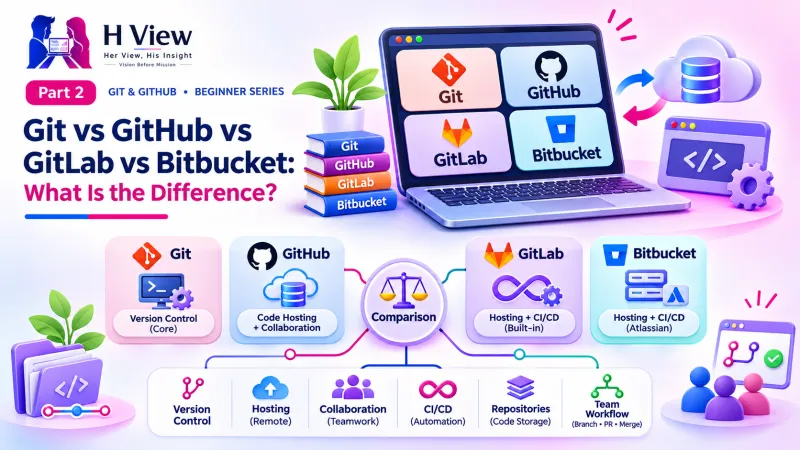
No. GitLab CI, Bitbucket Pipelines and others offer similar features. If you use GitHub, Actions is the most convenient choice.
H View stories follow our editorial policy. Spotted an error? Tell us and we will correct it.
Rate this article
One tap is enough. No comment needed.
Was this article helpful?
Your answer goes straight to our editors.








Comments0
No comments yet. Start the conversation.