
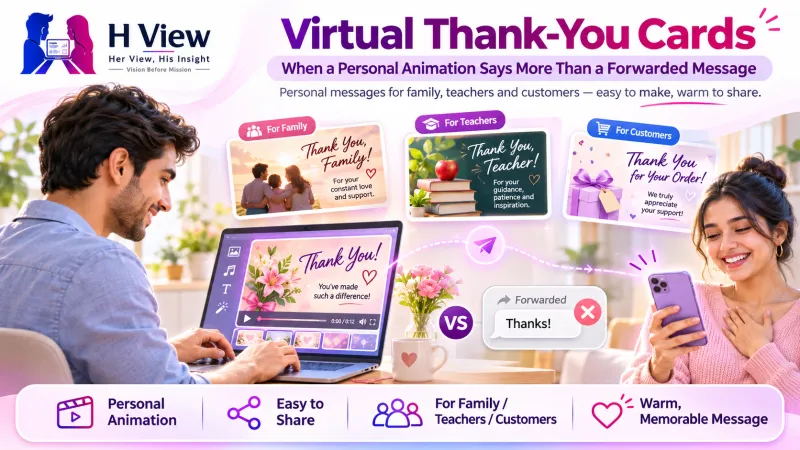
Virtual Thank-You Cards: When a Personal Animation Says More Than a Forwarded Message
A digital thank-you card works best when it carries a real memory or specific message, not just an animation. Here is when to send one, who may appreciate it and how to make it personal without oversharing.
A virtual thank-you card can make gratitude feel more personal when it gives the recipient a moment to pause, open a note and recognise the thought behind it. Animation alone does not make a message meaningful; a specific memory, honest sentence or small detail from the relationship does. A digital card is most useful when the person is far away, when a group wants to send one shared note, or when a simple message deserves a little more care than a forwarded image.
When does a digital thank-you card make sense?
People often want to say thank you after a teacher’s support, a friend’s practical help, a family visit, a colleague’s contribution or a customer’s decision to work with a small business. A card can be sent quickly across distance and can include a name, a photo or a message written for that person. It is a useful option when a paper card is difficult to deliver, but it should still sound like the sender.
A digital card is not the right answer for every moment. A quick text may be better for a small favour, and a phone call or face-to-face conversation may carry more warmth after a serious act of kindness. A customer who needs support should receive a helpful response before they receive a promotional thank-you animation. Choose the format based on the relationship and the moment, not on the novelty of the tool.
What makes a thank-you message feel personal?
Start with the person’s name and say what you are grateful for. “Thank you for staying late to help me prepare for the presentation” feels more real than “Thanks for everything,” because it tells the recipient that you noticed the effort. If you are unsure what to write, recall one detail: the time they gave, the advice they shared, the way they made you feel welcome or the task they handled when you needed support.
Keep the note in your natural voice. A short, sincere message is stronger than a long paragraph that sounds formal or copied. If the card includes a photo, choose one that both people would be comfortable sharing. Avoid adding a private moment just because the design has room for it.
 Also readThanksgiving Wishes and Thank-You Ideas: A Warm Message for Every Kind of Relationship→
Who might appreciate one?
Teachers and mentors
A note can mention a lesson, piece of advice or patient explanation that stayed with you. If a class or team is sending the card together, ask each person to contribute a short line rather than pasting a list of generic compliments. This keeps the message specific while allowing different people to express thanks in their own words.
Friends and family
For someone who helped during a busy week or made a difficult day lighter, a small memory can be more meaningful than an elaborate design. A private link is useful when a family member lives far away, but ask before sharing their photo or a personal story in a group chat.
Customers and colleagues
Businesses can use a thank-you card after a purchase, booking or project, provided the message does not replace useful service information. Say what the customer is being thanked for and make any next step optional. Colleagues may appreciate a note that recognises a specific contribution rather than only a general “great job.”
How to make and share a card thoughtfully
- Choose the recipient and reason. Be clear about what you want to acknowledge.
- Write the message first. This helps the design support the words instead of the other way around.
- Select a calm design. Animation should make the card pleasant to open, not distract from the message.
- Preview on a phone. Check that the name and note are readable and that the card opens as expected.
- Review the sharing settings. Decide whether the link is private, whether a photo is included and which channel is appropriate.
- Send it with a short personal introduction. Tell the recipient why you chose to send it.
H View has two formats that can help with different needs: the Virtual Thank You Card is designed as a personal card, while the Animated Thank You Page can work for a broader thank-you message. Review the preview and sharing details before sending, especially if you add a photo or information about someone else.
Keep privacy and access in mind
A personal card can contain names, photos, family details or a story that was shared in confidence. Include only what the recipient would expect and avoid adding addresses, phone numbers or other details that do not belong in the card. If you share the link in a public post, consider whether the recipient actually wants the message and their image to be public.
Before sending, test the link in a private browser or ask a friend to check that it opens without exposing editing controls or unrelated information. Make sure the design works on a smaller screen and that the essential message is available even if animation or sound is disabled. This is especially helpful for people using older phones, limited data or accessibility settings.
What if you do not know what to say?
Use a simple structure: name the action, say how it helped and close warmly. For example: “Thank you for helping me prepare for the interview. Your practice questions helped me feel calmer, and I really appreciated the time you gave me. I’ll remember it.” Adapt the words to what actually happened; do not copy a sentence that would feel strange coming from you.
If the situation is complicated, do not let a card carry the entire conversation. A thank-you can open the door to a call or a longer note, but it cannot substitute for an apology, explanation or practical help when those are needed. Send the message that fits the relationship.
Her View
For many recipients, the detail in the message matters more than the effect on screen. Being remembered for something small can feel deeply affirming, especially when people are busy or live apart. Let the animation frame the moment, then let your own words do the meaningful work.
 Also readAnimated Greeting Cards: How to Send a Digital Card for Any Occasion (and What to Write)→
His Insight
For a business, a thank-you is part of the relationship after a transaction. It should sound like the people behind the service and should not pressure the customer into another purchase. A brief, sincere note paired with reliable follow-up is more valuable than a polished graphic sent without context.
H View Verdict
A virtual thank-you card is a thoughtful format when it makes a real message easier to send across distance or turns a group note into a shared moment. Choose it for the right occasion, write in your own voice, preview the experience and be careful with photos and private details. The best card is the one that helps someone feel appreciated without making the sender’s effort seem bigger than the kindness they are recognising.
Frequently asked questions
Are virtual thank-you cards appropriate for work?
Yes, when the message fits the relationship and workplace culture. Keep it specific, respectful and free of private details the recipient would not expect to be shared.
Should I add a photo?
Only if it is relevant and the people shown are comfortable with it. A clear message does not need a photo to feel personal.
Is an animated card better than a text?
Not always. A text is ideal for a quick thank-you; an animated card adds a small presentation moment when the occasion or distance makes that useful.
Can a business send a digital thank-you after a purchase?
It can, but the note should remain relevant and easy to ignore. Do not use gratitude as a pretext to send unwanted promotions or make unsupported promises.
Sources
- H View Virtual Thank You Card
- H View Animated Thank You Page
- Google Search Central: Helpful, reliable, people-first content
H View stories follow our editorial policy. Spotted an error? Tell us and we will correct it.
Rate this article
One tap is enough. No comment needed.
Was this article helpful?
Your answer goes straight to our editors.




Comments0
No comments yet. Start the conversation.