
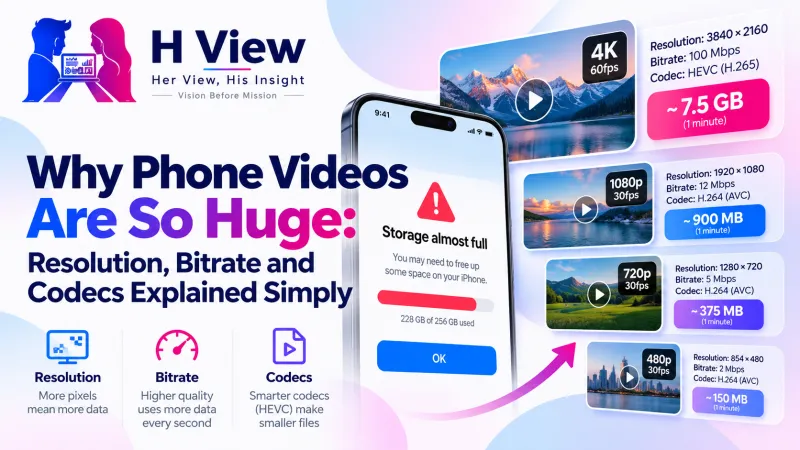
Why Phone Videos Are So Huge: Resolution, Bitrate and Codecs Explained Simply
Your phone storage is full again, and most of it is video. Here's why phone videos are so large, what resolution, frame rate, bitrate and codecs actually mean, and the settings that keep videos smaller without ruining them.
Phone videos are large because they record a lot of data every second: high resolution (often 4K), high frame rates (30 or 60 frames per second) and a generous bitrate to keep detail. A one-minute 4K clip can be several hundred megabytes. Recording at 1080p, or compressing to 720p before sharing, cuts that dramatically with little visible loss on a phone screen.
Your phone says “Storage almost full,” and when you check, it's not apps or photos; it's video. A few school functions, a wedding and some travel clips, and suddenly 30 GB is gone. Understanding what makes video heavy helps you record smarter and share easier.
What Makes a Video File Big?
| Factor | What it means | Effect on size |
|---|---|---|
| Resolution | Pixels per frame: 720p, 1080p, 4K | 4K has four times the pixels of 1080p |
| Frame rate | Frames per second: 24, 30, 60 | 60 fps stores twice as many frames as 30 fps |
| Bitrate | Data used per second of video | The biggest single driver of file size |
| Codec | How frames are compressed: H.264, HEVC, VP8 | Newer codecs fit similar quality into less data |
| Length | Minutes recorded | Double the length, roughly double the size |
MDN's video codec guide sums it up: the higher the resolution, frame rate or bit rate, the larger the encoded file.
Do I Need 4K for Everything?
Rarely. 4K is lovely on a big TV or when you plan to crop a shot later. For WhatsApp, Instagram and most family memories viewed on phones, 1080p at 30 fps looks great and uses far less space. Slow-motion and 60 fps are worth it for sport and fast action, not for a speech.
 Also readHow to Compress a Video for WhatsApp and Email Without Losing Much Quality→
What Phone Settings Help?
- Record at 1080p 30 fps by default; switch to 4K or 60 fps only when it matters.
- On iPhone, “High Efficiency” under Settings → Camera → Formats records HEVC, which saves space, though some older devices and apps may need MP4 conversion later.
- On Android, look for resolution and frame-rate options in the camera app's settings or the top bar.
- Back up and clear long videos regularly to a computer or cloud.
How Do I Shrink a Video I've Already Recorded?
- Cut what you don't need with the Video Trimmer.
- Compress with the Video Compressor: Balanced quality at 720p often saves 50 to 90 percent.
- If a device won't play HEVC or MOV, convert to MP4 with the Video Converter.
All three run on FFmpeg inside your browser, so your videos are never uploaded. Our guide on compressing a video for WhatsApp and email covers the settings.
Her View
The person whose phone fills up first is often the one recording everyone else's moments, usually a mother. Knowing which setting to use isn't “technical stuff”; it's what lets her keep recording without deleting memories in a panic.
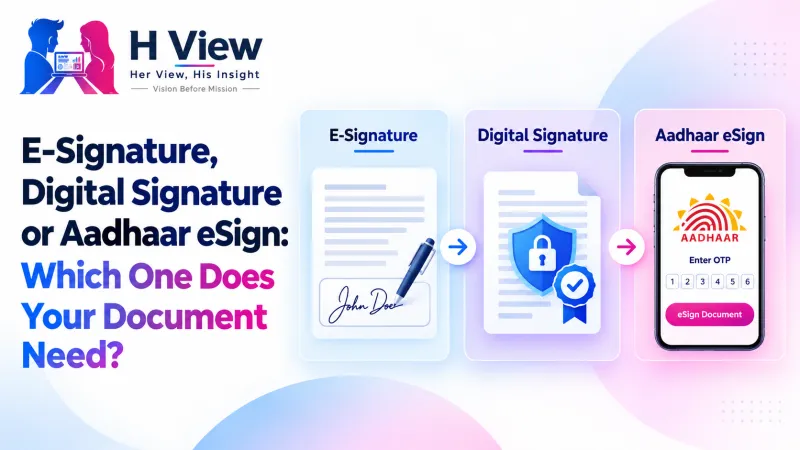 Also readE-Signature, Digital Signature or Aadhaar eSign: Which One Does Your Document Need?→
His Insight
Bitrate is the honest number to watch. Resolution sounds impressive, but a 4K video at a low bitrate can look worse than a well-encoded 1080p one. Phone makers set high bitrates by default to look good in reviews. For everyday sharing, you can safely trade some of that for space.
H View Verdict
Phone videos are big by design, not by accident. Record at 1080p unless you need more, trim and compress before sharing, and convert only when a device complains. Your storage, and your WhatsApp contacts, will thank you.
Frequently Asked Questions
Why are my phone videos so large?
High resolution, high frame rates and high bitrates mean a lot of data per second. 4K at 60 fps is especially heavy.
Is 1080p good enough?
For phones, social media and most family videos, yes. Choose 4K for big-screen viewing or when you'll crop later.
Does compressing a video reduce quality?
Somewhat, but at Balanced quality and 720p most people can't tell on a phone screen, while the file is much smaller.
Are my videos uploaded when I compress them on H View?
No. Compression runs in your browser and the video stays on your device.
H View stories follow our editorial policy. Spotted an error? Tell us and we will correct it.
Rate this article
One tap is enough. No comment needed.
Was this article helpful?
Your answer goes straight to our editors.







Comments0
No comments yet. Start the conversation.