
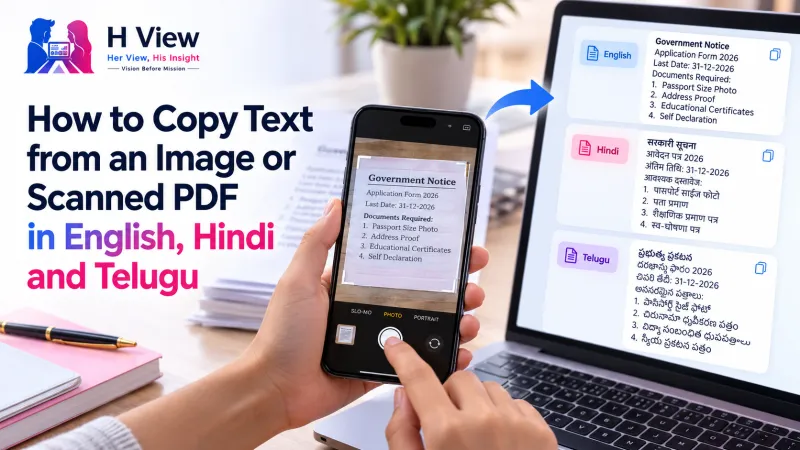
How to Copy Text from an Image or Scanned PDF in English, Hindi and Telugu
Stop retyping notices, screenshots and book pages. Here's how to convert image to text for free in English, Hindi or Telugu, including scanned PDFs, and save the result as a text or Word file.
To convert image to text for free, open the H View Image to Text (OCR) tool, add a photo, screenshot or scanned PDF, choose English, Hindi + English, Telugu + English, or Hindi or Telugu only, and press “Get text.” Edit the result in the text box, then copy it or save it as a .txt or Word file. Nothing is uploaded.
A circular on the college notice board. A page from a reference book. A screenshot of a bank message. A Telugu land record your grandfather kept. We photograph text all the time, and then someone has to type it out again, with mistakes creeping in at every line. OCR (optical character recognition) reads the letters for you.
How Do I Copy Text from an Image, Step by Step?
- Add images or a PDF. Photos of notes or notices, screenshots, or a scanned PDF; every page (up to 50) is read in order.
- Pick the language. English, Hindi + English, Telugu + English, or Hindi or Telugu only.
- Get the text. Words are found and highlighted on the picture as they are read, and unsure words are marked.
- Copy or save. Fix anything in the editable box, then copy it or download it as .txt or Word.
Try it now: Open the free Image to Text tool → Free · No sign-up · Files stay on your device.
Which Language Option Should I Choose?
| Your text | Choose |
|---|---|
| English only | English |
| Hindi notice with English words, numbers or names | Hindi + English |
| Telugu document with English terms | Telugu + English |
| Text entirely in Devanagari or Telugu script | Hindi only or Telugu only |
The tool runs Tesseract, a well-known open-source OCR engine that supports over 100 languages, inside your browser with language files for English, Hindi and Telugu. The first run downloads the reader and the language file (about 1.5 to 3 MB each); after that they are cached.
 Also readHow to Merge PDF Files and Split or Extract Pages for Free, Without Uploading Them→
How Do I Get Better OCR Results?
- Light and angle: shoot in daylight, straight above the page, with no shadow from your phone.
- Fill the frame with the text; small text in a large photo reads poorly.
- Prefer screenshots as PNG. As MDN notes, PNG suits screenshots and sharp text better than JPG, whose compression can blur edges.
- Printed beats handwritten. Neat handwriting sometimes works, but expect to correct it.
What Can I Do With the Text Afterwards?
Paste it into a WhatsApp message, an email or a document; translate it; search it; or fill a form with it. If you need to sign or fill the original document instead, use the PDF Editor & e-Sign. To shrink a scanned PDF you want to keep, use Compress PDF.
Her View
So much of our family history and local information lives in Hindi and Telugu print: old letters, temple notices, government circulars. Tools that only read English quietly leave those readers out. Being able to copy Telugu or Hindi text on a phone, for free, makes technology a little more ours.
 Also readHow to Sign a PDF and Fill Forms Online for Free, Without Printing→
His Insight
OCR is a reader, not a mind-reader. It is very good with clean, straight, printed text and much weaker with curled pages, glare and handwriting. Treat the output as a first draft: it saves you most of the typing, and a quick proofread against the image does the rest.
H View Verdict
If you are retyping text from a photo, you are working too hard. Take a clear photo, choose the right language combination, let OCR do the typing and spend your time checking instead. Free, private and built for Indian languages.
Frequently Asked Questions
How do I convert an image to text?
Add the image, choose the language of the text and press “Get text.” Copy the result or download it as .txt or Word.
Does it read Hindi and Telugu?
Yes. Choose “Hindi + English” or “Telugu + English” for mixed text, or the single language for text in only that script.
Can I get text from a scanned PDF?
Yes. Add the PDF and every page, up to 50, is read in order.
Are my images uploaded?
No. The text is read in your browser and nothing is sent to H View.
Explore all H View free tools.
H View stories follow our editorial policy. Spotted an error? Tell us and we will correct it.
Rate this article
One tap is enough. No comment needed.
Was this article helpful?
Your answer goes straight to our editors.









Comments0
No comments yet. Start the conversation.