
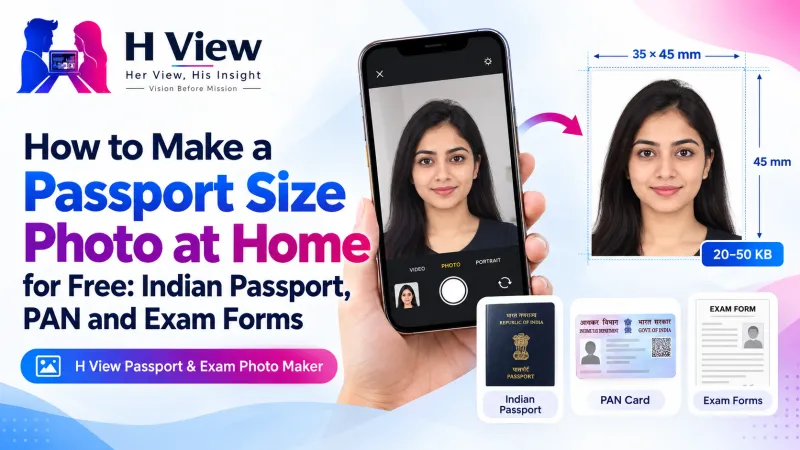
How to Make a Passport Size Photo at Home for Free: Indian Passport, PAN and Exam Forms
You don't need a studio or a paid app for a passport size photo. A clear selfie, good light and a free browser tool can give you a white background, the right framing and the exact KB size your form wants.
You can make a passport size photo at home for free. Take a clear, well-lit photo of your face and shoulders, open the free H View Passport & Exam Photo Maker, pick your form, and download a JPG with a white background, the correct framing and a file size inside the KB limit. Your photo never leaves your phone or laptop.
Most of us have lived this moment. The application deadline is tonight, the portal wants a “recent passport size photograph, 20–50 KB, white background,” and the only photo you have is a selfie against a cream wall. The nearest studio is closed, and the first app you download wants a subscription before it lets you save.
We built our free photo maker for exactly this situation. Here is how to use it, and how to get a photo that is accepted the first time.
What Does a Passport Size Photo Need in India?
The Indian passport photo is 35 × 45 mm (3.5 × 4.5 cm) with a plain white background. Exam, bank and government portals usually ask for a similar head-and-shoulders photo, but each sets its own pixel size and KB range. That is why one photo rarely works everywhere.
| What forms check | What it means for you |
|---|---|
| Physical size | Passport photos are 35 × 45 mm; online uploads are measured in pixels |
| Background | Plain white or very light, with no shadows or patterns |
| Framing | Face and shoulders, looking straight at the camera, head at the right height |
| File size | A minimum and maximum, such as 20–50 KB for many exam forms |
| File type | Almost always JPG |
Rules change from notice to notice, so always read the latest instructions for your form. For passports, check Passport Seva before you apply.
How Do I Make a Passport Photo on My Phone, Step by Step?
- Take a good photo. Stand facing a window in daylight, look straight at the camera, keep your shoulders square and ask someone else to take it at eye level. Avoid harsh overhead light that throws shadows under your eyes.
- Open the photo maker and add the photo. You can drop it in, choose it from your gallery or paste it.
- Pick the form. Choose Indian passport, PAN, exam form, bank exams, Indian e-Visa or US visa, or type your own size.
- Check the framing. The tool places your head between two guide lines automatically. Drag or zoom only if you want a small adjustment.
- Download. Save a JPG within the KB limit for online forms, or a 4 × 6 inch or A4 sheet with several copies to print.
The background is replaced with plain white (or light blue, if your form asks for it) by an AI portrait model that runs inside your browser. A home photo against a coloured wall works fine.
Try it now: Open the free Passport & Exam Photo Maker → Free · No sign-up · Files stay on your device.
 Also readHow to Compress a Photo to 50 KB or 20 KB for Exam and Job Forms, Free and Private→
Can I Make a Signature File for Forms Too?
Yes. Sign in dark ink on plain white paper, take a photo, choose Signature and your form. The tool turns the paper white, trims the empty space and saves the signature inside a range such as 10–20 KB. It is the step most people struggle with at midnight, so it is worth doing once and keeping the file.
How Do I Print Passport Photos at Home or at a Shop?
Choose the 4 × 6 inch sheet for a photo lab, or the A4 sheet for a home printer. Light cut lines show where to trim. The one rule people miss: print at 100% size, not “fit to page,” or each photo will no longer be 35 × 45 mm.
Why Is It Safe to Use for ID Photos?
Many “free” photo websites upload your face to their servers. Ours does not. The cut-out, framing and resizing all happen in your browser, and H View never receives your photo or signature. For an ID photo, that matters.
If you only need a background change or a different size, the Background Remover, Image Resizer and Image Compressor do each job separately.
Her View
Every year I watch students, especially girls from smaller towns, lose an evening and a few hundred rupees going back and forth to a photo shop because a form rejected a photo by 5 KB. It feels small, but it is one more barrier between someone and an exam or a job. A tool that fixes this in two minutes on a phone, without anyone handling your photo, is the kind of everyday help we want H View to give.
 Also readHow to Compress a PDF to 200 KB or 100 KB for Government and Job Portals, Free→
His Insight
Most rejections are not about how you look. They are about numbers the portal checks automatically: pixel size, KB range, file type and background brightness. Get those four right and the photo goes through. That is why the maker sets the size and KB range for you and saves a JPG, the format MDN describes as the most popular choice for photographs. Still, check the final file size shown before you upload.
H View Verdict
A passport size photo should not need a studio visit or a subscription. Take one good photo in daylight, let the free photo maker handle the background, framing and file size, and keep both the photo and signature files ready for the next form. Read the official notice first, then upload with confidence.
Frequently Asked Questions
What is the passport size photo size in India?
The Indian passport photo is 35 × 45 mm (3.5 × 4.5 cm) with a plain white background. For online uploads, the H View photo maker saves 630 × 810 pixels, within 10–250 KB.
How do I make a photo between 20 KB and 50 KB for an exam form?
Choose Photo, then “Exam form” or “Bank exams.” The photo is saved at the right pixel size and inside 20–50 KB automatically. Check the file size shown before you upload.
Can I use a selfie taken at home?
Yes, if it is clear, well lit and taken straight on. The AI model replaces the background with white, so the wall behind you does not matter much. Avoid filters, tilted heads and shadows.
Is my photo uploaded anywhere?
No. The cut-out, framing and resizing happen in your browser. Your photo and signature stay on your device.
Related: How to compress a PDF to 200 KB or 100 KB. Explore all our free tools that run in your browser, from PDF compression to QR codes.
H View stories follow our editorial policy. Spotted an error? Tell us and we will correct it.
Rate this article
One tap is enough. No comment needed.
Was this article helpful?
Your answer goes straight to our editors.







Comments0
No comments yet. Start the conversation.