

Best Digital Marketing Tools in 2026: What Marketers Actually Need and What They Can Skip
Open LinkedIn for a few minutes and you will probably come across a colourful graphic…
 Harika October 6, 2026
  By HarikaUpdated September 20, 202614 min read39 views
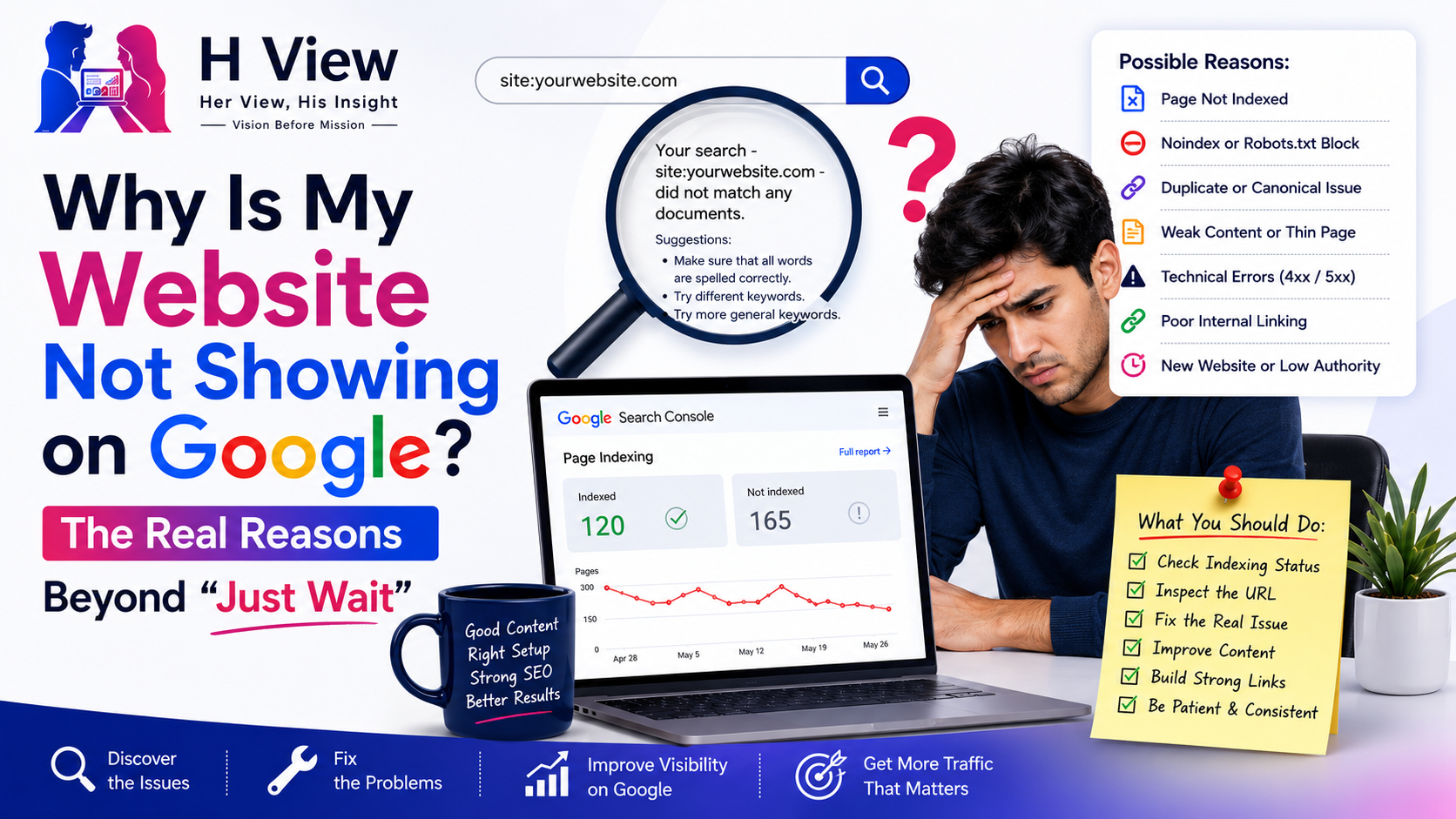
Publishing a website and then searching for it on Google can be surprisingly frustrating. You may have written the article, added the title, submitted the sitemap, checked Search Console and even requested indexing, yet the page still does not appear where you expect it to.
The most common advice at that stage is simply, “Wait.”
Sometimes waiting is reasonable. A new page may need time before Google crawls and processes it. But waiting is not always the answer, and repeatedly requesting indexing is not a strategy either. If an important page remains invisible for weeks, the better approach is to understand which stage is failing: discovery, crawling, indexing or ranking.
Google’s Page Indexing documentation makes one important point very clear: website owners should not expect every known URL to be indexed. Redirects, duplicate pages, blocked URLs and other intentionally excluded pages may legitimately remain outside Google’s index. The real question is whether the canonical versions of the pages that matter are being discovered, indexed and shown for relevant searches.
That distinction changes the troubleshooting process completely.
When someone says their website is not showing on Google, they may actually be describing several different problems.
The website may be completely unknown to Google. Google may know the URL but have not crawled it. The page may have been crawled but not indexed. It may be indexed but ranking so low that you cannot easily find it. Google may also be showing a different canonical version of the page.
These problems sound similar from the user’s perspective, but they require very different fixes.
Before changing anything, use Google Search Console’s URL Inspection tool to check the exact URL. That gives you much more useful information than searching your own title repeatedly and assuming the page is missing.
Google cannot crawl a page it does not know exists.
Google discovers URLs in several ways, including internal links, external links and sitemaps. For a normal website, strong internal navigation is one of the simplest ways to help search engines discover new content.
Imagine you publish an article but do not link to it from your homepage, category page, related articles or any other existing page. The URL may technically exist, but it has been placed in a weak part of the site’s structure.
Important new pages should normally have a clear path from already established pages.
For example:
Google itself recommends ensuring that the homepage is indexed and using comprehensive site navigation so crawlers can reach other important pages from there.
A page should feel like part of the website, not an isolated URL that exists only because you published it.
This status means Google knows the URL exists but has not crawled it yet.
Google’s current Page Indexing documentation says that “Discovered – currently not indexed” indicates that the page was found but has not yet been crawled. Google may schedule the crawl for later depending on crawl demand and site conditions.
If only one newly published page has this status, waiting may genuinely be appropriate.
If a large percentage of your important content remains in this state for a long time, however, look at the broader site.
Ask whether the website has too many low-value URLs competing for crawling attention. WordPress websites, for example, can sometimes generate large numbers of tag pages, archives, filters or thin URLs that provide very little standalone value.
Also review whether important articles are strongly linked and whether the website is consistently publishing useful content.
The solution is not necessarily submitting the same URL again every morning.
This is a different situation.
Google has already visited the page.
According to Google’s Page Indexing report, “Crawled – currently not indexed” means Google crawled the page but did not index it at that time, and Google specifically notes that there is no need to repeatedly resubmit that URL for crawling.
This is where website owners should stop focusing only on technical submission and look critically at the page itself.
Questions worth asking include:
There is no universal word count that guarantees indexing. A short page can be extremely useful, while a 3,000-word article can still be repetitive and weak.
The issue is whether the page gives Google and the user a strong reason for that URL to exist separately.
A noindex directive tells search engines not to include a page in the search index.
This sounds obvious, but accidental noindex settings are surprisingly common, particularly after website development, migration or changes to SEO plugins.
WordPress users should check whether the site was previously configured to discourage search engines during development. Individual pages can also receive noindex settings through SEO plugins.
If an important page is unexpectedly excluded, use URL Inspection to confirm what Google sees.
After correcting the setting, test the live URL and request indexing for the important page.
The key word here is important. Search Console’s request indexing function should not become a substitute for having a healthy crawlable website.
The robots.txt file tells crawlers which areas of a website they may or may not crawl.
A badly configured robots file can accidentally block important pages or directories.
For example, a rule intended to block an administrative section could accidentally cover a broader path containing public pages.
If Search Console reports URL blocked by robots.txt, verify the rules rather than assuming Google has made an indexing mistake. Google’s Page Indexing documentation lists robots blocking as one of the reasons a page may remain unindexed.
It is also important to understand that robots.txt controls crawling rather than serving as the ideal method for requesting removal from Google’s index.
For important public content, make sure Googlebot can actually access the page.
Canonicalization is one of the most overlooked reasons a page does not appear as expected.
Google defines canonicalization as the process of selecting one representative URL from a group of duplicate or very similar pages. The selected URL becomes the canonical version that Google generally prefers to show in Search.
Duplicate URLs can appear for many reasons, including:
You can suggest your preferred canonical using redirects, sitemap inclusion and rel="canonical" annotations, but Google describes these signals as preferences rather than absolute commands. It can still select another canonical if its systems believe that URL is a better representative.
If Search Console says Google chose different canonical than user, do not simply add the canonical tag again.
Inspect both URLs and ask why Google sees them as duplicates.
Google’s updated troubleshooting guidance recommends checking the Google-selected canonical, reviewing technical signals and making sure pages you want treated separately are meaningfully different from one another.
Duplicate content does not always mean someone copied an article word for word.
Several pages can target almost the same search intent while using different wording.
Imagine a website publishes all of these articles:
If each page covers essentially the same information, Google may struggle to understand why all five deserve separate indexing and ranking.
This is one reason keyword clustering matters.
When several keywords reflect essentially the same intent, one strong page is usually better than several thin variations.
Before creating another article, search your own site and ask whether the topic already exists in a sufficiently similar form.
A page that visually loads in your browser is not automatically healthy for search engines.
Servers can return unexpected HTTP statuses such as:
403 forbidden404 not found5xx server errorsGoogle’s Page Indexing report lists server errors, redirect problems and various 4xx responses among the reasons URLs may fail to index.
This is especially worth investigating after migrations, hosting changes, CDN configuration changes or security-plugin updates.
If several previously healthy pages suddenly disappear, do not assume the content itself caused the problem. Check whether Googlebot can still access the server normally.
A sitemap is not an indexing guarantee, but it helps Google discover important URLs.
For a small website with excellent internal linking, Google may find most pages without depending heavily on the sitemap. For larger or frequently updated websites, the sitemap becomes more useful.
Make sure your sitemap contains canonical URLs you actually want Google to consider.
A common mistake is submitting a sitemap containing large numbers of tag archives, parameter URLs or other pages that the website simultaneously marks as low-value or noindex.
That creates an unnecessarily noisy crawl environment.
Your sitemap should reflect the structure of the website you genuinely want users to find through Search.
Internal links are not just for encouraging readers to open another article.
They also help communicate relationships between pages.
Suppose you publish an important article called:
Google Search Console for Beginners
but none of your SEO articles link to it. The article appears only inside an old archive page and its sitemap.
Compare that with a page linked naturally from your SEO pillar article, keyword research guide and indexing guide.
The second page has a much clearer position within the site’s topic structure.
This is why topic clusters work better than publishing isolated content.
For every important new article, ask which existing pages should naturally reference it and which future articles should eventually link back.
New websites do not begin with the same discovery patterns or accumulated signals as websites that have existed for years.
Google may need time to discover pages, understand the website’s structure and determine which sections deserve more frequent crawling.
This does not mean a new website has to remain invisible for months.
It does mean that publishing twenty articles and expecting all twenty to be indexed and ranking immediately is unrealistic.
Focus on building a clear site structure, consistently publishing useful content and strengthening internal linking instead of constantly changing titles and requesting indexing.
If Google is gradually discovering more pages and impressions are increasing in Search Console, that is usually more encouraging than checking whether every page has indexed within 24 hours.
This is perhaps the most important distinction.
A page can be indexed perfectly and still receive almost no traffic.
Indexing simply makes a page eligible to appear.
It does not guarantee visibility for your chosen keyword.
You can confirm the URL is indexed through Search Console and still fail to find it manually because it ranks far below the first few pages, appears only for different queries or has not yet earned meaningful visibility.
At this stage, the problem changes from indexing to ranking.
You should begin examining:
This deserves its own discussion because fixing an indexed-but-not-ranking page is completely different from fixing an undiscovered page.
The Request Indexing button creates false confidence because it feels like action.
You click it.
Google confirms the request.
Nothing happens.
So you click it again three days later.
If the underlying page remains thin, duplicated, technically blocked or poorly integrated into the site, repeated requests do not address the problem.
Google’s current canonical troubleshooting guidance also notes that Request Indexing is subject to quotas and recommends reserving it for important URLs after genuine issues have been fixed.
Use the function when you have a reason.
Do not use it as a daily ritual.
Instead of trying random SEO fixes, follow a consistent diagnostic process.
This process is much more reliable than simply adding keywords or changing the publication date.
Website owners often interpret non-indexing as a judgement on the entire website, especially after spending hours creating an article. Search Console shows one unfamiliar status, and suddenly the natural reaction is to change everything at once.
That usually makes troubleshooting harder.
A missing page is better treated as a specific problem with a specific cause. Sometimes it is technical. Sometimes it is content-related. Sometimes Google simply needs more time. The important thing is to identify which situation you are actually dealing with before making changes.
SEO becomes far less stressful when every warning is not treated like an emergency.
The phrase “Google is not indexing my website” often hides a bigger issue: websites focus on publishing URLs instead of building a coherent source of information.
A sitemap full of hundreds of disconnected articles is not automatically stronger than a smaller website with clear topic clusters, useful content and good internal relationships between pages.
Google’s indexing systems do not exist to preserve every URL we publish. Their job is to decide which pages are useful enough and distinct enough to include as searchable documents.
That means the long-term solution is rarely to become better at pressing the indexing button.
It is to become better at creating pages that deserve to exist separately.
Waiting is valid when a new page has been discovered and Google simply has not processed it yet.
Waiting is not a solution when the page is accidentally blocked, duplicated, inaccessible, poorly linked or offering no meaningful value beyond existing pages.
The correct process is straightforward: identify the stage where the page is failing, fix the relevant problem and then give Google enough time to reassess the URL.
Also remember that indexed does not mean ranked.
Once a page is indexed successfully, another competition begins: convincing Google that your page deserves visibility for the searches you care about.
And that is where the next SEO question becomes much more interesting:
Google says the page is indexed. So why is nobody finding it?
A website may fail to appear because Google has not discovered or crawled it yet, the page is blocked from indexing, Google selected another canonical URL, the page contains technical errors or it is indexed but ranking too low to be easily found.
There is no fixed guarantee. Google notes that new content can take time to be crawled and indexed, and some URLs may take several days or longer depending on discovery and crawling conditions.
It means Google knows the URL exists but has not crawled it yet. Google may crawl it later depending on crawl scheduling and other factors.
It means Google already crawled the page but did not index it at that time. Google’s documentation says the page may or may not be indexed later and that repeatedly resubmitting it for crawling is unnecessary.
No. A sitemap helps Google discover important URLs but does not require Google to index them.
Yes. Google treats canonical signals as preferences rather than absolute rules and may select another canonical URL when its systems determine that another version is more representative.
No. Google specifically advises website owners not to expect 100% of known URLs to be indexed. Duplicate, redirected, intentionally excluded and other non-canonical URLs may legitimately remain outside the index.
Indexing only makes the page eligible to appear. Ranking depends on relevance, search intent, quality, competition and other signals. A page can therefore be indexed while still receiving very little visibility.
Harika is the co-founder of H View and covers AI, technology, gadgets, digital tools, online platforms, and modern internet trends. Her articles focus on simplifying complex topics with practical explanations, balanced opinions, and reader-first insights.
Share your real experience and help other readers decide better.
No community views yet. Be the first to share yours.

Open LinkedIn for a few minutes and you will probably come across a colourful graphic…
Harika October 6, 2026 
When an employee resigns, many organisations move quickly into replacement mode. The manager informs HR,…
Harika October 6, 2026 
For many corporate employees, the workday begins long before they actually start working. They wake…
Harika October 5, 2026 
Many projects begin with an assumption that sounds reasonable on paper: the client will explain…
Harika October 1, 2026