
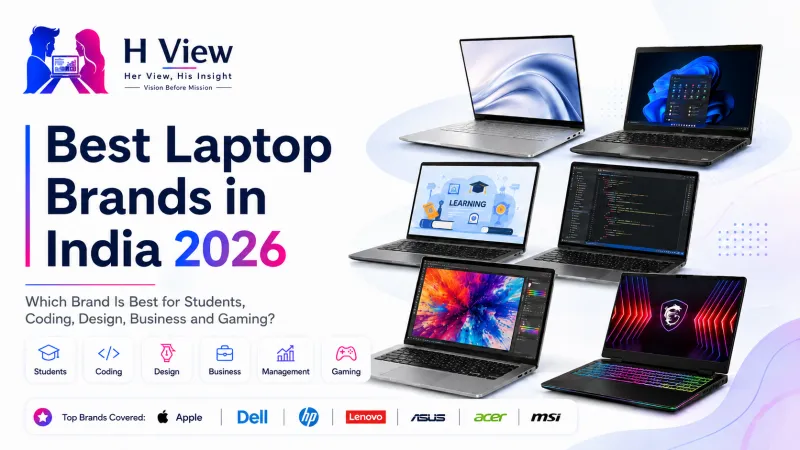
Best Laptop Brands in India 2026: Which Brand Is Best for Students, Coding, Design, Business and Gaming?
Buying a laptop in 2026 is much harder than simply choosing between “HP or Dell” or asking which brand is the best. Every major company now sells multiple laptop families aimed at very different users. Apple has MacBook Air and MacBook Pro. Lenovo stretches from IdeaPad and Yoga
Buying a laptop in 2026 is much harder than simply choosing between “HP or Dell” or asking which brand is the best. Every major company now sells multiple laptop families aimed at very different users. Apple has MacBook Air and MacBook Pro. Lenovo stretches from IdeaPad and Yoga to ThinkPad, LOQ and Legion. HP has OmniBook, ProBook, EliteBook, ZBook, Victus and OMEN. ASUS offers Vivobook, Zenbook, ProArt, TUF and ROG, while Acer covers everything from Aspire and Swift to Nitro and Predator.
The problem is that two laptops from the same brand can be designed for completely different people. A thin business notebook and a gaming machine may share the same logo but differ dramatically in weight, battery life, cooling, GPU performance, display quality and long-term serviceability. That is why asking “Which laptop brand is best?” without first asking what the laptop will be used for usually leads to the wrong purchase.
For H View, the better way to answer this question is to look at what each brand is genuinely good at. Students need affordability, portability and battery life. Developers need memory, processor performance, keyboard comfort and compatibility with their tools. Designers need colour-accurate displays and GPU capability. Managers usually need reliability, security and excellent video calling rather than maximum raw power. Gamers need cooling, dedicated graphics and high-refresh displays. Once those differences are clear, choosing a brand becomes much easier.
Apple: Best for Battery Life, Premium Build and Creative Workflows
Apple’s laptop lineup is smaller than most Windows brands, but that simplicity is one of its strengths. The current MacBook range is essentially divided between MacBook Air for mainstream premium users and MacBook Pro for people who need sustained performance, stronger displays and higher-end workflows.
The 2026 MacBook Air with M5 starts at ₹1,19,900 for the 13-inch model and ₹1,44,900 for the 15-inch model in India, with education pricing lower than the standard retail price. Apple now gives the M5 Air 16GB of unified memory and 512GB of storage as the base configuration, which makes the entry model much more practical than older MacBook Air generations. Apple also claims up to 18 hours of battery life.
For students, managers, writers and developers who value battery life and portability, MacBook Air remains one of the easiest premium laptops to recommend. It is quiet because it uses a fanless design, wakes quickly, has excellent standby behaviour and integrates tightly with iPhone, iPad and AirPods.
For creative professionals, MacBook Pro is the stronger choice because it offers better sustained performance, higher-end displays and more powerful chip options. Designers working in Photoshop, Lightroom or Final Cut, and developers running larger builds or virtual machines, will often benefit from the Pro line.
The limitation is software compatibility. Engineering applications, certain enterprise tools, some accounting software and Windows-only business systems may not work natively on macOS. Gaming support has improved, but Windows still offers a much broader gaming ecosystem.
Best for: premium students, developers, designers, managers, creators and Apple ecosystem users.
Dell: Best for Business Reliability and Corporate Environments
Dell remains one of the strongest choices for organisations, offices and business users because its portfolio has traditionally been structured around clear usage tiers. Mainstream users typically look toward Inspiron-style systems, premium buyers gravitate toward XPS-type machines, while Latitude and Precision-class systems target professional and enterprise workloads.
The important point is that Dell’s strength is not always having the most exciting specification sheet. Business users often care more about keyboard quality, support options, docking compatibility, security, warranty service and the ability to deploy hundreds of similar machines across an organisation.
That makes Dell particularly relevant for companies, project managers, IT teams and professionals whose laptop needs to work reliably every day rather than impress with RGB lighting or an unusually fast gaming GPU.
For programmers, Dell can also be a strong choice because many models offer good Linux compatibility and enterprise-friendly hardware. Higher-end workstation-class configurations are suited to CAD, engineering and professional rendering, although those systems can become expensive very quickly.
Dell is less straightforward for budget-conscious students because equivalent consumer configurations can sometimes cost more than ASUS, Acer or Lenovo alternatives.
Best for: business, corporate deployments, engineering, professional development and enterprise users.
 Also readLaptop Prices Are Rising in India: Should Students and Employees Buy Now or Wait?→
HP: One of the Broadest Laptop Portfolios in India
HP may currently have one of the widest laptop selections available through an official Indian store. HP’s India website was showing 86 laptop listings at the time of checking, spanning consumer machines, AI PCs, business notebooks, workstations and gaming systems.
That range is both a strength and a weakness.
For ordinary users and students, HP’s OmniBook family covers mainstream productivity and newer AI-PC configurations. Business users can move toward ProBook and EliteBook, while engineers and advanced professional users have ZBook mobile workstations. Gaming buyers can choose between Victus and OMEN depending on budget and performance requirements. HP’s official store currently lists EliteBook models specifically under business usage, while ProBook systems emphasise features such as Windows 11 Pro, spill-resistant keyboards, fingerprint readers and enterprise connectivity.
HP is particularly attractive for people who want service reach and many configuration choices. However, buyers need to pay attention to the exact model number because two laptops with nearly identical names can have very different displays, processors and RAM configurations.
This is also a brand where MRP can be misleading. HP’s official store often shows large differences between listed MRP and live selling price, so buyers should compare the actual current checkout price rather than treating the printed MRP as the market value.
Best for: students, office users, business professionals, enterprise deployments and buyers who want many choices.
Lenovo: Best Overall Range for Students, Business and Gaming
Lenovo is probably the easiest brand to recommend when someone has not yet decided exactly what type of laptop they need because its product families are clearly separated.
IdeaPad is aimed at mainstream users and students. Yoga focuses more on premium portability, convertibles and creative designs. ThinkBook targets small business and professional users who want something more stylish than a traditional corporate machine. ThinkPad remains one of the most established business laptop families, while LOQ and Legion serve gaming buyers at different price levels. Lenovo itself describes ThinkBook as business-focused and Legion as performance-oriented gaming hardware.
For coding and long working sessions, ThinkPad remains popular because of its keyboard reputation, durability and business-focused design. For students who want better value, IdeaPad usually makes more sense. Yoga is attractive for designers or executives who care about premium build and displays, while Legion is better for serious gaming and GPU-intensive work.
One advantage of Lenovo is that the range extends from affordable notebooks all the way to premium gaming systems and business workstations, so users can stay within one brand while moving between very different needs.
The downside is again model complexity. Lenovo may offer several configurations under the same family name, and not every IdeaPad or Yoga has the same display quality or memory upgradeability.
Best for: students, developers, business professionals, executives and gamers.
ASUS: Best for OLED Displays, Creators and Gaming Variety
ASUS has one of the most distinctive laptop portfolios because each major series has a relatively clear identity. The official ASUS India site currently shows ProArt, Zenbook, Vivobook and Chromebook families for home and creative use, while separate TUF and ROG lines cover gaming. ASUS describes ProArt as its creative professional range with colour-accurate wide-gamut displays, Zenbook as premium thin-and-light, and Vivobook as mainstream everyday computing.
ASUS is especially strong for people who care about displays. OLED panels appear throughout many Vivobook and Zenbook configurations, which can make them attractive for photography, graphic design and media consumption. The company also offers unusual designs such as Zenbook Duo for users who want dual-screen productivity.
For gaming, TUF usually targets value-conscious buyers who still want dedicated graphics and strong cooling, while ROG goes after the premium gaming segment. Creators who need professional-grade colour accuracy and powerful graphics should look at ProArt before assuming they need a gaming laptop.
ASUS also has an unusually large consumer portfolio. Its India site currently shows around 54 home-focused products, with 29 Vivobook-family listings and multiple Zenbook and ProArt models, although this number changes as models enter and leave stock.
The main challenge is that ASUS offers so many configurations that buyers need to check the exact CPU, GPU, panel resolution and RAM rather than buying only by series name.
Best for: designers, content creators, students, premium users and gamers.
Acer: Best for Value, Students and Affordable Gaming
Acer has long competed aggressively on price, and that remains one of its biggest strengths. The brand currently separates its portfolio into Aspire, Swift, Nitro, Predator, TravelMate, Extensa and TravelLite, while also offering AI PCs and Copilot+ machines.
Aspire usually makes the most sense for students and mainstream home users. Swift is better for people who want thinner and lighter productivity laptops. Nitro targets affordable gaming, while Predator moves into higher-performance gaming.
For students on a fixed budget, Acer often offers more RAM, storage or processor performance for the same money compared with premium brands. The trade-off can sometimes be build quality, speakers, webcam quality or display colour accuracy depending on the specific configuration.
Acer is also expanding more aggressively into AI PCs, which means newer Swift models increasingly combine strong battery life with dedicated AI hardware.
Best for: budget-conscious students, general productivity and affordable gaming.
MSI: Best for Gaming and Performance-Focused Buyers
MSI is still most closely associated with gaming, although its portfolio extends beyond that category. Its Modern and Prestige-type systems are designed for productivity and premium portability, while Katana, Stealth and other gaming lines focus much more heavily on GPUs, cooling and high-refresh displays.
For someone buying primarily for gaming, 3D rendering, Unreal Engine, Blender or GPU-accelerated workloads, MSI can offer excellent performance per rupee. The company often gives buyers aggressive GPU configurations at price points where premium business brands may still be using integrated graphics.
The trade-off is that MSI is not always the first brand I would recommend for a student who only needs browsing, Office, coding and video calls. The benefits of a powerful gaming GPU become irrelevant if the user spends most of the day carrying a heavier laptop between classrooms.
Best for: gamers, 3D artists, GPU-heavy creators and performance enthusiasts.
Which Brand Is Best for Students?
For most students, the best choice is not the most powerful laptop. It is the laptop that can comfortably handle lectures, assignments, coding practice, browser tabs, Office, video calls and perhaps some light creative work without becoming heavy or running out of battery halfway through the day.
For value, Lenovo IdeaPad, ASUS Vivobook, Acer Aspire and HP OmniBook are usually the first families I would compare. Students who can spend more and want long battery life should also consider MacBook Air, especially if the required course software works on macOS.
A sensible 2026 student configuration should ideally include 16GB RAM and at least a 512GB SSD. Buying 8GB RAM purely to save a small amount may reduce the useful life of the laptop, especially as browsers and AI-enabled applications become more demanding.
Which Brand Is Best for Coding?
Coding requirements depend heavily on the development stack.
A web developer working with VS Code, Node.js, React, Java, Python and databases can work comfortably on MacBook Air, ThinkPad, Dell business notebooks, HP EliteBook or a good ASUS Zenbook. For full-stack development, 16GB RAM should be treated as the practical minimum, with 32GB becoming useful if you regularly run Docker containers, Android Studio, virtual machines or local AI models.
MacBook Air is especially attractive for developers who want excellent battery life and Unix-based tooling, but Windows laptops remain the safer option if the job requires Windows-only enterprise applications, .NET-specific environments or specialised hardware tools.
A dedicated gaming GPU is usually unnecessary for normal software development unless machine learning, 3D graphics or GPU computing is part of the workload.
Which Brand Is Best for Graphic Design and Video Editing?
For design work, the display matters as much as the processor.
A laptop can have a powerful CPU and still be a poor design machine if its screen has weak colour coverage. Creators should look for good sRGB or DCI-P3 coverage, accurate factory calibration where possible, sufficient resolution and at least 16GB RAM.
Apple MacBook Pro remains one of the strongest premium options. ASUS ProArt is specifically designed around creative workflows, while higher-end Zenbook OLED and Lenovo Yoga models can also make excellent design machines. ASUS explicitly positions ProArt around professional graphics and colour-accurate wide-gamut displays.
For heavier Premiere Pro, DaVinci Resolve, Blender or 3D workloads, dedicated NVIDIA graphics can make a major difference. In that case, creator laptops or gaming-class systems may provide better performance than ultra-thin notebooks.
Which Brand Is Best for Business and Management?
Business buyers should think differently from gamers.
A manager spending the day in Teams meetings, presentations, email, Excel and browser-based business tools does not need a 240Hz display and RTX 5070 GPU. Battery life, webcam quality, microphone quality, keyboard comfort, Wi-Fi stability, security and service support matter far more.
That is where Lenovo ThinkPad, HP EliteBook, HP ProBook and Dell business-class systems become particularly attractive. HP’s current EliteBook range, for example, is explicitly categorised for business and includes security-oriented configurations with Windows 11 Pro, fingerprint readers and enterprise connectivity.
MacBook Air can also be excellent for executives where company software is macOS-compatible because of its low weight, battery life and premium build.
 Also readMacBook Air M5 vs Windows AI Laptop: Which Is Better Value in 2026?→
Which Brand Is Best for Gaming?
For gaming, brand matters less than the exact GPU, cooling system and power limits.
ASUS ROG, ASUS TUF, Lenovo Legion, Lenovo LOQ, Acer Nitro, Acer Predator, HP Victus, HP OMEN and MSI gaming systems all compete strongly. The right choice depends on the GPU class, thermal design, display refresh rate and price.
A poorly cooled RTX 5070 laptop can perform worse over long sessions than a better-designed machine with similar hardware. Buyers should therefore look at sustained gaming performance rather than simply reading the GPU name.
For value gaming, Lenovo LOQ, ASUS TUF, Acer Nitro and HP Victus are usually the families worth checking first. For higher budgets, Legion, ROG, Predator, OMEN and MSI’s premium gaming lines become more relevant.
Her View
The biggest mistake I see when people buy laptops is beginning with the brand name instead of beginning with their own routine. Someone hears that MacBooks are excellent and buys one without checking whether their course software runs on macOS. Another person buys a heavy gaming laptop for coding because it has a powerful processor, then spends three years carrying unnecessary weight to college.
A better buying process starts with ordinary questions. How many hours will you carry it? Do you need a colour-accurate display? Will you use Adobe software? Do you run Docker or virtual machines? Do you need Windows-only applications? Once those questions are answered, the brand usually becomes much easier to choose.
His Insight
Laptop brands are increasingly becoming ecosystems rather than individual products. Lenovo can sell one customer an IdeaPad as a student, a ThinkPad when they enter corporate work and a Legion when they want a gaming machine. HP, Dell, ASUS and Acer follow similar strategies.
That means brand reputation alone is no longer enough. The specific product family matters almost as much as the manufacturer. A premium business laptop and an entry-level consumer model from the same company can differ enormously in display quality, keyboard, thermal design and service options.
For 2026, I would also pay much more attention to RAM and long-term usability. Sixteen gigabytes should increasingly be treated as the sensible baseline for a laptop expected to remain useful for several years.
H View Verdict
There is no single best laptop brand in India because each company is strongest in different areas.
Apple is our strongest choice for premium portability, battery life and creative or developer workflows where macOS fits. Dell remains one of the safest choices for corporate and professional environments. HP offers one of the widest ranges and is particularly strong across mainstream, business and workstation categories. Lenovo may have the best overall balance because its IdeaPad, Yoga, ThinkPad, LOQ and Legion families cover almost every type of buyer.
ASUS stands out for OLED displays, creators and gaming variety, while Acer is frequently attractive for students and value-conscious buyers. MSI remains a strong specialist choice for gaming and GPU-heavy workloads.
The most important conclusion is that buyers should stop asking only, “Which brand is best?” and instead ask, “Which laptop family inside that brand was built for the work I actually do?”
That one change in thinking can prevent an expensive mistake.
Frequently Asked Questions
There is no universal winner, but Lenovo offers one of the broadest and clearest ranges across students, business and gaming. Apple is particularly strong for premium battery life and creative workflows, while HP and Dell remain excellent for business users.
Lenovo IdeaPad, ASUS Vivobook, Acer Aspire and HP OmniBook are strong places to start. MacBook Air is also excellent for students with a larger budget if their required software supports macOS.
MacBook Air, Lenovo ThinkPad, Dell business notebooks, HP EliteBook and ASUS Zenbook are all good coding choices. For development in 2026, 16GB RAM and a 512GB SSD should be considered a sensible minimum for most serious users.
Apple MacBook Pro and ASUS ProArt are particularly strong for professional creative work. High-end ASUS Zenbook OLED and Lenovo Yoga models can also be excellent when they provide accurate colour reproduction.
Lenovo ThinkPad, HP EliteBook, HP ProBook and Dell’s business-class laptop ranges are among the strongest choices because they prioritise reliability, keyboards, security and enterprise support.
ASUS ROG and TUF, Lenovo Legion and LOQ, Acer Predator and Nitro, HP OMEN and Victus, and MSI gaming laptops are all strong options. The exact GPU and cooling design matter more than the brand logo alone.
It depends on the course. MacBook Air offers excellent battery life, build quality and performance, but some engineering, enterprise or specialised Windows applications may not work natively on macOS.
It can still handle basic browsing, Office and streaming, but for a new laptop expected to last several years, 16GB is the safer choice. Coding, design, multitasking and modern AI-enabled software can quickly make 8GB feel limiting.
H View stories follow our editorial policy. Spotted an error? Tell us and we will correct it.
Rate this article
One tap is enough. No comment needed.
Was this article helpful?
Your answer goes straight to our editors.








Comments0
No comments yet. Start the conversation.