

Best Digital Marketing Tools in 2026: What Marketers Actually Need and What They Can Skip
Open LinkedIn for a few minutes and you will probably come across a colourful graphic…
 Harika October 6, 2026
  By HarikaUpdated September 20, 202614 min read73 views
Nothing OS 5.0 is now officially in Open Beta, and for Nothing Phone users this is much more than another routine Android update.
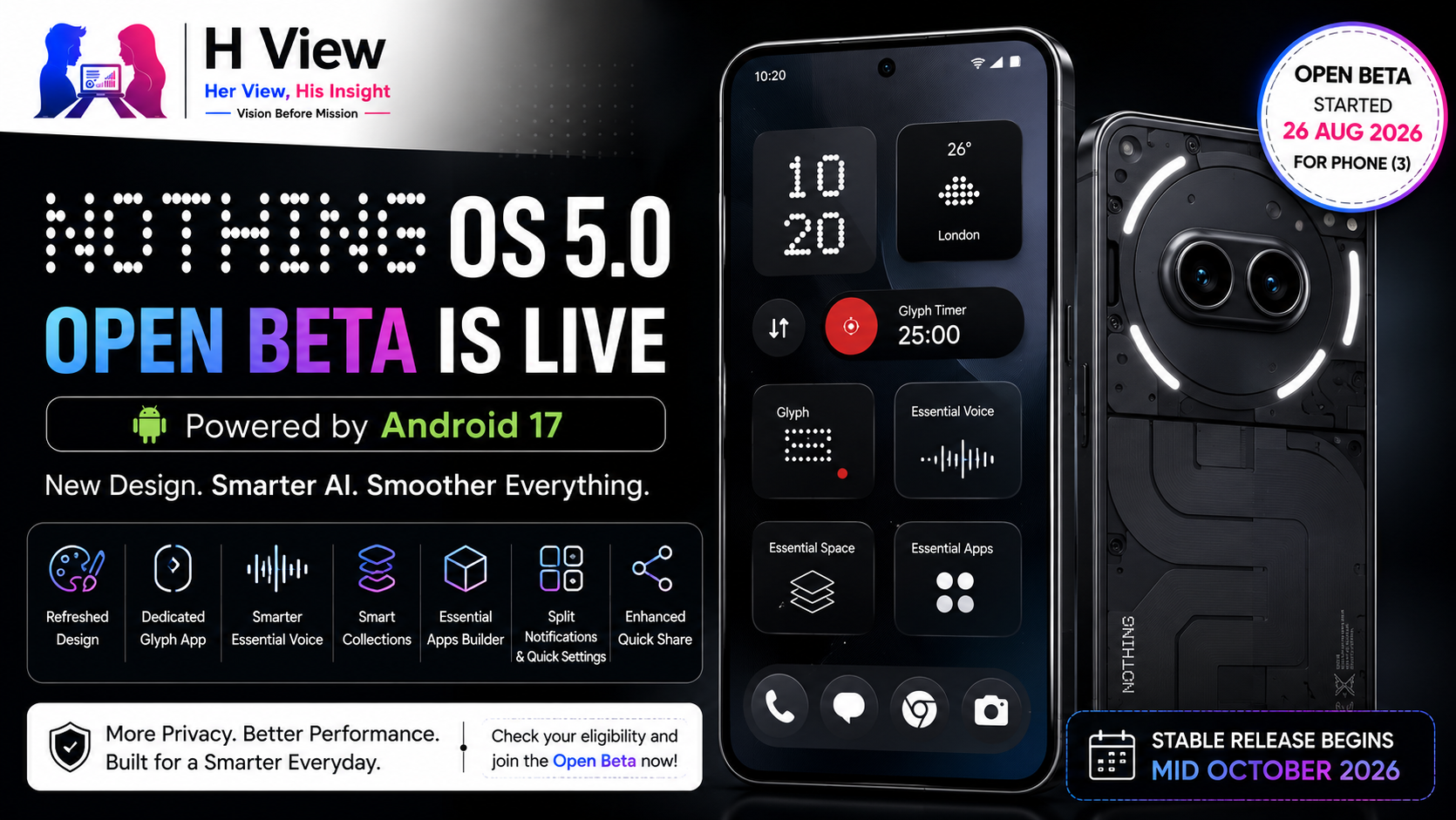
The beta opened first for Nothing Phone (3) on 26 August 2026, with a broader rollout planned across eligible Nothing and CMF devices over the coming months. Built on Android 17, the update brings a refreshed visual design, smoother animations, faster Bluetooth controls, a dedicated Glyph app, major upgrades to Essential Voice and Essential Space, an on-device Essential Apps builder and several useful Android 17 features.
That sounds like a long list, but the important question is whether these changes actually improve the phone in daily use. Nothing is also being very clear that this is still pre-release software. Battery life, stability and performance can be affected, some headline features are not yet available, and rolling back to stable software will erase the device.
So if you own a Phone (3), should you install Nothing OS 5.0 now, or wait for the stable release? More importantly, which other Nothing phones are actually getting it?
Nothing OS 5.0 moves the company’s software platform onto Android 17, but Nothing is not treating this as a simple version-number upgrade.
The company says the update changes the home screen, lock screen, Camera, Gallery, status bar, widgets, Settings and system controls while also improving common interactions such as opening apps, scrolling, multitasking and switching between frequently used applications. Smarter background management is intended to keep active apps responsive while reducing unnecessary reloads.
That broader scope matters because Nothing OS has matured considerably since its earliest releases. The operating system originally stood out mainly through dot-matrix typography, monochrome icons and Glyph integration. OS 5.0 feels more like Nothing trying to turn those ideas into a complete visual and functional system rather than a collection of design touches layered over Android.
For users, that should ideally mean the phone feels more consistent rather than simply looking different after an update.
Nothing OS 5.0 introduces changes to typography, icons, spacing, materials and motion across the interface. Camera, Gallery, Settings, widgets and system controls have all received visual refinement.
Nothing has also worked on animation behaviour. Supported animations can now respond when you reverse an interaction halfway through. For example, if you begin opening something and immediately swipe back, the animation can react to your gesture instead of finishing the original movement first. Nothing says this behaviour extends across apps, folders, widgets, multitasking, shortcuts and status-bar icons.
That sounds like a small technical detail, but it can affect how responsive a phone feels. A device does not feel fast only because applications launch quickly; it also feels fast when the interface reacts naturally to what your finger is doing.
This kind of polish is especially important for Nothing because software fluidity has become part of the brand’s identity.
One of the most important things to know before installing the beta is that not every Nothing OS 5.0 feature is available yet.
Nothing confirms that the refreshed home screen is still under development and will not be part of the current Open Beta. The company says it will arrive with the general release beginning in October. The new Micrographics clock face is also being held back until the stable rollout.
This is worth highlighting because promotional screenshots can create the impression that installing the beta immediately gives you the complete OS 5.0 experience.
It does not.
If your main reason for joining is the redesigned launcher or Micrographics lock-screen clock, there is little reason to rush.
The beta is better understood as an early look at the underlying system changes, AI tools, Glyph improvements and Android 17 features while Nothing continues polishing some of its largest visual additions.
One of the smartest organisational changes is the introduction of a dedicated Glyph app.
Until now, Glyph controls have been scattered across different parts of Settings depending on the phone and feature. Nothing OS 5.0 brings supported Glyph features, sounds, schedules and ringtones together in one place.
That makes sense because Glyph has evolved significantly.
It is no longer just a collection of lights for calls and notifications. Different Nothing phones now use different Glyph implementations, and the ecosystem includes timers, visual indicators and other device-specific functions. Giving it a dedicated app makes the feature easier to discover rather than requiring owners to remember where each option is buried.
Nothing is also adding a Glyph Timer widget, allowing users to begin a countdown directly from the home screen while supported Glyph hardware shows the remaining time on the back of the phone.
For someone using a timer while cooking, studying or working, this is exactly the sort of interaction where Glyph makes more sense than repeatedly waking the display.
Nothing OS 5.0 redesigns Bluetooth controls inside Quick Settings.
Nearby devices can be easier to find, and supported accessories can be connected or disconnected with fewer taps instead of opening the complete Bluetooth Settings page every time.
This may be one of the least glamorous improvements in the update, but it is also one of the easiest to appreciate.
Imagine using Nothing Ear or CMF earbuds with both a phone and laptop. If the earbuds reconnect to the wrong device, quicker Bluetooth controls save you from repeatedly navigating through Settings.
These small quality-of-life changes are important because they reduce friction around actions people perform every day.
Nothing OS 5.0 also brings substantial improvements to Essential Voice.
Nothing says transcription is now faster and better formatted. The system can more intelligently distinguish between ordinary paragraphs and situations where spoken information should be structured as a list. Real-time transcription also displays words while you speak rather than making you wait until the entire recording is finished.
Real-time translation is planned for later in the year.
For anyone who already uses Essential Voice to draft messages, notes or emails, these changes are more important than a visual redesign. Voice transcription becomes genuinely useful only when the output needs little correction.
A practical example would be speaking:
“Tomorrow I need to call the client, finish the design, send the invoice and check the server.”
If Essential Voice correctly recognises that as a set of tasks and formats it clearly, that saves more time than simply converting every spoken word into one long sentence.
This is exactly where Nothing’s AI approach becomes interesting: the feature is trying to remove work rather than simply demonstrate that AI exists on the phone.
Essential Space is also getting more organised.
The new Smart Collections feature can help group related captures. After you create and name a collection, Essential Space can examine existing captures and suggest items that belong there. It can continue recommending related content as you save new information, and when several captures share a common topic, it may suggest creating an entirely new collection.
Consider someone researching a trip. They may save screenshots of hotels, train timings, restaurant recommendations and maps over several weeks.
Normally those screenshots become scattered across Gallery or different apps. Smart Collections is attempting to identify that they belong to the same subject and bring them together.
If the system becomes reliable, this could solve one of Essential Space’s biggest challenges: capturing information is easy, but finding it again months later is what determines whether the feature remains useful.
Nothing is also introducing support for Model Context Protocol, or MCP, in Essential Space.
The initial implementation will allow compatible AI platforms to search and read selected information stored in Essential Space. Nothing says the first release will be read-only, meaning connected AI tools will not be able to modify that saved data. MCP support is scheduled to arrive separately through Google Play around October.
This sounds technical, but the practical idea is simple.
Imagine you have been saving screenshots, notes and documents about a project for several months. Instead of manually finding each item and pasting it into an AI assistant, a compatible service could potentially search the information you explicitly allow it to access.
That begins to connect Nothing’s AI features in a way that feels more useful than isolated tools.
Privacy and permission controls will be critical, though. A feature that allows AI tools to read personal information needs to make it extremely clear what is being shared and when.
Nothing OS 5.0 also pushes Essential Apps further.
Until now, Essential Apps could run on the phone, but creation primarily happened through the web. With OS 5.0, Nothing is moving the Essential Apps Builder onto the phone itself. Users can describe the tool they want in natural language, preview the generated result, refine it and then deploy it to the home screen.
The builder remains in early beta, and access is still expanding gradually.
This ties directly into Nothing Playground, where users can discover and share community-created tools.
The interesting long-term possibility is that smartphone personalisation may eventually mean more than changing a wallpaper or downloading a widget. A user could create a very small tool specifically for one personal need.
For example, a student could ask for a countdown widget showing the number of days until exams. A freelancer could build a simple unpaid-invoice tracker. Those are the kinds of narrow tools that may never justify an entire Play Store application but could still be useful to one person.
One of the largest Android 17 interaction changes is the option to separate Notifications and Quick Settings.
With the split layout enabled, notifications and system controls occupy their own spaces instead of sharing the traditional Android panel. Nothing confirms this as part of OS 5.0.
Whether this is better will depend heavily on personal preference.
Some users like having everything in one swipe. Others prefer a cleaner separation between notifications and controls such as Wi-Fi, brightness and Bluetooth.
The important part is choice. Nothing is not forcing one layout on everyone.
Android 17 also improves Quick Share.
Nothing says users can continue sharing directly with nearby Android devices while also generating a QR code that allows iPhones or other devices to download through a secure web link.
This is particularly useful in mixed-device groups.
Imagine three people at an event: one with a Nothing Phone, one with Samsung and another with an iPhone. Instead of sending full-resolution photographs through WhatsApp or uploading them somewhere first, the QR workflow can provide a simpler bridge.
It is not the same as AirDrop, but it reduces one of the recurring annoyances of moving content between different ecosystems.
Nothing OS 5.0 also inherits several smaller Android 17 changes, including improved screen recording, Noto 3D Emoji, expanded Dark Theme, separate assistant volume, enhanced HDR brightness and a redesigned Recents interface.
The expanded Dark Theme is particularly practical because it can apply a darker appearance to applications that do not provide a complete dark mode themselves. Users can control the behaviour per app rather than forcing the same treatment everywhere.
Assistant volume is another small improvement that solves a real annoyance. Voice-assistant responses can be adjusted independently instead of being tied entirely to ordinary media volume.
These are not reasons to install the beta by themselves, but they help make Android 17 feel like more than a version number.
Nothing has published a clear rollout schedule, although the company warns that timing can change as testing progresses.
| Device | Open Beta | General Release |
|---|---|---|
| Nothing Phone (3) | 26 August | Mid October |
| Nothing Phone (4a) Pro | Early September | Early November |
| Nothing Phone (4a) | Late September | Early November |
| Nothing Phone (3a) Pro | Late September | Early November |
| Nothing Phone (3a) | Late September | Early November |
| Nothing Phone (2a) | Mid October | Mid November |
| Nothing Phone (2a) Plus | Mid October | Mid November |
| Nothing Phone (3a) Lite | No Open Beta listed | Late December |
| Nothing Phone (4b) | Mid December | Mid January |
| CMF Phone 2 Pro | No Open Beta listed | Mid January |
Nothing says these timelines are indicative and may vary by region or carrier.
The disappointing news is that Phone (1), Phone (2) and CMF Phone 1 will not receive Nothing OS 5.0 because Nothing says those devices have reached the end of their major OS-update commitments.
For Phone (2) owners in particular, that may feel frustrating because the hardware can still feel capable in everyday use. But software eligibility depends on the company’s support commitment, not simply whether the processor could technically boot a newer Android version.
At the moment, Phone (3) is the device with active Open Beta access.
Nothing requires users to install the latest Nothing Beta Hub V2.0 and make sure the phone is already running the required stable software build. For Phone (3), Nothing currently lists Metroid-V4.1-260814-1733 as the required baseline build.
The official process is:
If the update does not immediately appear, Nothing says it may take up to five minutes. Users can also manually check through Settings → System → System updates.
Before doing any of this, back up important data.
For most people, not yet.
Nothing explicitly warns that Open Beta software can contain bugs and affect device stability, battery life and performance. The phone may also run warmer and consume more power temporarily after installation while apps and system data are optimised.
There is also an important rollback warning.
Joining the beta itself should not erase your data, but if you decide to return to stable software, the rollback process will erase the phone.
That changes the risk calculation considerably.
If Phone (3) is your only device and you rely on it for banking, work authentication, calls, UPI and important communication, the stable release in October is probably the sensible choice.
If you enjoy testing new software, are comfortable troubleshooting occasional issues and have everything backed up, the beta gives you an early look at one of Nothing’s biggest OS releases.
What I like about Nothing OS 5.0 is that many of its improvements seem aimed at removing small everyday annoyances rather than simply generating screenshots for launch day.
Faster Bluetooth controls, better Essential Voice formatting, smarter organisation inside Essential Space and easier Gallery filtering are the kinds of features that may quietly improve a phone over months of use. I also appreciate that Nothing is giving users choice around things such as separate Notifications and Quick Settings instead of forcing every interface change.
I would still wait for the stable release on a primary device. The most visually interesting parts, including the redesigned home screen and Micrographics clock, are not even in the current beta. For me, there is little benefit in risking everyday stability simply to be first.
Nothing OS 5.0 is interesting because the company’s previously separate software experiments are beginning to form an ecosystem.
Essential Voice captures information. Essential Space organises it. Essential Apps lets users create small tools around their needs. Playground provides a place to share those creations, while Glyph becomes easier to manage through a dedicated application.
The challenge now is fragmentation.
Some OS 5.0 features arrive through the operating-system update, some are coming later through Google Play, some remain in beta, and some depend on specific Nothing hardware. Nothing’s official roadmap is therefore becoming almost as important as the OS itself.
If Nothing can keep compatibility clear and deliver these features consistently, software may become one of the strongest reasons to remain inside the Nothing ecosystem.
Nothing OS 5.0 looks like a meaningful step forward rather than an update created simply to attach Android 17 to Nothing phones.
The stronger animations, dedicated Glyph app, improved Bluetooth controls, Essential Voice upgrades, Smart Collections, on-device Essential Apps creation and Android 17 improvements all address parts of the phone people actually interact with.
But this Open Beta is still incomplete.
The redesigned home screen and Micrographics clock are coming with the stable release, MCP support arrives separately around October, and Essential Apps access remains limited. Most importantly, Nothing itself warns that the beta can affect stability, battery life and performance.
Final H View Take: Phone (3) enthusiasts who enjoy testing software can install the beta after making a complete backup. Everyone else should wait for the mid-October stable release. Nothing OS 5.0 appears worth upgrading to; there is simply no need for most users to experience it before Nothing finishes polishing it.
Yes. Nothing OS 5.0 Open Beta began with Phone (3) on 26 August 2026. Other eligible devices will join according to Nothing’s rollout schedule.
Yes. Nothing OS 5.0 is based on Android 17 and combines Android 17 platform changes with Nothing-specific visual, Glyph and Essential AI features.
No. Nothing says Phone (1), Phone (2) and CMF Phone 1 have reached the end of major software support and will not receive OS 5.0.
Installing the beta should not normally erase your data, but Nothing strongly recommends backing up first because it is pre-release software. Rolling back from the beta to stable software will erase the device.
The refreshed home screen is not included in the current Open Beta. Nothing says it will arrive with the general release beginning in October.
Phone (3) is currently scheduled for mid-October. Phone (4a), 4a Pro and the 3a series follow in early November, with other models rolling out through January 2027.
For enthusiasts with Phone (3), it can be worth trying after making a backup. For anyone relying on the phone as their primary work, banking or communication device, waiting for the stable release is the safer option.
Harika is the co-founder of H View and covers AI, technology, gadgets, digital tools, online platforms, and modern internet trends. Her articles focus on simplifying complex topics with practical explanations, balanced opinions, and reader-first insights.
Share your real experience and help other readers decide better.
No community views yet. Be the first to share yours.

Open LinkedIn for a few minutes and you will probably come across a colourful graphic…
Harika October 6, 2026 
When an employee resigns, many organisations move quickly into replacement mode. The manager informs HR,…
Harika October 6, 2026 
For many corporate employees, the workday begins long before they actually start working. They wake…
Harika October 5, 2026 
Many projects begin with an assumption that sounds reasonable on paper: the client will explain…
Harika October 1, 2026