

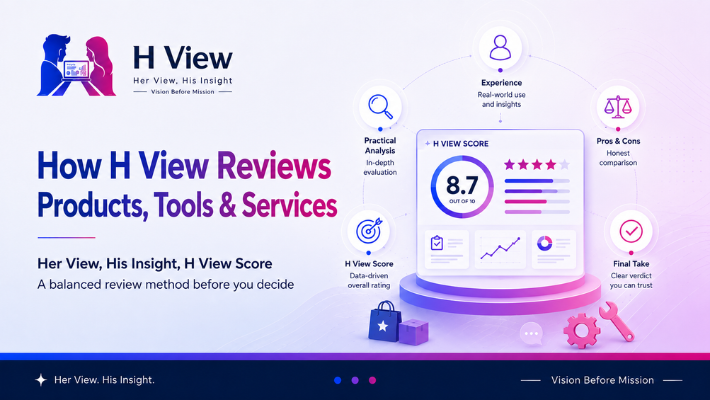
How H View Reviews Products, Tools, and Services
Online reviews are everywhere. Before buying a product, choosing a tool, selecting hosting, trying software,…
 H View May 23, 2026
 By HarikaUpdated August 12, 202615 min read63 views
Choosing hosting is one of those decisions that feels much bigger when you are building your first WordPress website.
You may have already decided what you want to write about, chosen a name for the blog and perhaps even imagined what the homepage will look like. Then hosting enters the picture, and suddenly the conversation becomes technical. Storage, SSL, backups, server locations, bandwidth, caching, databases and renewal prices all begin appearing on the screen at once.
For an experienced website owner, most of that is familiar. For a beginner, it can feel like you need to understand web infrastructure before you are allowed to publish your first article.
That is one of the reasons Hostinger has become attractive to new WordPress users. Its approach is built around making the setup process feel less intimidating. You can install WordPress, manage the website, handle SSL, check backups and work with your domain from a relatively straightforward control panel without needing to understand every technical detail behind it.
But ease of use alone does not make hosting worth buying.
The more important question is whether Hostinger gives a WordPress blogger enough performance, reliability, flexibility and long-term value to justify choosing it over the many alternatives available.
That is what this review looks at.
Hostinger is a web-hosting company that provides shared hosting, managed WordPress hosting, cloud hosting, VPS products and other website services. For a typical blogger, the relevant part is its managed hosting environment, where WordPress can be installed without manually configuring a server.
On its current India hosting page, Hostinger includes WordPress support across its web-hosting plans and advertises features such as a one-click WordPress installer, SSL certificates, backups, LiteSpeed servers, free website migration and access to its own hPanel control panel. The exact storage, backup frequency and other limits depend on the plan selected.
That combination makes more sense when you think about what a new blogger is actually trying to achieve.
Most people starting a blog are not trying to become server administrators. They want to publish posts, upload images, configure an SEO plugin, customise a theme and gradually build traffic. Hosting should support that work quietly in the background.
If the hosting itself becomes the project, something has gone wrong.
The first few days with WordPress already involve enough learning.
You are figuring out the difference between posts and pages, wondering which theme to use, trying to understand plugins, setting up menus and discovering that even something as simple as a featured image has several settings attached to it.
A complicated hosting panel on top of all that can make starting a blog feel harder than it needs to be.
Hostinger uses its own control panel called hPanel rather than traditional cPanel. Its layout is designed around common tasks such as websites, domains, email, files and backups, and Hostinger itself positions the system as usable without technical knowledge.
That simplicity has genuine value for a first-time blogger.
You do not need the hosting dashboard to be exciting. You need to be able to find the setting you need without searching through twenty menus or wondering whether changing something will break the site.
For someone who already knows server administration, hPanel may not be the main reason to choose Hostinger. For someone opening their first hosting account, it can make the entire experience less intimidating.
A few years ago, installing WordPress manually often meant downloading files, creating a database, editing configuration details and uploading everything to a server. That process is still possible, but a beginner no longer needs to start there.
Hostinger currently provides one-click WordPress installation through its hosting environment.
The benefit is not simply that it saves a few minutes. It removes one of the earliest technical barriers from the blogging process.
A beginner can move fairly quickly from purchasing hosting to working inside the WordPress dashboard. From there, the real work begins: choosing a sensible theme, creating the required pages and publishing useful content.
That is exactly how beginner hosting should behave. The setup should disappear into the background as quickly as possible.
Hostinger’s strongest marketing advantage has always been price, and that remains part of its appeal in India.
At the time of this review, Hostinger’s India page shows a Single plan promoted at ₹69 per month when purchased for 48 months, while the Premium plan is promoted at ₹139 per month on the same long-term term. Hostinger also clearly shows higher renewal rates of ₹289 per month for Single and ₹449 per month for Premium. Prices are shown before GST.
That distinction matters.
A beginner may see “₹69/month” and naturally assume that is what the website will continue costing indefinitely. It is not. The promotional rate is connected to a long upfront commitment, and renewal happens at a higher price.
This does not make the offer misleading when the renewal information is disclosed, but it does mean you should calculate hosting the same way you would any other long-term subscription.
Ask yourself what the first contract costs in total, what the renewal will cost later and whether you are comfortable paying for several years upfront.
A cheap monthly headline is useful for comparison, but it should never be the only number you look at.
This is where choosing Hostinger becomes more interesting.
The Single plan is clearly positioned as an entry-level option. Hostinger currently lists one website, 10 GB SSD storage and weekly backups on that tier. Premium currently increases the allowance to three websites and 20 GB SSD storage while retaining weekly backups and adding a free domain for the first year. Higher plans increase resources further, and the Unlimited tier currently includes daily backups and NVMe storage.
For someone experimenting with their first personal blog, the entry plan may be enough.
For someone who already knows they want to build a serious content website, use several plugins, publish many images or maintain more than one site, the cheapest plan may become limiting sooner than expected.
This does not mean beginners should automatically purchase the most expensive option. That would simply replace under-buying with overspending.
The more sensible approach is to consider what you expect the website to look like over the next year or two rather than choosing solely from the headline price.
If you are still deciding what type of hosting setup you need, our guide to the best WordPress hosting for beginners in India provides a broader comparison before you commit to one provider.
Backups are easy to ignore when the website is brand new.
There may be only a few articles on the site, and nothing feels valuable enough yet to worry about losing. A few months later, the situation can be completely different. You may have dozens of posts, customised layouts, plugin settings, uploaded media and hours of work sitting inside the installation.
Then a bad update or accidental change suddenly matters.
Hostinger currently includes weekly backups on its lower hosting plans, while some higher plans provide daily backups and easier restore options.
Weekly backups are useful for a basic blog, although a website that changes frequently may eventually benefit from more frequent protection.
It is also worth remembering that a hosting backup should not necessarily be your only backup strategy forever. As the site becomes more important, having an additional independent backup can give you another layer of protection.
For a beginner, though, having automated backups included is considerably better than discovering backups only after something has already gone wrong.
Years ago, SSL certificates were sometimes sold as additional products. For a modern website, HTTPS is simply expected.
Hostinger currently includes unlimited SSL certificates with its hosting service and says they are installed automatically. Its current hosting page also highlights malware scanning and other built-in protection.
For a blogger, the practical benefit is that one more technical task is handled without requiring a separate purchase.
That does not mean the site becomes magically secure. WordPress still needs updates, strong passwords, sensible plugin choices and basic maintenance. A badly maintained site can create security problems regardless of which hosting company it uses.
The hosting provider is part of the security foundation, not a replacement for good website management.
Hosting reviews often make speed sound like a race where one provider has to be crowned the fastest.
Real websites are more complicated than that.
Hostinger currently uses LiteSpeed technology and promotes its global data-centre network, caching and CDN-related features as part of its performance setup.
Those are useful foundations, but your hosting is only one part of page speed.
A WordPress blog can still become slow if it uses a heavy theme, enormous uncompressed photographs, several poorly built plugins, unnecessary animations and third-party scripts everywhere. On the other hand, a sensibly built blog on ordinary hosting can feel very quick.
For most new bloggers, Hostinger provides enough performance headroom to begin comfortably. If the website later develops into a high-traffic publication, resource requirements may change and a stronger plan or different hosting setup can be considered at that point.
It makes little sense to purchase infrastructure for traffic you do not yet have.
Free migration sounds irrelevant if you are building your first website from scratch, but it becomes more useful when you think long-term.
Hostinger currently says it provides unlimited free website migrations with no downtime and support during the transfer process.
That can matter if you already have a blog elsewhere or eventually consolidate several sites under one account.
Migration is one of those hosting features that nobody becomes excited about until they actually need it. Moving a WordPress website manually can involve files, databases, DNS changes and a small amount of anxiety about whether everything will survive the journey.
Having the provider assist with that process removes some of the risk.
A typical WordPress blog rarely stays as a bare WordPress installation.
You may use an SEO plugin, caching tools, forms, an image-optimisation plugin, an affiliate-link manager or a page builder such as Elementor. A review site may add comparison elements, ratings or custom content layouts.
Hostinger’s normal WordPress environment supports the usual WordPress plugin ecosystem, which makes it suitable for these kinds of content websites.
That said, compatibility should not become an excuse to install everything you find.
The number of plugins is not as important as their quality, but unnecessary plugins increase maintenance and can create performance or security problems. If your blog needs eight well-maintained plugins, use eight. If it needs fifteen, fifteen may be fine. The mistake is installing thirty because every tutorial recommends something different.
Hosting works best when the WordPress installation itself is kept reasonably clean.
No hosting company fits every type of user, and Hostinger has trade-offs that should be understood before buying.
The first is the pricing structure we have already discussed. The introductory rates are attractive, particularly on long commitments, but renewal costs are significantly higher.
The second is that plan differences matter. Backup frequency, storage and other allowances change as you move between tiers. The lowest-priced package may therefore be more suitable for experimenting than for a site you already expect to grow quickly.
Hostinger also uses hPanel rather than cPanel. For beginners, that can be a positive. Someone who has spent years working specifically with cPanel workflows may prefer the environment they already know.
Advanced developers may eventually want deeper control than a managed shared-hosting setup is designed to offer. Hostinger itself positions VPS and cloud products for users who need more power or control.
None of these issues makes Hostinger unsuitable for bloggers. They simply define where the product fits best.
Hostinger makes the most sense for someone who wants to get a WordPress site online without spending a large amount of money or learning server management first.
That includes new bloggers, freelancers creating portfolio sites, small companies building straightforward websites and creators experimenting with content-based projects.
It can also work well for affiliate and review websites during their early stages. These sites usually need WordPress compatibility, decent performance, images, internal linking, SEO tools and a stable environment rather than advanced server customisation.
If you are building your first blog and want to understand the overall setup before choosing hosting, our guide on how to start a blogging website in India on a low budget may be a useful place to begin.
If you already operate a very high-traffic website, require root-level server access or have a development workflow built around specialised infrastructure, an entry-level Hostinger plan is unlikely to be what you are looking for.
Likewise, someone who specifically wants traditional cPanel because their existing processes depend on it may not enjoy moving to hPanel.
Businesses running highly critical applications may also have requirements that go far beyond what a beginner hosting comparison should address.
This is an important part of reviewing any hosting provider fairly. A service can be a good recommendation without being the correct recommendation for everyone.
The thing I appreciate most about Hostinger for a first-time blogger is that it does not make hosting feel like the main challenge.
Starting a website already comes with a long list of unfamiliar decisions. You are choosing a theme, learning WordPress, creating pages, thinking about branding and trying to write articles that somebody might actually want to read. Having a hosting dashboard that feels reasonably understandable removes one unnecessary layer of anxiety.
That matters more than it may seem from a feature comparison.
A beginner does not need to feel powerful inside a server dashboard. They need to feel confident enough to use it without being afraid that every click might break the website.
Hostinger generally fits that expectation well.
From a practical perspective, Hostinger’s strongest argument is not that it is the cheapest hosting available. It is that the cost, WordPress features and usability form a sensible package for the type of customer it is targeting.
The promotional prices can be very attractive, but I would never choose a plan without first checking the commitment length and renewal cost. I would also compare the storage and backup frequency rather than automatically taking the lowest tier.
For a small new blog, there is little reason to pay for advanced infrastructure. If the website later grows enough that shared or basic managed hosting becomes restrictive, moving up to stronger hosting is a natural next step.
The hosting decision should match the website you actually have, not the website you hope to have after five years.
For many beginners, yes.
Hostinger does the most important beginner-oriented things reasonably well. WordPress setup is straightforward, SSL and backups are integrated into the service, the control panel is approachable and the lower plans keep the initial investment relatively modest.
Its weaknesses are manageable if you understand them before buying. The promotional pricing requires a longer commitment to achieve the lowest advertised monthly cost, renewals are higher, and lower tiers naturally carry more restrictions.
That makes Hostinger a good fit for someone who values simplicity and affordability more than advanced server control.
It is particularly easy to understand why new bloggers in India consider it. The barrier to getting a WordPress site online is fairly low, and the service gives enough room for an ordinary blog to develop before hosting becomes something you need to rethink.
Yes, it can be a good fit for a first WordPress blog because the installation and management process is designed for users who may not have server experience. Hostinger currently includes WordPress installation tools, SSL, backups and hPanel management across its hosting offering, although exact features vary by plan.
Pricing changes regularly, so it is better to check the current Hostinger India page before purchasing. At the time this article was updated, the 48-month promotional prices shown were ₹69 per month for Single and ₹139 per month for Premium, with higher renewal rates disclosed separately. Prices were listed before GST.
Yes. The current India hosting page includes weekly backups on the Single and Premium plans, while higher tiers include daily backups. Features can change, so confirm the exact plan details before purchase.
Yes. Hostinger currently advertises unlimited free SSL certificates with its web hosting and says SSL is installed automatically.
Hostinger currently advertises unlimited free website migration with support and no downtime during the transfer. Migration eligibility and the process should still be checked for your specific website before moving.
Someone testing a single small blog may be comfortable starting with an entry-level plan. A blogger who expects to publish seriously, wants more storage or needs multiple sites may find a higher tier more practical. The important thing is to compare the current limits rather than buying purely from the promotional price.
Hostinger is not interesting because it promises to turn a new blog into a successful website. No hosting company can do that.
Its value is much simpler.
It gives beginners a relatively uncomplicated place to put WordPress online and begin working.
For a first-time blogger, that may be exactly what hosting should do. You can install the site, secure it with SSL, maintain backups, publish your content and gradually learn what your website needs without beginning with an expensive or highly technical infrastructure setup.
The current introductory pricing is attractive, particularly for users willing to commit for several years, but the renewal cost deserves attention before checkout. Storage and backup differences between plans also mean that the cheapest option should not automatically be treated as the best value.
If I were starting a straightforward WordPress blog in India with a controlled budget, Hostinger would be one of the providers I would seriously consider. I would choose the plan based on the website I expect to operate over the next year or two, not based on the largest discount banner.
After that, I would stop worrying about hosting and focus on the part that matters far more.
Building a website people actually want to read.
Harika is the co-founder of H View and covers AI, technology, gadgets, digital tools, online platforms, and modern internet trends. Her articles focus on simplifying complex topics with practical explanations, balanced opinions, and reader-first insights.
Share your real experience and help other readers decide better.
No community views yet. Be the first to share yours.
Online reviews are everywhere. Before buying a product, choosing a tool, selecting hosting, trying software,…
H View May 23, 2026 
There was a time when blogging mainly meant choosing a topic, writing an article, adding…
Harika May 14, 2026