

Best Digital Marketing Tools in 2026: What Marketers Actually Need and What They Can Skip
Open LinkedIn for a few minutes and you will probably come across a colourful graphic…
 Harika October 6, 2026
  By HarikaUpdated September 20, 202617 min read62 views
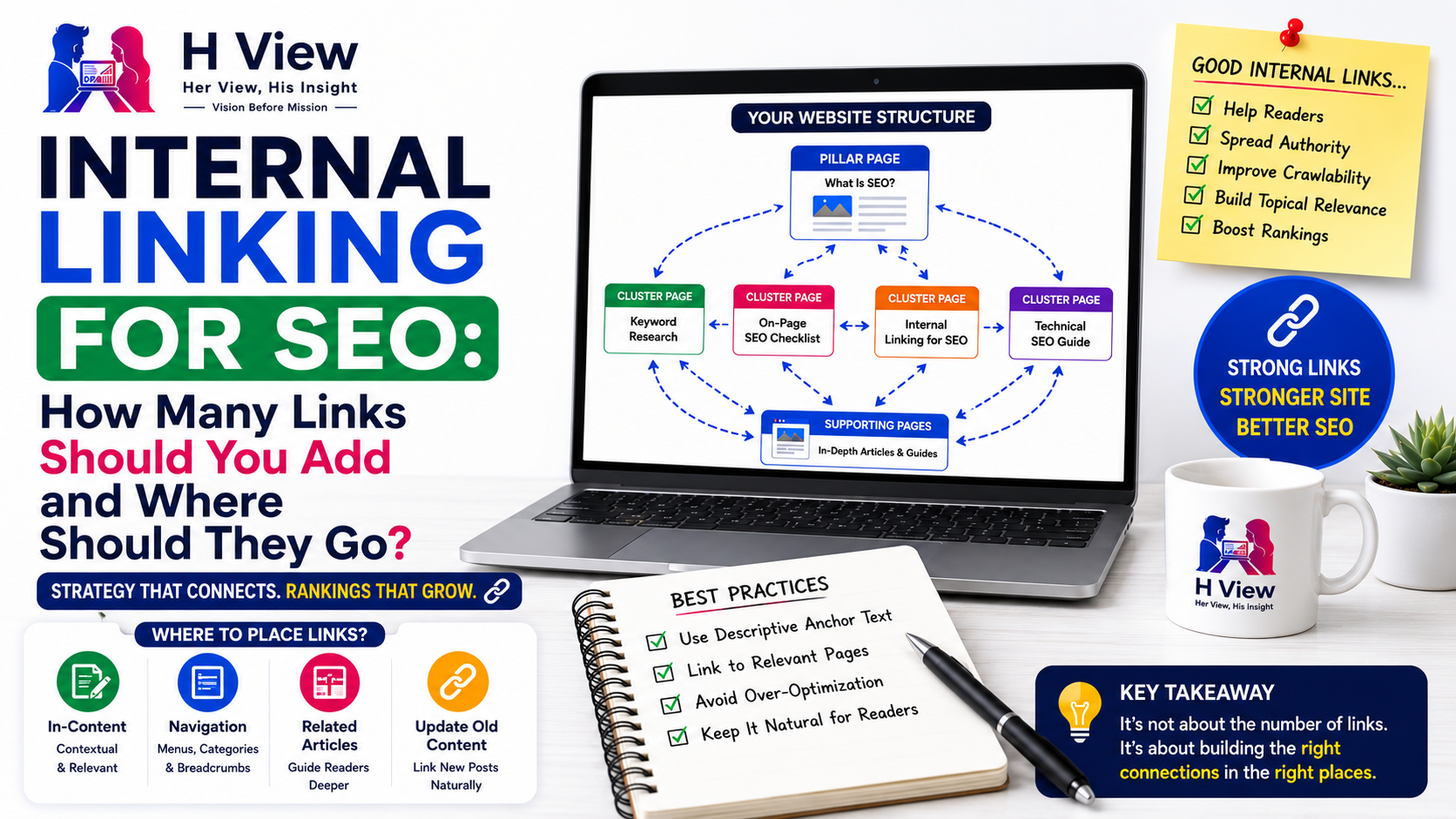
Internal linking sounds simple until you actually try to build a sensible structure across a growing website. You publish a new article, notice that your SEO plugin recommends adding internal links, and then the questions begin. How many links should a single article contain? Should every article link back to a pillar page? Is it better to place links near the top or only inside the body? Can too many links make a page look spammy?
These are common questions because internal linking is often taught as though there is a fixed SEO formula. Add five links here, three there, point everything toward a cornerstone page, and rankings will supposedly improve. In practice, good internal linking works very differently. It is less about hitting a number and more about creating meaningful connections between related pages.
A strong internal linking strategy should help readers move naturally through your content, help search engines discover important URLs, and make the overall structure of the website easier to understand. Google itself recommends making sure every important page has at least one internal link pointing to it, because links help both users and Google make sense of the site. (developers.google.com)
That is a much better starting point than trying to reach an arbitrary internal-link count.
An internal link is simply a link from one page on your website to another page on the same website. If an article about keyword research links to your guide on Google Search Console, that is an internal link. If your homepage links to a category page, that is also internal linking. Breadcrumbs, navigation menus, related-post sections and contextual links inside paragraphs all contribute to the internal structure of a website.
The important thing is that pages should not exist like isolated islands. A useful website should feel connected. Someone reading about why a page is not ranking may naturally want to understand on-page SEO next. A reader learning keyword research may later want help with Search Console or internal linking. When these relationships are clear, users find it easier to continue reading and search engines can better understand how the topics fit together.
This is why internal linking is not just an SEO task. It is also part of good site navigation and content organization.
There is no universal number that works for every article, and trying to force one usually creates bad results. A short article covering a narrow question may only need a few internal links. A long pillar guide that touches multiple related subtopics may naturally include many more.
The right number depends on the article itself.
A useful way to decide whether a link belongs is to ask a few simple questions:
If the answer is yes, the link probably belongs. If the only reason for adding it is that an SEO plugin says the article needs more internal links, it is worth reconsidering.
Internal links should improve the reading experience, not interrupt it.
One of the clearest principles in internal linking is that pages you genuinely care about should not be left disconnected. Google recommends ensuring that every important page has at least one link from another page on the site. (developers.google.com)
This matters because orphan pages are surprisingly common. An orphan page is a page that exists but has no meaningful internal link pointing toward it. It may appear in a sitemap and Google may eventually discover it, but structurally it has almost no relationship with the rest of the website.
Imagine publishing an important guide about technical SEO and then never linking to it from your main SEO article, your Digital Marketing category or any related content. The page may technically exist, but from the website structure it looks almost forgotten.
Important content should normally have clear paths from relevant existing pages. That does not mean forcing links from unrelated articles, but it does mean making sure the page has a proper place within the site.
Search engines do not only read what is written on a page. They also analyze how pages are connected.
Google explains in its site-structure documentation that the number and pattern of internal links can help it understand relationships between pages and their relative importance within the website. (developers.google.com)
This is where pillar pages and supporting content become useful.
Suppose your website has a main guide called What Is SEO and How Does It Work? Around that pillar, you publish supporting articles on keyword research, Search Console, indexing problems, on-page SEO, technical SEO and internal linking. If those supporting articles naturally link back to the main SEO guide, and the pillar page links outward to them, the relationship becomes very clear.
That structure helps users understand where they are and helps search engines understand which content is central to the topic.
The key is relevance. Adding dozens of unrelated links to one page will not create genuine importance.
The best internal links usually appear inside the content where the related topic naturally comes up. These are called contextual links, and they are useful because the reader already understands why the destination matters.
For example, if an article about rankings mentions search intent, that is a logical place to link to a keyword research guide. If a paragraph explains why pages are not indexed, it makes sense to link to a Search Console or indexing guide.
There are several useful places for internal links, but each serves a different purpose:
These methods should support each other rather than replace one another. A related-post widget at the bottom of a page is useful, but it does not provide the same contextual value as a link placed naturally inside a relevant passage.
You can, but only when it makes sense.
There is no rule saying internal links must appear after a certain number of paragraphs. However, the introduction should mainly help the reader understand the problem and what the article will cover. If the first few lines contain several links pointing elsewhere, the page can feel distracting before the reader has even settled into the article.
A better approach is to let links appear when the related concept becomes relevant. If the topic is important enough to mention in the introduction and another article genuinely explains it better, then a link can make sense. Otherwise, there is no need to force one early just for SEO.
Placement should follow the logic of the content.
Anchor text is the clickable wording of a link, and it matters because it tells readers what they are likely to find after clicking.
Descriptive anchor text is generally better than vague wording. For example, “read our Google Search Console guide” gives much more context than “click here.”
Google also recommends using anchor text that is descriptive, concise and relevant to the linked page. (developers.google.com)
You do not need to use the exact same keyword every time you link to a page. In fact, natural variation usually reads better.
A page about Search Console might be linked using phrases such as:
Each of these can work depending on the sentence.
The goal is clarity, not exact-match repetition.
Usually, no.
Using the same phrase every time can make the writing feel unnatural and repetitive. A better approach is to let the anchor text fit naturally into the sentence while still clearly describing the destination.
If one article refers to internal linking for SEO and another refers to improving internal links across your site, both can still point to the same article without creating a problem.
The most important thing is that the reader understands where the link leads.
Having many useful internal links is not automatically harmful. The problem begins when the page becomes cluttered, distracting or filled with irrelevant links.
A long guide with twenty useful links may be perfectly reasonable. A short article with eight unrelated links may feel excessive.
The best way to judge this is by reading the page as a visitor. If every sentence contains another link and the reader is constantly being pulled away from the article, the structure is probably too aggressive.
Internal links should support the journey through the content. They should not compete with it.
Not every article needs to link to the same pillar, but closely related supporting content usually benefits from a clear connection to the broader topic.
Suppose you have a main SEO pillar article. Supporting articles on keyword research, Search Console, indexing, internal linking and technical SEO naturally belong to that cluster. Linking them back to the pillar makes sense because it helps readers move from a specific problem to the broader subject.
The pillar should also link outward to those supporting articles. This creates a two-way relationship that feels natural and useful.
Supporting articles can also link to each other where relevant. A strong topic cluster should not behave like a wheel where every page only points inward to one central article. It should feel more like a connected network.
Yes, and this is one of the most useful habits a growing content website can develop.
When you publish something new, it is easy to add links from that new article to older content. What many publishers forget is to go back and update older relevant articles so they point toward the new page as well.
Suppose you publish a new guide on internal linking and already have articles about on-page SEO, Search Console, keyword research and ranking problems. Those older pages may already receive traffic and impressions. Adding a relevant link from them helps integrate the new article into the existing structure.
This is especially useful because new pages often need pathways from established content.
A simple publishing routine can help: every time you publish a new article, identify at least two or three older pages that could naturally reference it.
An orphan page is a page that has no meaningful internal link pointing toward it.
Search engines may still discover it through a sitemap or external link, but from the website structure it is disconnected. For users, the page may also be difficult to find unless they land on it directly from search.
A simple way to reduce orphan pages is to review important content regularly and ask whether each page has a clear place within the site.
For every important article, check whether:
If none of those things are true, the page probably needs better integration.
Topic clusters are one of the simplest ways to organize a content-heavy website. A broad pillar page covers the main subject, while supporting articles answer narrower questions around it.
For example, an SEO cluster might contain a central guide on what SEO is, supported by articles on keyword research, Search Console, indexing, on-page SEO, internal linking and technical SEO.
This structure is useful because each article has a clear role. The pillar provides the overview, while the supporting pages go deeper into individual problems.
Internal links then connect those pages naturally.
A reader can move from the broad guide to the detailed article they need, and search engines can see that the website is covering the topic in a structured way rather than publishing unrelated posts.
SEO professionals often talk about “link equity” or authority flowing between pages. The concept is simplified in many discussions, but the basic idea is that internal links can help communicate which pages are more important within a site.
Google’s documentation confirms that internal link relationships can help it understand site structure and relative page importance. (developers.google.com)
This means priority pages should not be buried deep inside the site with almost no internal references. If a strong evergreen guide is important to your content strategy, it should receive natural links from related pages.
However, this should not turn into a numbers game. Adding one hundred artificial links does not automatically make a page one hundred times more important.
The value comes from relevant structure.
Category pages can be useful internal-link destinations when they are intentionally designed as content hubs.
A strong Digital Marketing category, for example, could help users explore SEO, PPC, social media and content marketing in one place.
However, not every category page automatically deserves strong SEO emphasis. A thin archive containing only a list of posts may not provide much standalone value.
If category pages are part of your site strategy, make them useful. Add a clear description, organize the content logically and make sure the page has a real reason to exist.
Then internal links to that category can make sense.
Breadcrumbs show where a page sits within the website hierarchy.
A simple breadcrumb path might look like:
Home → Digital Marketing → SEO → Internal Linking
This helps readers understand where they are and makes it easier to move back to broader sections.
Google also notes that breadcrumb navigation can help users understand and explore site hierarchy. (developers.google.com)
Breadcrumbs are useful, but they should be considered another structural layer rather than a replacement for contextual links inside the article.
Most normal WordPress links already work correctly, but technically important links should use standard crawlable HTML.
Google recommends links that use an <a> element with an href attribute so crawlers can reliably follow them. (developers.google.com)
This usually becomes relevant only when developers create custom navigation or clickable elements that rely heavily on JavaScript.
For ordinary publishers, the practical rule is simple: important destinations should be reachable through real links, not hidden behind unusual interactions that search engines may struggle to follow.
The homepage is important, but it should not become the default destination for every link.
If a reader is learning about keyword research, send them directly to the keyword research guide. Do not send them back to the homepage and expect them to find the article again.
Direct links improve usability and provide clearer context about how pages relate to each other.
The most relevant destination is almost always better than the most important page on the site.
A simple routine can prevent most internal-linking problems.
When publishing a new article:
This workflow is much more useful than trying to reach a fixed number of links per article.
Not every page deserves equal emphasis.
Some pages are more strategically important because they support traffic, conversions or the overall structure of the website. These may include pillar articles, evergreen guides, important service pages, useful category hubs, pages close to ranking well and new articles that need stronger discovery.
Search Console can help identify pages that already receive meaningful impressions or sit close to stronger positions. If those pages are genuinely valuable, adding internal links from relevant established content can strengthen their visibility within the site.
The key word remains relevant. A commercially important page should not be linked from unrelated articles just because you want to push it harder.
A website changes over time. New articles appear, old pages lose relevance, certain topics become stronger and some content is updated or merged.
That means internal linking should not be treated as a one-time task completed on publishing day.
Every few months, review your strongest content and ask whether newer related articles should be added. Also look at older pages that no longer receive much traffic and decide whether better internal links, stronger content or consolidation would improve them.
As the website grows, the internal structure should grow with it.
Internal linking becomes unnecessarily complicated when publishers start treating it as an SEO quota. Instead of asking what would help the reader next, they ask how many links Google wants.
That usually makes the article worse.
A thoughtful internal link feels like guidance. It appears at the moment when the reader naturally needs more information and points directly to the next useful resource. When links are added only because a checklist demands them, they begin to feel like interruptions.
Good internal linking should make the website easier to explore, not harder to read.
The real power of internal linking is structure.
A website can contain hundreds of good articles and still feel weak if those pages behave like isolated islands. Search engines and users both have to work harder to understand what matters and how the content fits together.
Internal links turn those isolated pages into a connected system. They show which articles are foundational, which ones provide deeper explanations and which pages belong to the same topic.
That is why asking for a perfect number of links misses the point. The better question is whether each important page has a clear place within the website.
Enough to help the reader move naturally through related content. Enough to make important pages discoverable. Enough to show search engines how your topics connect.
But not so many that the article becomes a collection of links instead of a useful piece of writing.
A short article may only need a few. A long guide may need many more. The number should follow the content rather than control it.
Internal linking works best when it stops looking like SEO and starts looking like good navigation. Build clear paths between related ideas, connect new content with old content and make sure the pages that matter are never left isolated.
That is the internal linking strategy that scales.
Internal linking is the practice of linking one page on your website to another page on the same website. It helps users discover related content and helps search engines understand relationships between pages.
There is no fixed number. The right amount depends on the length of the article, the topic and how many genuinely useful related pages exist.
Yes. Google recommends that pages you care about should have at least one internal link from another page on your site. (developers.google.com)
Use concise, descriptive anchor text that clearly explains what the linked page contains. Avoid vague wording such as “click here” when a more informative phrase is available.
Large numbers of useful links are not automatically harmful, but excessive or irrelevant links can make a page difficult to read and weaken the user experience.
An orphan page is a page that has no meaningful internal links pointing to it. It may still be discovered through a sitemap or external link, but it is poorly connected to the rest of the site.
Yes. Updating relevant older articles with links to new content is one of the best ways to integrate new pages into an established site structure.
Yes. Google says internal link relationships help it understand site structure and the relative importance of pages. (developers.google.com)
Harika is the co-founder of H View and covers AI, technology, gadgets, digital tools, online platforms, and modern internet trends. Her articles focus on simplifying complex topics with practical explanations, balanced opinions, and reader-first insights.
Share your real experience and help other readers decide better.
No community views yet. Be the first to share yours.
Open LinkedIn for a few minutes and you will probably come across a colourful graphic…
Harika October 6, 2026 
When an employee resigns, many organisations move quickly into replacement mode. The manager informs HR,…
Harika October 6, 2026 
For many corporate employees, the workday begins long before they actually start working. They wake…
Harika October 5, 2026 
Many projects begin with an assumption that sounds reasonable on paper: the client will explain…
Harika October 1, 2026