

Best Digital Marketing Tools in 2026: What Marketers Actually Need and What They Can Skip
Open LinkedIn for a few minutes and you will probably come across a colourful graphic…
 Harika October 6, 2026
  By HarikaUpdated May 31, 20268 min read55 views
ChatGPT is useful only when you know how to ask.
Many beginners open ChatGPT, type one short question, get a basic answer, and think, “This is okay, but not amazing.” The problem is usually not ChatGPT. The problem is the prompt.
A prompt is the instruction you give to ChatGPT.
If your prompt is unclear, the answer will also be general. If your prompt is specific, the answer becomes much more useful.
At H View, our practical view is simple:
ChatGPT works best when you treat it like an assistant and explain what you need clearly.
This beginner guide will show you how to use ChatGPT with simple, practical examples.
You do not need technical knowledge to use ChatGPT.
You mainly need three things:
OpenAI describes ChatGPT as a conversational AI assistant that can help with a wide range of tasks, including answering questions, drafting, rewriting, brainstorming, explaining concepts, translating, and summarizing information.
So instead of thinking of it only as a chatbot, think of it as a flexible assistant for daily thinking, writing, planning, and learning.
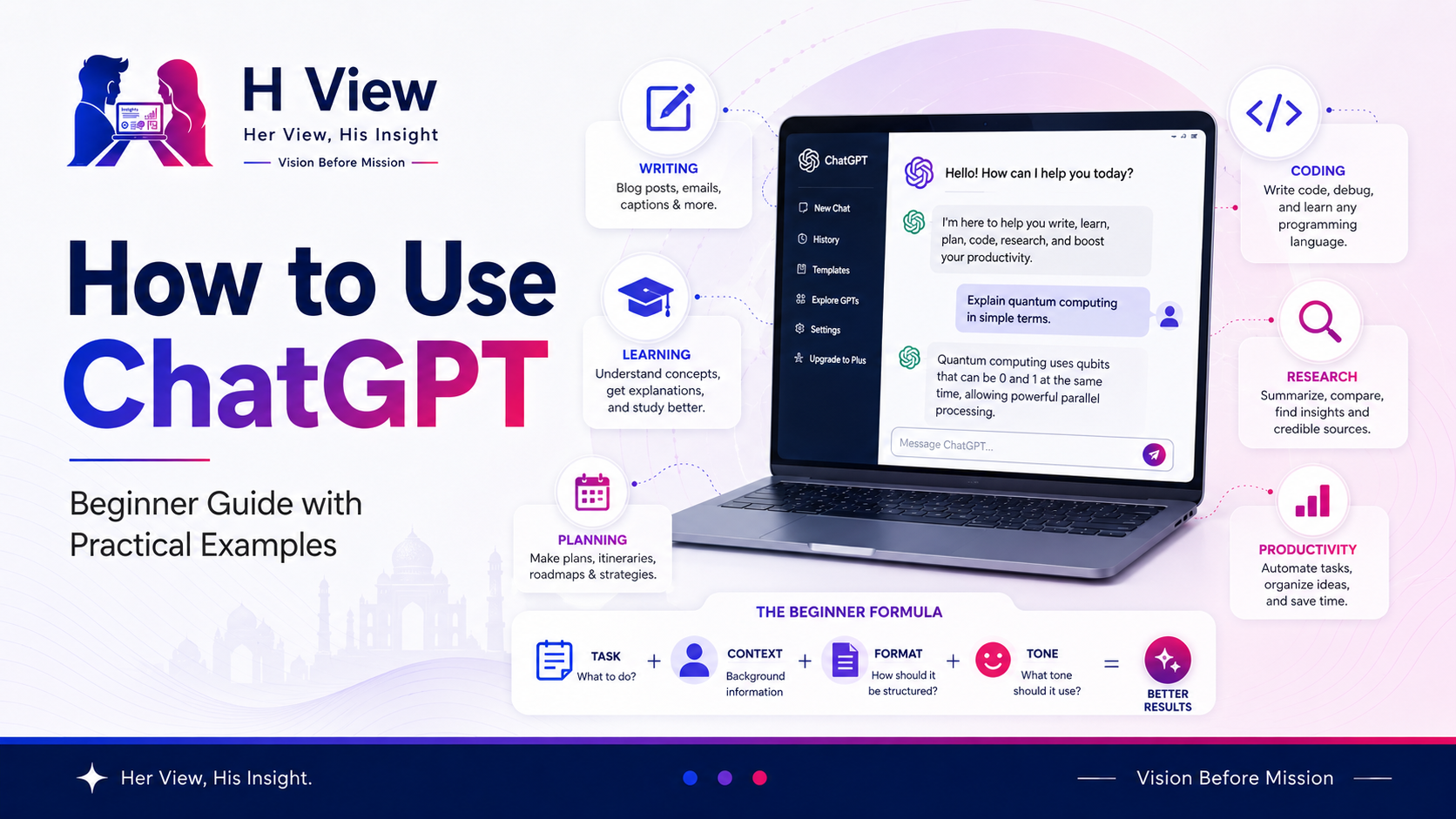
A good ChatGPT prompt usually has four parts:
Task + Context + Format + ToneLet’s understand this simply.
What do you want ChatGPT to do?
Example:
Write an email.What is the situation?
Example:
I need to follow up with a client who has not replied to my proposal.How should the answer be presented?
Example:
Keep it short and professional.How should it sound?
Example:
Polite and friendly.Write a short, polite follow-up email to a client who has not replied to my proposal. Keep it professional and friendly.This will usually give a much better answer than simply typing:
Write follow-up email.ChatGPT is very useful for writing support.
You can use it for:
Rewrite this message in a more polite and professional tone:
“Send the update fast. We are waiting.”Rewrite this message politely for a client. Keep it short, respectful, and professional:
“Send the update fast. We are waiting.”ChatGPT can help you sound clearer, but always read the final output before sending. Your message should still feel natural.
Students and learners can use ChatGPT to understand difficult topics in a simpler way.
Explain compound interest in simple language with one easy example.Explain compound interest to a 10th class student using a simple example from daily life. Keep the explanation short and easy to remember.You can also ask follow-up questions like:
Explain it again with a table.or:
Give me 5 practice questions.This is where ChatGPT becomes helpful. You can continue the conversation until the topic feels clear.
ChatGPT can help turn confusion into a plan.
You can use it for:
Create a 7-day study plan for a student preparing for exams. Include 3 hours of study per day and time for revision.Create a simple weekly plan for someone who wants to learn basic digital marketing. Include topics for each day and one practical task.Planning prompts work better when you mention time, goal, level, and preferred format.
ChatGPT can help you understand a topic, summarize concepts, and prepare research questions. But for important or current information, you should verify from trusted sources.
Give me a beginner-friendly overview of electric vehicles in India. Include benefits, challenges, and what buyers should check before buying.Give me a beginner-friendly overview of electric vehicles in India. Structure it with headings: benefits, challenges, cost factors, charging, and buyer checklist. Mention what facts should be verified from official sources.ChatGPT can give you direction, but do not use it as your only source for important facts.
Developers, students, and beginners can use ChatGPT for coding help.
It can explain code, suggest logic, find mistakes, and create sample snippets.
Explain this JavaScript error in simple language: Cannot read properties of undefined.I am a beginner in JavaScript. Explain why this error happens: “Cannot read properties of undefined.” Give one simple example and show how to fix it.You can also paste code and ask:
Find the bug in this code and explain the fix step by step.For coding, always test the output. ChatGPT can help, but your final code should be checked properly.
ChatGPT can save time in everyday office and professional tasks.
You can ask it to:
Create a meeting agenda for a 30-minute weekly project update. Include discussion points, blockers, next steps, and responsibilities.Summarize these meeting notes into action items with owner and deadline columns.Depending on your plan and available features, ChatGPT can also support file and data analysis. OpenAI says ChatGPT can analyze uploaded files, answer questions about data, create tables or charts, and review code-backed analysis when available.
ChatGPT is not only for work.
You can use it for:
Create a simple grocery list for a vegetarian family of 3 for one week. Keep it budget-friendly.Help me compare two options before buying a laptop. Ask me 5 questions first, then suggest what I should check.This makes ChatGPT useful as a thinking partner for everyday decisions.
Many beginners do not get good results because they use ChatGPT too casually.
Avoid these mistakes:
ChatGPT improves when your instructions improve.
Explain [topic] in simple language for a beginner. Use an example and avoid technical words.Write a [type of content] about [topic]. Keep it [tone] and around [length].Rewrite this in a clearer and more human tone. Keep the meaning same:
[paste text]Create a step-by-step plan to achieve [goal] in [time period]. Keep it realistic for a beginner.Compare [option 1] and [option 2] in a simple table. Include pros, cons, best use case, and final recommendation.Give me 20 practical ideas for [topic]. Avoid generic ideas and group them by category.From a user experience side, ChatGPT feels easy because you can talk to it naturally.
A beginner does not need to understand complex software. You can ask, correct, continue, and improve the answer step by step.
The best part is that it reduces pressure. Whether you are writing, learning, planning, or solving a problem, ChatGPT gives you a starting point.
But the final output should still sound like you.
From a practical side, ChatGPT becomes powerful when you give it structure.
The difference between an average answer and a useful answer is usually the prompt.
A good prompt explains:
ChatGPT is not a mind reader. Better input creates better output.
Start simple.
Do not try to master every feature on day one. Begin with daily tasks like writing messages, explaining topics, creating plans, and improving drafts.
Then slowly use ChatGPT for more advanced tasks like research support, coding help, document summaries, and workflow planning.
The best way to learn ChatGPT is to use it regularly and improve your prompts.
Beginners can start by asking simple questions, requesting explanations, writing emails, creating plans, rewriting text, or generating ideas. The key is to give clear instructions and context.
A prompt is the question or instruction you give ChatGPT. Better prompts usually include the task, context, format, and tone.
Yes, ChatGPT can draft emails, rewrite messages, improve tone, and create professional communication. You should review the final email before sending.
Yes, ChatGPT can explain topics, create notes, generate practice questions, make study plans, and simplify difficult concepts.
No. ChatGPT can make mistakes. Important facts, pricing, legal, medical, financial, and technical details should be verified from trusted sources.
ChatGPT is easy to use, but learning how to ask better questions makes it much more powerful.
Use it for writing, learning, planning, research support, coding help, work tasks, and daily decisions. But always review, edit, and verify before using the final output.
At H View, our final view is simple:
ChatGPT is most useful when your prompts are clear and your final judgment stays human.
Harika is the co-founder of H View and covers AI, technology, gadgets, digital tools, online platforms, and modern internet trends. Her articles focus on simplifying complex topics with practical explanations, balanced opinions, and reader-first insights.
Share your real experience and help other readers decide better.
No community views yet. Be the first to share yours.

Open LinkedIn for a few minutes and you will probably come across a colourful graphic…
Harika October 6, 2026 
When an employee resigns, many organisations move quickly into replacement mode. The manager informs HR,…
Harika October 6, 2026 
For many corporate employees, the workday begins long before they actually start working. They wake…
Harika October 5, 2026 
Many projects begin with an assumption that sounds reasonable on paper: the client will explain…
Harika October 1, 2026